引入:
因为项目需求,我们要用到openCMS。虽然以前用过很多类似的内容管理系统类似Vignette,Fatwire,但是openCMS虽然大体功能差不多,具体并没用过,所以这里做了一些研究,会陆续把这些研究心得分享出来。这里先从openCMS安装讲起,虽然简单,但也有一些值得探讨的问题。
安装亮点1:不可以重复配置openCMS。
我们知道,第一次运行openCMS需要做配置,配置的请求URL是:http://localhost:8080/opencms/setup/ ,但是运行第一次之后就不可以运行第二次了,理由是在安装过程中,它会去调用CmsSetupBean类的prepareSetup10()方法:
|
1
2
3
4
5
6
7
8
9
10
11
12
13
14
15
|
/**
* Prepares step 10 of the setup wizard.<p>
*/
publicvoidprepareStep10() {
if
(isInitialized()) {
// lock the wizard for further use
lockWizard();
// save Properties to file "opencms.properties"
saveProperties(getProperties(),CmsSystemInfo.FILE_PROPERTIES,
false
);
setSchemaGeneration(
false
);
m_peristenceConfigurator.save();
}
}
|
而这个方法会去调用lockWizard()方法后保存opencms.properties让其生效,lockWizard方法的实现就是把opencms.properties中key为wizard.enabled设为false:
|
1
2
3
4
|
publicvoidlockWizard() {
setExtProperty(
"wizard.enabled"
, CmsStringUtil.FALSE);
}
|
这会导致我们的opencms.properties被更改:
|
1
2
3
4
5
6
7
|
#
# Enable/Disable OpenCms Setup Wizard
# The wizard sets the flag to false after the setup.
# To use the wizard again, reset it manually to true.
# By setting no value, wizard can always be used.
#################################################################################
wizard.enabled=false
|
而下次运行时候,它会去判断此属性,判断点在CmsAutoSetup类的main()方法中调用的run()方法的第一行:
|
1
2
3
4
5
6
7
8
9
10
11
12
13
14
|
/**
* Performs the setup.<p>
* @throws Exception
*/
publicvoidrun() throwsException {
if
(m_bean.getWizardEnabled()) {
longtimeStarted = System.currentTimeMillis();
CmsSetupTests setupTests =
new
CmsSetupTests();
…
}
}
|
安装亮点2: 正确设置max_allowed_packet这个mysql系统变量的大小。
在opencms安装过程中,它会对一些DB变量做检查,其代码如下:
|
1
2
3
4
5
6
7
8
9
10
11
12
13
14
15
16
17
18
19
20
21
22
23
24
25
26
27
28
29
30
31
32
33
34
35
36
37
38
39
40
41
42
43
44
45
46
47
48
49
50
51
52
53
54
55
56
57
58
59
60
61
62
63
64
65
66
67
68
69
|
/**
* Returns an optional warning message ifneeded, <code>null</code> if not.<p>
*
* @param db the selected database key
*
* @return html warning, or <code>null</code> if no warning
*/
publicString checkVariables(String db) {
StringBuffer html =
new
StringBuffer(
512
);
if
(m_con ==
null
){
return
null
;
// prior error,trying to get a connection
}
Exception exception =
null
;
if
(db.equals(
"mysql"
)){
String statement =
"SELECT @@max_allowed_packet;"
;
Statement stmt =
null
;
ResultSet rs =
null
;
longmaxAllowedPacket =
0
;
try
{
stmt = m_con.createStatement();
rs = stmt.executeQuery(statement);
if
(rs.next()) {
maxAllowedPacket = rs.getLong(
1
);
}
}
catch
(Exception e) {
exception = e;
}
finally
{
if
(stmt !=
null
){
try
{
stmt.close();
}
catch
(SQLException e) {
// ignore
}
}
}
if
(exception ==
null
){
intmegabyte =
1024
*
1024
;
if
(maxAllowedPacket >
0
) {
html.append(
"<p>MySQL system variable <code>'max_allowed_packet'</code>is set to "
);
html.append(maxAllowedPacket);
html.append(
" Byte ("
);
html.append((maxAllowedPacket / megabyte) +
"MB).</p>\n"
);
}
html.append(
"<p>Please note that it will not be possible for OpenCms tohandle files bigger than this value in the VFS.</p>\n"
);
intrequiredMaxAllowdPacket =
16
;
if
(maxAllowedPacket < (requiredMaxAllowdPacket * megabyte)){
m_errors.add(
"<p><b>Your <code>'max_allowed_packet'</code>variable is set to less than "
+ (requiredMaxAllowdPacket* megabyte)
+
" Byte("
+ requiredMaxAllowdPacket
+
"MB).</b></p>\n"
+
"<p>The required value for running OpenCms isat least "
+ requiredMaxAllowdPacket
+
"MB."
+
"Please change your MySQL configuration (in the<code>my.ini</code> or <code>my.cnf</code>file).</p>\n"
);
}
}
else
{
html.append(
"<p><i>OpenCms was not able to detect the value of your<code>'max_allowed_packet'</code>variable.</i></p>\n"
);
html.append(
"<p>Please note that it will not be possible for OpenCms tohandle files bigger than this value.</p>\n"
);
html.append(
"<p><b>The recommended value for running OpenCms is 16MB,please set it in your MySQL configuration (in your<code>my.ini</code> or <code>my.cnf</code>file).</b></p>\n"
);
html.append(CmsException.getStackTraceAsString(exception));
}
}
if
(html.length() ==
0
) {
return
null
;
}
return
html.toString();
}
|
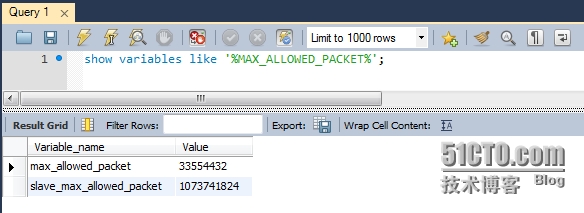
从这里可以看出,对于数据库是mysql的情形,它会先去执行数据库查询读取max_allowed_packet的值,这个变量主要让mysql限制服务器接受的单个数据包的大小(因为在openCMS中,经常要存富文本内容,所以这个值还是要设置大点为好),并且如果它<16MB, 则报错our max_allowed_packet variable is set to less than 16MB。而默认的mysql这个值配置是4MB,所以第一次setup出错。我们在my.ini中将其改为30MB,这样才过了这关:
安装亮点3:opencms中资产的存储。
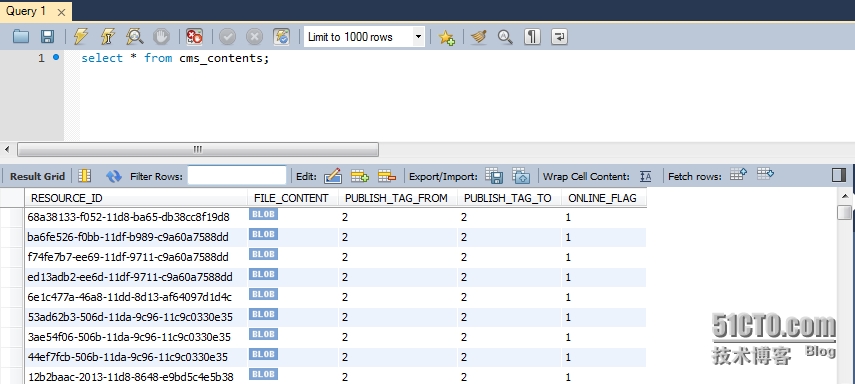
opencms中,这些资产都是以BLOB形式存储的: