WPF的小示例
1、
<Window x:Class=
"GadgetWindow"
xmlns=
"http://schemas.microsoft.com/winfx/2006/xaml/presentation"
xmlns:x=
"http://schemas.microsoft.com/winfx/2006/xaml"
Height=
"300"
Width=
"300"
AllowsTransparency=
"True"
WindowStyle=
"None"
Background=
"Transparent"
MouseLeftButtonDown=
"Window_MouseLeftButtonDown"
>
<Grid>
<Ellipse Fill=
"Red"
Opacity=
"0.5"
Margin=
"20"
>
<Ellipse.BitmapEffect>
<DropShadowBitmapEffect/>
</Ellipse.BitmapEffect>
</Ellipse>
<Button Margin=
"100"
Click=
"Button_Click"
Content=
"Close"
>
<Button.BitmapEffect>
<DropShadowBitmapEffect/>
</Button.BitmapEffect>
</Button>
</Grid>
</Window>
|
void
Window_MouseLeftButtonDown(
object
sender, MouseButtonEventArgs e)
{
this
.DragMove();
}
void
Button_Click(
object
sender, RoutedEventArgs e)
{
this
.Close();
}
|
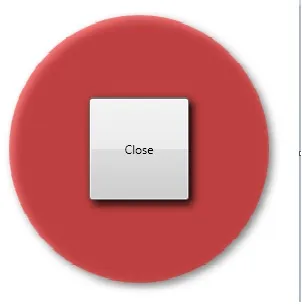
效果图:
本文转自Work Hard Work Smart博客园博客,原文链接:http://www.cnblogs.com/linlf03/archive/2011/08/31/2160796.html,如需转载请自行联系原作者