
之前部署的gitlab,采用ssh方式连接gitlab,在客户机上产生公钥上传到gitlab的SSH-Keys里,git clone下载和git push上传都没问题,这种方式很安全。
后来应开发同事要求采用http方式连接gitlab,那么首先将project工程的“Visibility Level”改为“Public”公开模式,要保证gitlab的http端口已对客户机开放。
后面发现了一个问题:
http方式连接gitlab后,git clone下载没有问题,但是git push上传有报错:
error: The requested URL returned error: 401 Unauthorized while accessing http://git.xqshijie.net:8081/weixin/weixin.git/info/refs
fatal: HTTP request failed
或者
The requested URL returned error: 403 Forbidden while accessing
实例如下:
假设git的url为http://git.wangshibo.net
[root@test-huanqiu ~]# mkdir /root/git
[root@test-huanqiu ~]# cd /root/git
[root@test-huanqiu git]# git init .
[root@test-huanqiu git]# git clone http://git.wangshibo.net:8081/weixin/weixin.git
Initialized empty Git repository in /root/git/weixin/.git/
remote: Counting objects: 10, done.
remote: Compressing objects: 100% (6/6), done.
remote: Total 10 (delta 0), reused 0 (delta 0)
Unpacking objects: 100% (10/10), done.
上面可以看出,已经能成功git clone下代码
[root@test-huanqiu git]# ll
total 4
drwxr-xr-x. 3 root root 4096 Nov 30 15:58 weixin
[root@test-huanqiu git]# cd weixin/
[root@test-huanqiu weixin]# ll
total 8
-rw-r--r--. 1 root root 15 Nov 30 15:58 heihei
-rw-r--r--. 1 root root 1 Nov 30 15:38 README.md
现在测试下git push
[root@test-huanqiu weixin]# git rm heihei
[root@test-huanqiu weixin]# touch test.file
[root@test-huanqiu weixin]# echo "123456" > test.file
[root@test-huanqiu weixin]# git add .
[root@test-huanqiu weixin]# git commit -m "this is a test"
[root@test-huanqiu weixin]# git push //或者git push -u origin master
error: The requested URL returned error: 401 Unauthorized while accessing http://git.wangshibo.net:8081/weixin/weixin.git/info/refs
fatal: HTTP request failed
解决办法:
在代码的.git/config文件内[remote "origin"]的url的gitlab域名前添加gitlab注册时的“用户名:密码@”
另外发现这个用户要在对应项目下的角色是Owner或Master才行,如果是Guest、Reporter、Developer,则如下操作后也是不行。
如下,gitlab的用户名是wangshibo,假设密码是HU@wew12378!h8
查看gitlab界面里的登陆用户名:
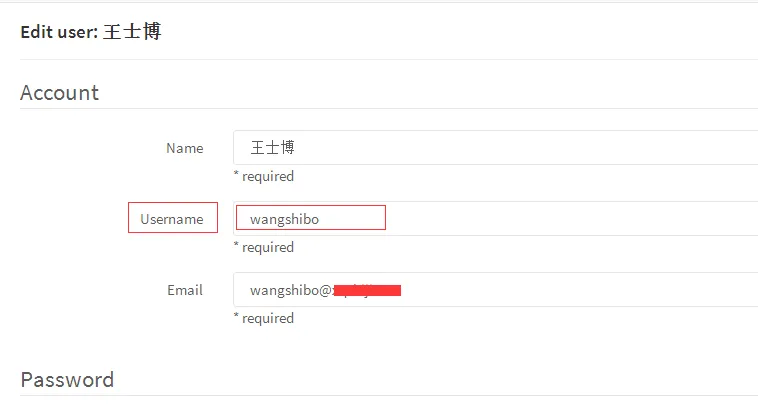
然后修改代码里的.git/config文件
[root@test-huanqiu weixin]# cd .git
[root@test-huanqiu .git]# cat config
[core]
repositoryformatversion = 0
filemode = true
bare = false
logallrefupdates = true
[remote "origin"]
fetch = +refs/heads/*:refs/remotes/origin/*
url = http://git.wangshibo.net:8081/weixin/weixin.git
[branch "master"]
remote = origin
merge = refs/heads/master
修改如下:
[root@test-huanqiu .git]# cat config
[core]
repositoryformatversion = 0
filemode = true
bare = false
logallrefupdates = true
[remote "origin"]
fetch = +refs/heads/*:refs/remotes/origin/*
url = http://wangshibo:HU@wew12378!h8@git.wangshibo.net:8081/weixin/weixin.git
[branch "master"]
remote = origin
merge = refs/heads/master
然后再次git push,发现可以正常提交了!
[root@test-huanqiu weixin]# git push
Counting objects: 4, done.
Delta compression using up to 8 threads.
Compressing objects: 100% (2/2), done.
Writing objects: 100% (3/3), 297 bytes, done.
Total 3 (delta 0), reused 0 (delta 0)
To http://wangshibo:HUIhui1987521@git.xqshijie.net:8081/weixin/weixin.git
8fcb559..6c97b56 master -> master
------------------------------------------------------------------------------------------------------------------------------------
可以创建一个用户名作为admin管理员,然后将这个用户名和密码添加到项目代码的.git/config里面,如上操作!
如果不是管理员,则至少对当前代码具有owner或master权限。
这样,在.git/config文件里添加这个用户名和密码权限,然后其他人在git push的时时候都使用这个文件进行覆盖。
其他人在首次git clone下载代码的时候,需要进行--global全局配置,然后就可以在gitweb控制台里追踪到每个操作者的提交记录了!


![git 使用之remote: File [4e21e71a555febaa4dfaaa05cf7eeb606ea96ae2] size 104.090MB, exceeds quota 100MB remote: Please remove the file[s] from history and try again 报错如何解决-优雅草卓伊凡](https://ucc.alicdn.com/pic/developer-ecology/oapu2a2t6nd3o_8d8a4fbd673246beb95e6cc30ec51869.png?x-oss-process=image/format,webp/resize,h_160,m_lfit)