git添加远程仓库报错To add an exception for this directory解决方案-优雅草卓伊凡

简介: git添加远程仓库报错To add an exception for this directory解决方案-优雅草卓伊凡

git添加远程仓库报错To add an exception for this directory解决方案-优雅草卓伊凡

执行添加远程仓库命令 git remote add origin https://gitee.com/youyacao/siyu-api.git 报错

[root@VM-20-5-centos api.siyusiyu.com]# git remote add origin https://gitee.com/youyacao/siyu-api.git
fatal: detected dubious ownership in repository at ‘/www/wwwroot/api.siyusiyu.com’
To add an exception for this directory, call:

git config --global --add safe.directory /www/wwwroot/api.siyusiyu.com
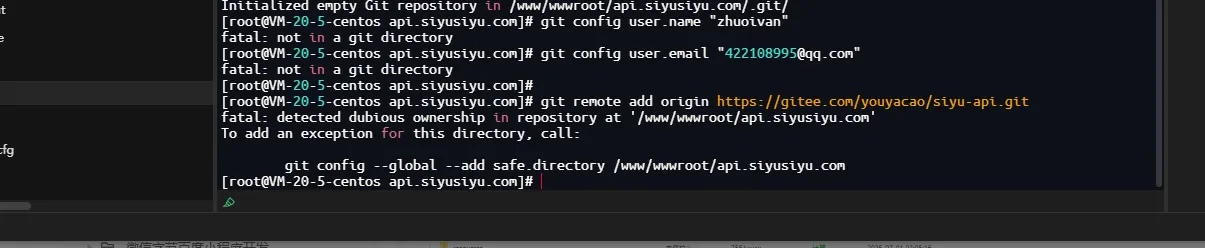

这个错误是因为 Git 的安全机制检测到仓库目录的所有权可疑。这是因为您可能使用 root 用户操作了一个非 root 用户创建的 Git 仓库。

解决方案(任选其一):

方案1:添加安全目录(推荐)

git config --global --add safe.directory /www/wwwroot/api.siyusiyu.com

就这个方法是最推荐的,处理了就不会有问题,以下内容也是参考。

方案2:添加所有目录到安全列表

git config --global --add safe.directory "*"

方案3:修改目录所有权

如果这个目录确实应该属于 root 用户:

chown -R root:root /www/wwwroot/api.siyusiyu.com

方案4:关闭安全目录检查(不推荐)

git config --global --add safe.directory ""

验证解决方案

执行上述任一命令后,再次运行您的 git 命令:

git remote add origin https://gitee.com/youyacao/siyu-api.git

推荐使用方案1,因为它只针对当前目录添加例外,既解决了问题又保持了 Git 的安全特性。

这个安全机制是 Git 为了防止潜在的安全风险而引入的,特别是在多用户环境中操作其他用户的仓库时。

目录
相关文章
|
存储 安全 开发工具
深度解决 Git “fatal: refusing to merge unrelated histories” 错误解析什么是历史分支优雅草卓伊凡
1094 4
深度解决 Git “fatal: refusing to merge unrelated histories” 错误解析什么是历史分支优雅草卓伊凡
|
9月前
|
Shell Linux 网络安全
宝塔服务器面板部署安装git通过第三方应用安装收费怎么办—bash: git: command not found解决方案-优雅草卓伊凡
1430 3
宝塔服务器面板部署安装git通过第三方应用安装收费怎么办—bash: git: command not found解决方案-优雅草卓伊凡
|
12月前
|
算法 安全 网络安全
git clone操作报错diffie-hellman-group1-sha1的解决方案
在处理这一问题时,需要确保了解相关操作的安全影响。`diffie-hellman-group1-sha1`算法被认为是不够安全的,这是因为随着计算能力的提高,`SHA-1`算法可以在合理的时间内被破解,而且其对应的 `1024位`Diffie-Hellman组也可能不够强大。因此,在确保Git操作的同时,也要考虑提升安全性的长期解决办法。强烈推荐与管理员或相关技术支持团队合作,升级和加强服务器端的安全配置。
316 12
|
12月前
|
API 开发工具 git
使用git pull遇到Automatic merge failed; fix conflicts and then commit the result.解决方案卓伊凡
701 0
使用git pull遇到Automatic merge failed; fix conflicts and then commit the result.解决方案卓伊凡
|
存储 人工智能 缓存
Git Commit规范:为什么有些公司要求变更行数限制?·优雅草卓伊凡
543 3
Git Commit规范:为什么有些公司要求变更行数限制?·优雅草卓伊凡
|
10月前
|
开发工具 git
Git版本控制工具合并分支merge命令操作流程
通过以上步聚焦于技术性和操作层面指南(guidance), 可以有效管理项目版本控制(version control), 并促进团队协作(collaboration).
2568 15
|
安全 开发工具 git
git的常用操作命令
git的常用操作命令
694 57
|
人工智能 前端开发 Java
用git rebase命令合并开发阶段中多条commit提交记录
通过 `git rebase`,可以合并多个提交记录,使开发历史更简洁清晰。操作分为 6 步:查看提交历史 (`git log --oneline`)、设置需合并的提交数 (`git rebase -i HEAD~N`)、修改动作标识为 `s`(squash)、保存退出编辑、调整提交信息、强制推送至远程仓库 (`git push -f`)。此方法适合清理本地无关提交,但若有团队协作或冲突风险,需谨慎使用以避免问题。
2712 60
|
存储 项目管理 开发工具
Git常用命令及操作技巧
以上是Git的常用命令及操作技巧,尽管看起来有些繁琐,但实际上只要花费一些时间进行实践,您将很快熟练掌握。随着使用熟练度的提高,您会发现Git对项目管理和协同工作的强大帮助。
311 20