问题描述
如何把开启NFS协议的Azure Blob挂载到Linux虚拟机中呢?
【答案】:可以使用 NFS 3.0 协议从基于 Linux 的 Azure 虚拟机 (VM) 或在本地运行的 Linux 系统,在 Blob 存储中装载容器
操作步骤
参考官方文档(Mount Blob storage by using the Network File System (NFS) 3.0 protocol: https://docs.microsoft.com/en-us/azure/storage/blobs/network-file-system-protocol-support-how-to )可以成功的让 NFS 3.0的Blob Mount到VM中。

准备条件:
1) 开启NFS的Azure Storage Account (官网中说可以选择 Root Squash为All Squash。谨记,最好是选择No Root Squash,不然会遇见Mount成功,但是没有查看/操作 /mnt/test 目录的权限问题)
2) Linux 虚拟机(本示例中使用的为 UbuntuServer 18.04-LTS)
3) Storage Account与Linux 处于同一虚拟网络中,并且在Storage Account中设置允许访问的子网。
注意事项:
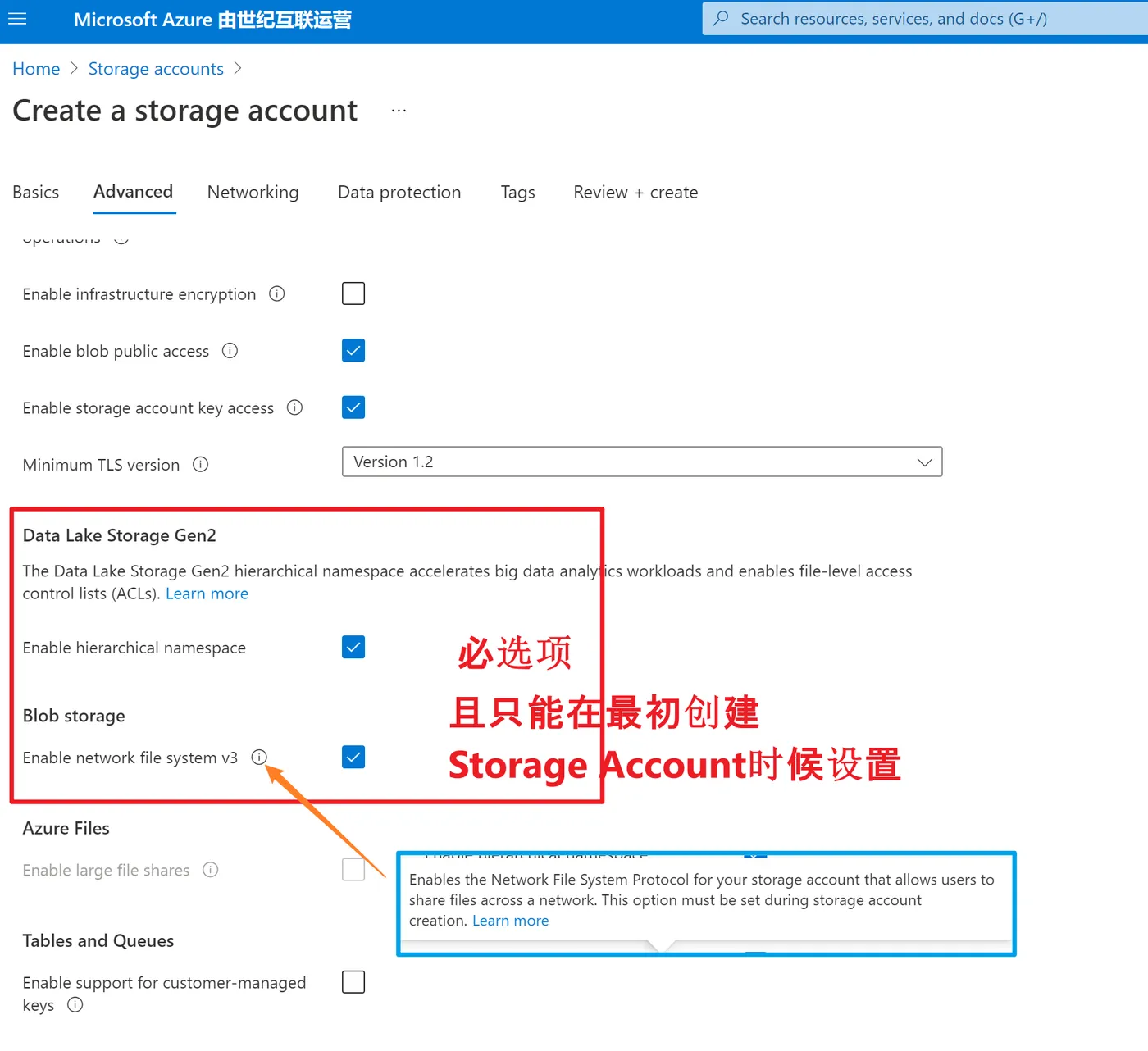
1)在创建Storage Account的时候要先开启ADLS Gen 2.0 (即Enable Hierarchical namespace 和 Enable network file system v3)
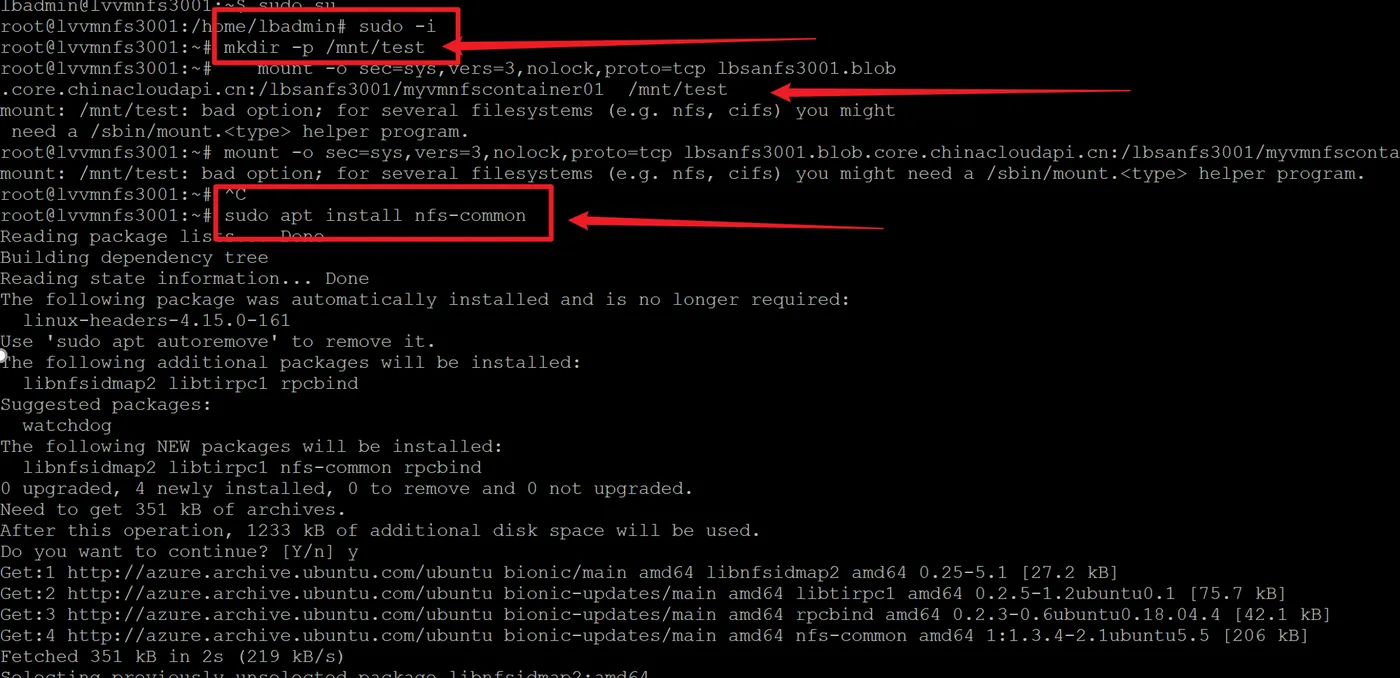
2) 使用PuTTy,SSH登录到VM后,需要使用用root权限执行mount命令。 使用 sudo -i 切换到root目录中。同时,如果没有安装nfs helper会提示bad option消息。只需使用 sudo apt install nfs-common 安装nfs helper。
3)最终,使用正确的 Storage Account 和 Container 名称替换下面指令中的信息。
mkdir -p /mnt/test
mount -o sec=sys,vers=3,nolock,proto=tcp <storage-account-name>.blob.core.chinacloudapi.cn:/<storage-account-name>/<container-name>  /mnt/test
#1: Replace the <storage-account-name> placeholder that appears in this command with the name of your storage account.
#2:Replace the <container-name> placeholder with the name of your container.

4) 使用 df -h 查看 FileSystem信息,可以看见挂载Blob的大小。
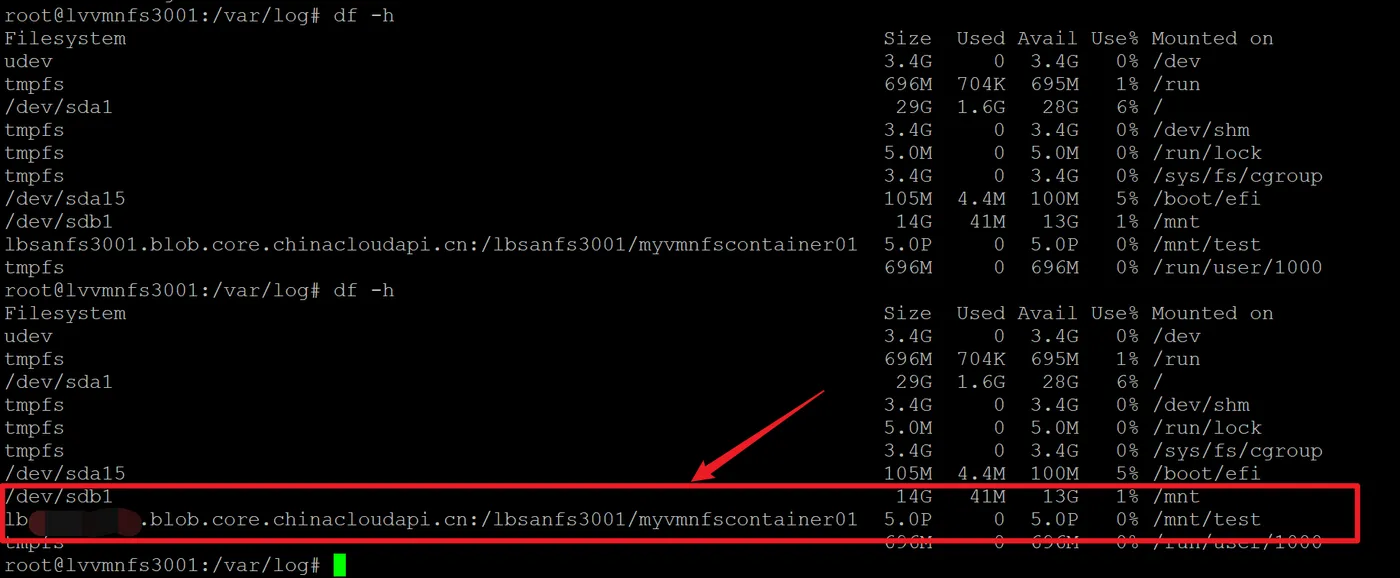
如果遇见错误,可以参考文档后面的常见错误部分,在本次的实验中,就先后遇见了 Access denied by server while mounting 和 mount: /mnt/test: bad option;错误。
| Error | Cause / resolution |
Access denied by server while mounting |
Ensure that your client is running within a supported subnet. See the Supported network locations. |
No such file or directory |
Make sure to type the mount command and it's parameters directly into the terminal. If you copy and paste any part of this command into the terminal from another application, hidden characters in the pasted information might cause this error to appear. This error also might appear if the account isn't enabled for NFS 3.0. |
Permision denied |
The default mode of a newly created NFS v3 container is 0750. Non-root users do not have access to the volume. If access from non-root users is required, root user must change the mode to 0755. Sample command: sudo chmod 0755 /mnt/<newcontainer> |
EINVAL ("Invalid argument") |
This error can appear when a client attempts to:
|
EROFS ("Read-only file system") |
This error can appear when a client attempts to:
|
NFS3ERR_IO/EIO ("Input/output error") |
This error can appear when a client attempts to read, write, or set attributes on blobs that are stored in the archive access tier. |
OperationNotSupportedOnSymLink error |
This error can be returned during a write operation via a Blob or Azure Data Lake Storage Gen2 API. Using these APIs to write or delete symbolic links that are created by using NFS 3.0 is not allowed. Make sure to use the NFS v3 endpoint to work with symbolic links. |
mount: /mnt/test: bad option; |
Install the nfs helper program using sudo apt install nfs-common. |
参考文档
Mount Blob storage by using the Network File System (NFS) 3.0 protocol:https://docs.microsoft.com/en-us/azure/storage/blobs/network-file-system-protocol-support-how-to