
应用场景
不同的接口服务器处理不同的应用,我们会在实际应用中将A服务器的数据提交给B服务器进行数据接收并处理业务。
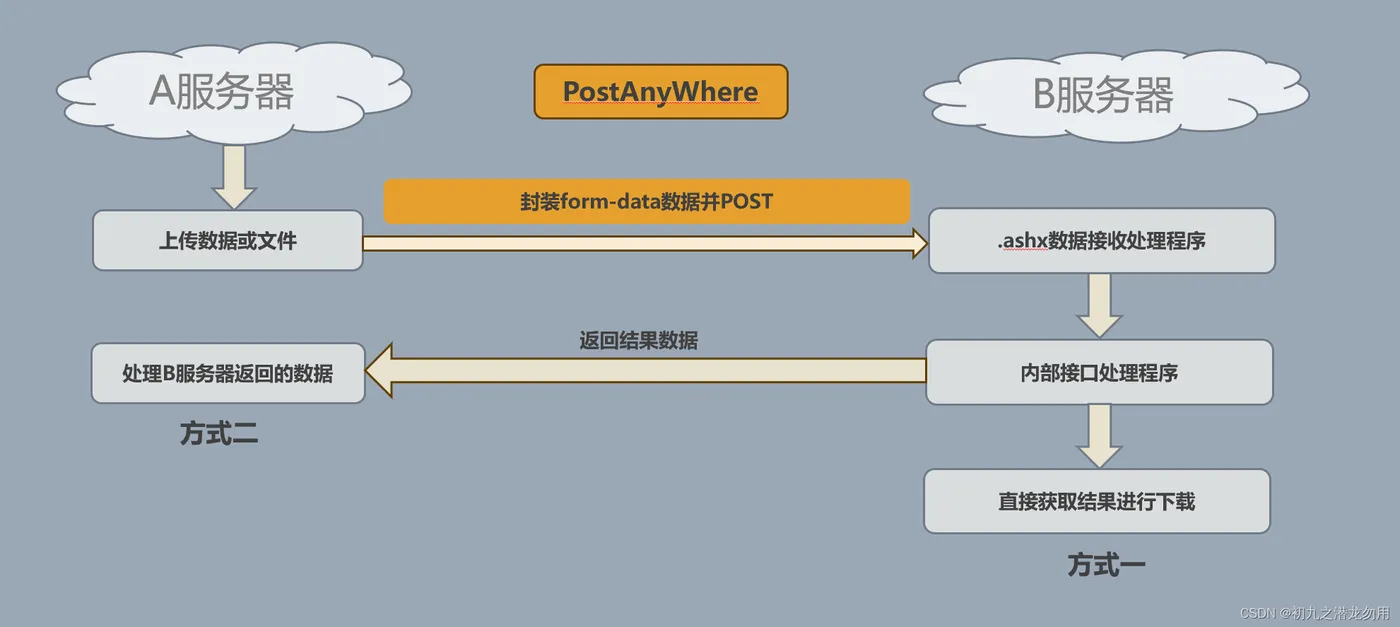
比如我们想要处理一个OFFICE文件,由用户上传到A服务器,上传成功后,由B服务器负责进行数据处理和下载工作,这时我们就需要 POST A服务器的文件数据到B服务器进行处理。
实现原理
将用户上传的数据或A服务器已存在的数据,通过form-data的形式POST到B服务器,B服务由指定ashx文件进行数据接收,并转由指定的业务逻辑程序进行处理。如下图:
实现代码
PostAnyWhere类
创建一个 PostAnyWhere 类,
该类具有如下属性:
(1)public string PostUrl 要提交的服务器URL
(2)public List<PostFileItem> PostData 要准备的数据(PostFileItem类可包括数据和文件类型)
该类包含的关键方法如下:
(1)public void AddText(string key, string value)
该方法将指定的字典数据加入到PostData中
(2)public void AddFile(string name, string srcFileName, string desName, string contentType = "text/plain")
该方法将指定的文件添加到PostData中,其中 srcFileName 表示要添加的文件名,desName表示接收数据生成的文件名
(3)public string Send()
该方法将开始POST传送数据
代码如下:
    public class PostAnyWhere
    {
        public string PostUrl { get; set; }
        public List<PostFileItem> PostData { get; set; }

        public PostAnyWhere()
        {
            this.PostData = new List<PostFileItem>();
        }

        public void AddText(string key, string value)
        {
            this.PostData.Add(new PostFileItem { Name = key, Value = value });
        }

        public void AddFile(string name, string srcFileName, string desName,string at, string contentType = "text/plain")
        {
            string[] srcName = Path.GetFileName(srcFileName).Split('.');
            string exName = "";
            if (srcName.Length > 1)
            {
                exName = "."+srcName[srcName.Length-1];
            }

            this.PostUrl = "https://www.xxx.com/test.ashx?guid=" + desName;
            ReadyFile(name, GetBinaryData(srcFileName), exName,contentType);
        }
         void ReadyFile(string name, byte[] fileBytes, string fileExName = "", string contentType = "text/plain")
        {
            this.PostData.Add(new PostFileItem
            {
                Type = PostFileItemType.File,
                Name = name,
                FileBytes = fileBytes,
                FileName = fileExName,
                ContentType = contentType
            });
        }

        public string Send()
        {
            var boundary = "----------------------------" + DateTime.Now.Ticks.ToString("x");
            var request = (HttpWebRequest)WebRequest.Create(this.PostUrl);
            request.ContentType = "multipart/form-data; boundary=" + boundary;
            request.Method = "POST";
            request.KeepAlive = true;

            Stream memStream = new System.IO.MemoryStream();
            var boundarybytes = System.Text.Encoding.ASCII.GetBytes("\r\n--" + boundary + "\r\n");
            var endBoundaryBytes = System.Text.Encoding.ASCII.GetBytes("\r\n--" + boundary + "--");

            var formdataTemplate = "\r\n--" + boundary + "\r\nContent-Disposition: form-data; name=\"{0}\";\r\n\r\n{1}";

            var formFields = this.PostData.Where(m => m.Type == PostFileItemType.Text).ToList();
            foreach (var d in formFields)
            {
                var textBytes = System.Text.Encoding.UTF8.GetBytes(string.Format(formdataTemplate, d.Name, d.Value));
                memStream.Write(textBytes, 0, textBytes.Length);
            }

            const string headerTemplate = "Content-Disposition: form-data; name=\"{0}\"; filename=\"{1}\"\r\nContent-Type: {2}\r\n\r\n";
            var files = this.PostData.Where(m => m.Type == PostFileItemType.File).ToList();
            foreach (var fe in files)
            {
                memStream.Write(boundarybytes, 0, boundarybytes.Length);
                var header = string.Format(headerTemplate, fe.Name, fe.FileName ?? "System.Byte[]", fe.ContentType ?? "text/plain");
                var headerbytes = System.Text.Encoding.UTF8.GetBytes(header);
                memStream.Write(headerbytes, 0, headerbytes.Length);
                memStream.Write(fe.FileBytes, 0, fe.FileBytes.Length);
            }
            memStream.Write(endBoundaryBytes, 0, endBoundaryBytes.Length);
            request.ContentLength = memStream.Length;

            HttpWebResponse response;

            try
            {
                using (var requestStream = request.GetRequestStream())
                {
                    memStream.Position = 0;
                    var tempBuffer = new byte[memStream.Length];
                    memStream.Read(tempBuffer, 0, tempBuffer.Length);
                    memStream.Close();
                    requestStream.Write(tempBuffer, 0, tempBuffer.Length);
                }
                response = (HttpWebResponse)request.GetResponse();
            }
            catch (WebException webException)
            {
                response = (HttpWebResponse)webException.Response;
            }

            if (response == null)
            {
                throw new Exception("HttpWebResponse is null");
            }

            var responseStream = response.GetResponseStream();
            if (responseStream == null)
            {
                throw new Exception("ResponseStream is null");
            }

            using (var streamReader = new StreamReader(responseStream))
            {
                return streamReader.ReadToEnd();
            }
        }
    }

    public class PostFileItem
    {
        public PostFileItem()
        {
            this.Type = PostFileItemType.Text;
        }

        public PostFileItemType Type { get; set; }
        public string Value { get; set; }
        public byte[] FileBytes { get; set; }
        public string Name { get; set; }
        public string FileName { get; set; }
        public string ContentType { get; set; }
    }

    public enum PostFileItemType
    {
        Text = 0,
        File = 1
    }
    public byte[] GetBinaryData(string filename)
    {
      if(!File.Exists(filename))
      {
        return null;
      }
      try
      {
        FileStream fs = new FileStream(filename, FileMode.Open, FileAccess.Read);
        byte[] imageData = new Byte[fs.Length];
        fs.Read( imageData, 0,Convert.ToInt32(fs.Length));
        fs.Close();
        return imageData;
      }
      catch(Exception)
      {
        return null;
      }
      finally
      {

      }
    }
ashx文件部署
在B服务器上部署ashx文件接收数据,ashx程序即,一般处理程序(HttpHandler),一个httpHandler接受并处理一个http请求,需要实现IHttpHandler接口,这个接口有一个IsReusable成员,一个待实现的方法ProcessRequest(HttpContextctx) 。.ashx程序适合产生供浏览器处理的、不需要回发处理的数据格式。
示例代码如下:
<%@ WebHandler Language="C#" Class="Handler" %>

using System;
using System.Web;
using System.IO;

public class Handler : IHttpHandler {

public void ProcessRequest (HttpContext context) {
   if (context.Request.Files.Count > 0)
   {
      string strPath = System.Web.HttpContext.Current.Server.MapPath("~/app_data/test/");
      string strName = context.Request.Files[0].FileName;
      string ext=Path.GetExtension(strName);
      string filename =HttpContext.Current.Request.QueryString["guid"].ToString()+Path.GetFileNameWithoutExtension(strName);
      if(ext!=""){
         filename = filename  + ext;
      }
      context.Request.Files[0].SaveAs(System.IO.Path.Combine(strPath, filename));
   }
}

public bool IsReusable {
   get {
      return false;
   }
}

}
小结
ashx处理接收的数据后,后续还需要配合实际的接口功能继续处理应用。另外,对于ashx页面,实际的应用则需要使用安全访问控制,只有正常登录或提供合法访问令牌的用户才可以进行访问。
以上代码仅供参考,欢迎大家指正,再次感谢您的阅读!
