具体讲解
心跳传感器会返回一个心率的数字。传感器提供的只是一个从0到1023的“模拟”值
简而言之:把手指放在传感器的IR led和光晶体管之间。你的心跳会使手指的血管扩张,从而过滤掉红外线。这就产生了一个脉动信号。
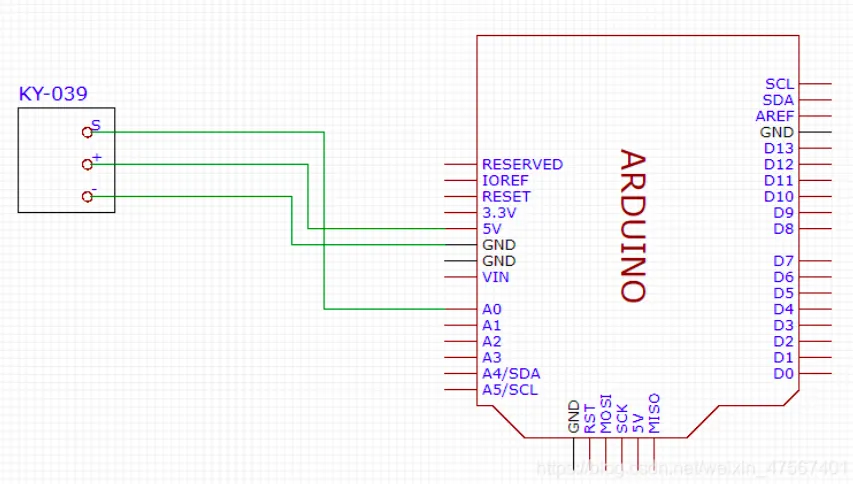
电路连接
效果图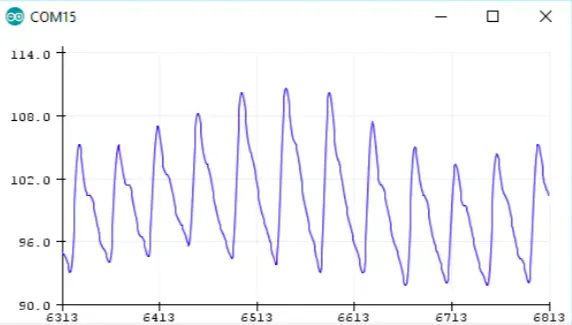
代码介绍
#define samp_siz 4
#define rise_threshold 5
// Pulse Monitor Test Script
int sensorPin = 0;
void setup() {


   Serial.begin(9600);
}
void loop ()
{


   float reads[samp_siz], sum;
   long int now, ptr;
   float last, reader, start;
   float first, second, third, before, print_value;
   bool rising;
   int rise_count;
   int n;
   long int last_beat;
   for (int i = 0; i < samp_siz; i++)
     reads[i] = 0;
   sum = 0;
   ptr = 0;
   while(1)
   {


     // calculate an average of the sensor
     // during a 20 ms period (this will eliminate
     // the 50 Hz noise caused by electric light
     n = 0;
     start = millis();
     reader = 0.;
     do
     {


       reader += analogRead (sensorPin);
       n++;
       now = millis();
     }
     while (now < start + 20);
     reader /= n;  // we got an average
     // Add the newest measurement to an array
     // and subtract the oldest measurement from the array
     // to maintain a sum of last measurements
     sum -= reads[ptr];
     sum += reader;
     reads[ptr] = reader;
     last = sum / samp_siz;
     // now last holds the average of the values in the array
     // check for a rising curve (= a heart beat)
     if (last > before)
     {


       rise_count++;
       if (!rising && rise_count > rise_threshold)
       {


         // Ok, we have detected a rising curve, which implies a heartbeat.
         // Record the time since last beat, keep track of the two previous
         // times (first, second, third) to get a weighed average.
         // The rising flag prevents us from detecting the same rise
         // more than once.
         rising = true;
         first = millis() - last_beat;
         last_beat = millis();
         // Calculate the weighed average of heartbeat rate
         // according to the three last beats
         print_value = 60000. / (0.4 * first + 0.3 * second + 0.3 * third);
         Serial.print(print_value);
         Serial.print('\n');
         third = second;
         second = first;
       }
     }
     else
     {


       // Ok, the curve is falling
       rising = false;
       rise_count = 0;
     }
     before = last;
     ptr++;
     ptr %= samp_siz;
   }
}