
需要源码请点赞关注收藏后评论区留言私信~~~
一、扫描BLE设备
传统蓝牙虽然历史悠久,但它的缺陷也很明显,包括但不限于下列几点:
(1)需要两部设备配对之后才能继续连接,而且连接速度也慢;
(2)连接之后就一直保持传输链路,很消耗电能;
(3)数据传输的有效距离不到10米,导致使用场景受限;
为解决传统蓝牙的上述痛点,蓝牙技术联盟制定了低功耗蓝牙技术(BLE),因为BLE采取非常快速的连接方式,所以平时处于非连接的状态,此时链路两端仅仅只是知晓对方,只有在必要时才开启链路,完成传输后会尽快关闭链路,BLE技术与之前版本的蓝牙标准相比,主要有三个方面的改进,更省电,连接速度更快以及传输距离更远
低功耗蓝牙所有BLE设备遵循统一的通用属性规范(GATT):
(1)BLE从机,又称服务端,它接受GATT指令,并根据指令调整自身行为。
(2)BLE主机,又称客户端,它向服务端发送GATT指令,令其遵照指令行事。
(3)特征值(characteristic),BLE通过参数来传输数据,这种参数被称作特征值。
(4)服务(service),一个设备可拥有多个服务,每个服务也可包含多个特征值,每个特征值又存在多种属性(properties)。
GATT规范的内容框架如下

扫描与连接BLE设备
调用蓝牙适配器的getBluetoothLeScanner方法,获得BluetoothLeScanner扫描器对象。 扫描器的主要方法说明如下:
startScan方法表示开始扫描BLE设备,
stopScan方法表示停止扫描BLE设备。 调用设备对象的connectGatt方法,连接GATT服务器并获得客户端的GATT对象。
BLE连接之后的回调
BluetoothGattCallback接口定义了许多方法,常用方法主要有:
onConnectionStateChange:BLE连接的状态发生变化时回调。此时判断如果连接成功,就调用GATT对象的discoverServices方法查找BLE服务。
onServicesDiscovered:发现BLE服务端的服务列表及其特征值时回调。 onCharacteristicChanged:收到BLE服务端的数据变更时回调。该方法会收到服务端送来的消息。
onCharacteristicWrite:收到BLE服务端的数据写入时回调。此时判断执行成功的话,表示服务端已经收到了客户端发给它的消息。
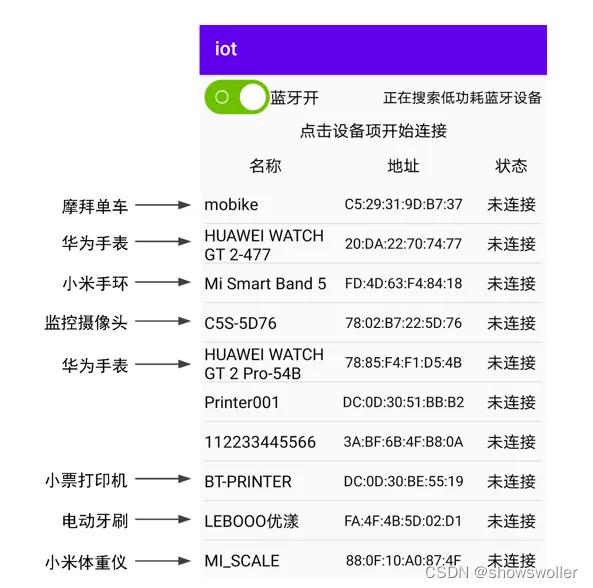
运行测试App效果如下 系统会自动扫描附近的低功耗蓝牙设备
代码如下
package com.example.iot;
import androidx.appcompat.app.AppCompatActivity;
import android.bluetooth.BluetoothAdapter;
import android.bluetooth.BluetoothDevice;
import android.bluetooth.BluetoothGatt;
import android.bluetooth.BluetoothGattCharacteristic;
import android.bluetooth.BluetoothGattServer;
import android.bluetooth.BluetoothGattServerCallback;
import android.bluetooth.BluetoothGattService;
import android.bluetooth.BluetoothManager;
import android.bluetooth.BluetoothProfile;
import android.bluetooth.le.AdvertiseCallback;
import android.bluetooth.le.AdvertiseData;
import android.bluetooth.le.AdvertiseSettings;
import android.bluetooth.le.BluetoothLeAdvertiser;
import android.content.Context;
import android.content.pm.PackageManager;
import android.os.Bundle;
import android.os.Handler;
import android.os.Looper;
import android.text.TextUtils;
import android.util.Log;
import android.view.View;
import android.view.WindowManager;
import android.widget.EditText;
import android.widget.LinearLayout;
import android.widget.ScrollView;
import android.widget.TextView;
import android.widget.Toast;
import com.example.iot.constant.BleConstant;
import com.example.iot.util.BluetoothUtil;
import com.example.iot.util.ChatUtil;
import com.example.iot.util.DateUtil;
import com.example.iot.util.Utils;
import com.example.iot.util.ViewUtil;
import java.util.List;
public class BleServerActivity extends AppCompatActivity {
    private static final String TAG = "BleServerActivity";
    private TextView tv_hint; // 声明一个文本视图对象
    private ScrollView sv_chat; // 声明一个滚动视图对象
    private LinearLayout ll_show; // 声明一个线性视图对象
    private LinearLayout ll_input; // 声明一个线性视图对象
    private EditText et_input; // 声明一个编辑框对象
    private Handler mHandler = new Handler(Looper.myLooper()); // 声明一个处理器对象
    private int dip_margin; // 每条聊天记录的四周空白距离
    private String mMinute = "00:00";
    private BluetoothManager mBluetoothManager; // 声明一个蓝牙管理器对象
    private BluetoothAdapter mBluetoothAdapter; // 声明一个蓝牙适配器对象
    private BluetoothDevice mRemoteDevice; // 声明一个蓝牙设备对象
    private BluetoothGattServer mGattServer; // 声明一个蓝牙GATT服务器对象
    private BluetoothGattCharacteristic mReadChara; // 客户端读取数据的特征值
    @Override
    protected void onCreate(Bundle savedInstanceState) {
        super.onCreate(savedInstanceState);
        setContentView(R.layout.activity_ble_server);
        getWindow().addFlags(WindowManager.LayoutParams.FLAG_KEEP_SCREEN_ON); // 保持屏幕常亮
        initView(); // 初始化视图
        initBluetooth(); // 初始化蓝牙适配器
        mHandler.postDelayed(mAdvertise, 200); // 延迟200毫秒开启低功耗蓝牙广播任务
    }
    // 初始化视图
    private void initView() {
        dip_margin = Utils.dip2px(this, 5);
        tv_hint = findViewById(R.id.tv_hint);
        sv_chat = findViewById(R.id.sv_chat);
        ll_show = findViewById(R.id.ll_show);
        ll_input = findViewById(R.id.ll_input);
        et_input = findViewById(R.id.et_input);
        findViewById(R.id.btn_send).setOnClickListener(v -> sendMesssage());
    }
    // 初始化蓝牙适配器
    private void initBluetooth() {
        if (!getPackageManager().hasSystemFeature(PackageManager.FEATURE_BLUETOOTH_LE)) {
            Toast.makeText(this, "当前设备不支持低功耗蓝牙", Toast.LENGTH_SHORT).show();
            finish(); // 关闭当前页面
        }
        // 获取蓝牙管理器,并从中得到蓝牙适配器
        mBluetoothManager =(BluetoothManager) getSystemService(Context.BLUETOOTH_SERVICE);
        mBluetoothAdapter = mBluetoothManager.getAdapter(); // 获取蓝牙适配器
        if (!BluetoothUtil.getBlueToothStatus()) { // 还未打开蓝牙
            BluetoothUtil.setBlueToothStatus(true); // 开启蓝牙功能
        }
    }
    // 创建一个低功耗蓝牙广播任务
    private Runnable mAdvertise = new Runnable() {
        @Override
        public void run() {
            if (BluetoothUtil.getBlueToothStatus()) { // 已经打开蓝牙
                stopAdvertise(); // 停止低功耗蓝牙广播
                String server_name = getIntent().getStringExtra("server_name");
                startAdvertise(server_name); // 开始低功耗蓝牙广播
                tv_hint.setText("“"+server_name+"”服务端正在广播,请等候客户端连接");
            } else {
                mHandler.postDelayed(this, 2000);
            }
        }
    };
    // 开始低功耗蓝牙广播
    private void startAdvertise(String ble_name) {
        // 设置广播参数
        AdvertiseSettings settings = new AdvertiseSettings.Builder()
                .setConnectable(true) // 是否允许连接
                .setTimeout(0) // 设置超时时间
                .setTxPowerLevel(AdvertiseSettings.ADVERTISE_TX_POWER_HIGH)
                .setAdvertiseMode(AdvertiseSettings.ADVERTISE_MODE_LOW_LATENCY)
                .build();
        // 设置广播内容
        AdvertiseData advertiseData = new AdvertiseData.Builder()
                .setIncludeDeviceName(true) // 是否把设备名称也广播出去
                .setIncludeTxPowerLevel(true) // 是否把功率电平也广播出去
                .build();
        mBluetoothAdapter.setName(ble_name); // 设置BLE服务端的名称
        // 获取BLE广播器
        BluetoothLeAdvertiser advertiser = mBluetoothAdapter.getBluetoothLeAdvertiser();
        // BLE服务端开始广播,好让别人发现自己
        advertiser.startAdvertising(settings, advertiseData, mAdvertiseCallback);
    }
    // 停止低功耗蓝牙广播
    private void stopAdvertise() {
        if (mBluetoothAdapter != null) {
            // 获取BLE广播器
            BluetoothLeAdvertiser advertiser = mBluetoothAdapter.getBluetoothLeAdvertiser();
            if (advertiser != null) {
                advertiser.stopAdvertising(mAdvertiseCallback); // 停止低功耗蓝牙广播
            }
        }
    }
    // 创建一个低功耗蓝牙广播回调对象
    private AdvertiseCallback mAdvertiseCallback = new AdvertiseCallback() {
        @Override
        public void onStartSuccess(AdvertiseSettings settings) {
            Log.d(TAG, "低功耗蓝牙广播成功:"+settings.toString());
            addService(); // 添加读写服务UUID,特征值等
        }
        @Override
        public void onStartFailure(int errorCode) {
            Log.d(TAG, "低功耗蓝牙广播失败,错误代码为"+errorCode);
        }
    };
    // 添加读写服务UUID,特征值等
    private void addService() {
        BluetoothGattService gattService = new BluetoothGattService(
                BleConstant.UUID_SERVER, BluetoothGattService.SERVICE_TYPE_PRIMARY);
        // 只读的特征值
        mReadChara = new BluetoothGattCharacteristic(BleConstant.UUID_CHAR_READ,
                BluetoothGattCharacteristic.PROPERTY_READ | BluetoothGattCharacteristic.PROPERTY_NOTIFY,
                BluetoothGattCharacteristic.PERMISSION_READ);
        // 只写的特征值
        BluetoothGattCharacteristic charaWrite = new BluetoothGattCharacteristic(BleConstant.UUID_CHAR_WRITE,
                BluetoothGattCharacteristic.PROPERTY_WRITE | BluetoothGattCharacteristic.PROPERTY_NOTIFY,
                BluetoothGattCharacteristic.PERMISSION_WRITE);
        gattService.addCharacteristic(mReadChara); // 将特征值添加到服务里面
        gattService.addCharacteristic(charaWrite); // 将特征值添加到服务里面
        // 开启GATT服务器等待客户端连接
        mGattServer = mBluetoothManager.openGattServer(this, mGattCallback);
        mGattServer.addService(gattService); // 向GATT服务器添加指定服务
    }
    private BluetoothGattServerCallback mGattCallback = new BluetoothGattServerCallback() {
        // BLE连接的状态发生变化时回调
        @Override
        public void onConnectionStateChange(BluetoothDevice device, int status, int newState) {
            super.onConnectionStateChange(device, status, newState);
            Log.d(TAG, "onConnectionStateChange device=" + device.toString() + " status=" + status + " newState=" + newState);
            if (newState == BluetoothProfile.STATE_CONNECTED) {
                mRemoteDevice = device;
                runOnUiThread(() -> {
                    String desc = String.format("已连接BLE客户端,对方名称为“%s”,MAC地址为%s",
                            device.getName(), device.getAddress());
                    tv_hint.setText(desc);
                    ll_input.setVisibility(View.VISIBLE);
                });
            }
        }
        // 收到BLE客户端写入请求时回调
        @Override
        public void onCharacteristicWriteRequest(BluetoothDevice device, int requestId, BluetoothGattCharacteristic chara, boolean preparedWrite, boolean responseNeeded, int offset, byte[] value) {
            super.onCharacteristicWriteRequest(device, requestId, chara, preparedWrite, responseNeeded, offset, value);
            String message = new String(value); // 把客户端发来的数据转成字符串
            Log.d(TAG, "收到了客户端发过来的数据 " + message);
            // 向GATT客户端发送应答,告诉它成功收到了要写入的数据
            mGattServer.sendResponse(device, requestId, BluetoothGatt.GATT_SUCCESS, offset, chara.getValue());
            runOnUiThread(() -> appendChatMsg(message, false)); // 往聊天窗口添加聊天消息
        }
    };
    @Override
    protected void onDestroy() {
        super.onDestroy();
        stopAdvertise(); // 停止低功耗蓝牙广播
        if (mGattServer != null) {
            mGattServer.close(); // 关闭GATT服务器
        }
    }
    // 发送聊天消息
    private void sendMesssage() {
        String message = et_input.getText().toString();
        if (TextUtils.isEmpty(message)) {
            Toast.makeText(this, "请先输入聊天消息", Toast.LENGTH_SHORT).show();
            return;
        }
        et_input.setText("");
        ViewUtil.hideOneInputMethod(this, et_input); // 隐藏软键盘
        List<String> msgList = ChatUtil.splitString(message, 20); // 按照20字节切片
        for (String msg : msgList) {
            mReadChara.setValue(msg); // 设置读特征值
            // 发送本地特征值已更新的通知
            mGattServer.notifyCharacteristicChanged(mRemoteDevice, mReadChara, false);
        }
        appendChatMsg(message, true); // 往聊天窗口添加聊天消息
    }
    // 往聊天窗口添加聊天消息
    private void appendChatMsg(String content, boolean isSelf) {
        appendNowMinute(); // 往聊天窗口添加当前时间
        // 把单条消息的线性布局添加到聊天窗口上
        ll_show.addView(ChatUtil.getChatView(this, content, isSelf));
        // 延迟100毫秒后启动聊天窗口的滚动任务
        new Handler(Looper.myLooper()).postDelayed(() -> {
            sv_chat.fullScroll(ScrollView.FOCUS_DOWN); // 滚动到底部
        }, 100);
    }
    // 往聊天窗口添加当前时间
    private void appendNowMinute() {
        String nowMinute = DateUtil.getNowMinute();
        if (!mMinute.substring(0, 4).equals(nowMinute.substring(0, 4))) {
            mMinute = nowMinute;
            ll_show.addView(ChatUtil.getHintView(this, nowMinute, dip_margin));
        }
    }
}
创作不易 觉得有帮助请点赞关注收藏~~~

