需要全部源码或运行有问题请点赞关注收藏后评论区留言~~~
一、通知渠道NtoificationChannel
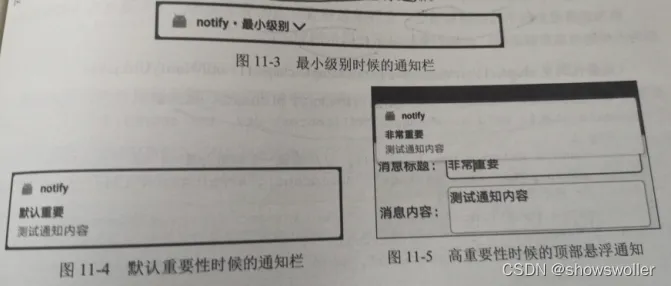
为了分清消息通知的轻重缓急,Android8.0新增了通知渠道,并且必须指定通知渠道才能正常推送消息,一个应用允许拥有多个通知渠道,每个渠道的重要性各不相同,有的渠道消息在通知栏被折叠成小行,有的渠道消息在通知栏展示完整的大行,有的会发出铃声甚至震动等等
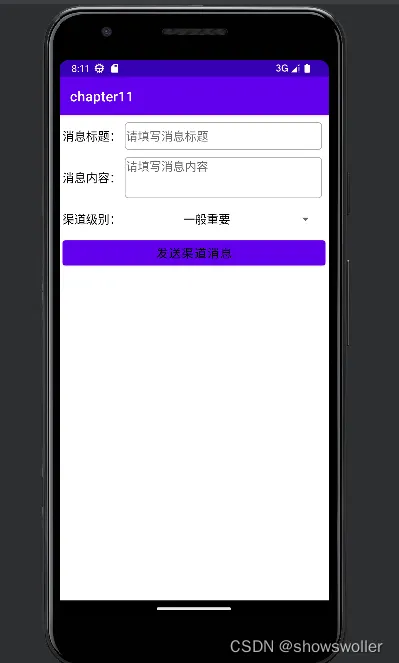
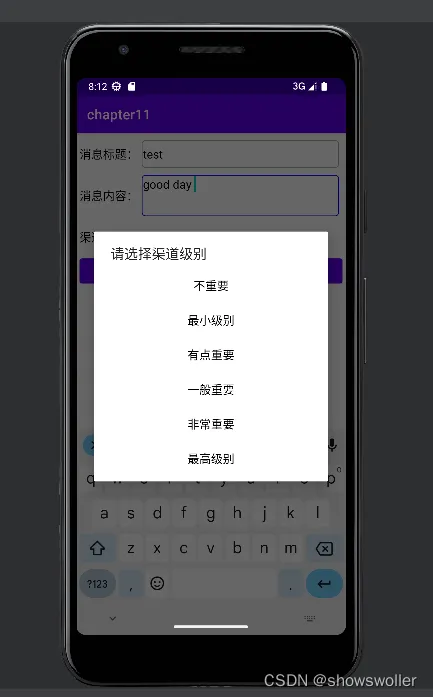
效果如下 可以输入标题和内容,然后下拉框里面选择消息的重要级别,根据重要级别的不同消息会有不同的通知方式(这里要连接真机才能具体展示 读者可自行连接 或者参考我之前的博客连接步骤)
代码如下
Java类
package com.example.chapter11;
import android.app.Notification;
import android.app.NotificationManager;
import android.app.PendingIntent;
import android.content.Context;
import android.content.Intent;
import android.os.Build;
import android.os.Bundle;
import android.text.TextUtils;
import android.view.View;
import android.widget.AdapterView;
import android.widget.ArrayAdapter;
import android.widget.EditText;
import android.widget.Spinner;
import android.widget.Toast;
import androidx.appcompat.app.AppCompatActivity;
import com.example.chapter11.util.NotifyUtil;
import com.example.chapter11.util.ViewUtil;
public class NotifyChannelActivity extends AppCompatActivity implements View.OnClickListener {
    private EditText et_title;
    private EditText et_message;
    private String mChannelId = "0"; // 通知渠道的编号
    private String mChannelName; // 通知渠道的名称
    private int mImportance; // 通知渠道的级别
    @Override
    protected void onCreate(Bundle savedInstanceState) {
        super.onCreate(savedInstanceState);
        setContentView(R.layout.activity_notify_channel);
        et_title = findViewById(R.id.et_title);
        et_message = findViewById(R.id.et_message);
        findViewById(R.id.btn_send_channel).setOnClickListener(this);
        if (Build.VERSION.SDK_INT >= Build.VERSION_CODES.O) {
            initImportanceSpinner(); // 初始化渠道级别的下拉框
        }
    }
    // 初始化渠道级别的下拉框
    private void initImportanceSpinner() {
        findViewById(R.id.ll_channel).setVisibility(View.VISIBLE);
        ArrayAdapter<String> importanceAdapter = new ArrayAdapter<String>(this,
                R.layout.item_select, importanceDescArray);
        Spinner sp_importance = findViewById(R.id.sp_importance);
        sp_importance.setPrompt("请选择渠道级别");
        sp_importance.setAdapter(importanceAdapter);
        sp_importance.setSelection(3);
        sp_importance.setOnItemSelectedListener(new TypeSelectedListener());
    }
    private int[] importanceTypeArray = {NotificationManager.IMPORTANCE_NONE,
            NotificationManager.IMPORTANCE_MIN,
            NotificationManager.IMPORTANCE_LOW,
            NotificationManager.IMPORTANCE_DEFAULT,
            NotificationManager.IMPORTANCE_HIGH,
            NotificationManager.IMPORTANCE_MAX};
    private String[] importanceDescArray = {"不重要", // 无通知
            "最小级别", // 通知栏折叠,无提示声音,无锁屏通知
            "有点重要", // 通知栏展开,无提示声音,有锁屏通知
            "一般重要", // 通知栏展开,有提示声音,有锁屏通知
            "非常重要", // 通知栏展开,有提示声音,有锁屏通知,在屏幕顶部短暂悬浮(有的手机需要在设置页面开启横幅)
            "最高级别" // 通知栏展开,有提示声音,有锁屏通知,在屏幕顶部短暂悬浮(有的手机需要在设置页面开启横幅)
    };
    class TypeSelectedListener implements AdapterView.OnItemSelectedListener {
        public void onItemSelected(AdapterView<?> arg0, View arg1, int arg2, long arg3) {
            mImportance = importanceTypeArray[arg2];
            mChannelId = "" + arg2;
            mChannelName = importanceDescArray[arg2];
        }
        public void onNothingSelected(AdapterView<?> arg0) {
        }
    }
    // 发送指定渠道的通知消息(包括消息标题和消息内容)
    private void sendChannelNotify(String title, String message) {
        // 创建一个跳转到活动页面的意图
        Intent clickIntent = new Intent(this, MainActivity.class);
        // 创建一个用于页面跳转的延迟意图
        PendingIntent contentIntent = PendingIntent.getActivity(this,
                R.string.app_name, clickIntent, PendingIntent.FLAG_UPDATE_CURRENT);
        // 创建一个通知消息的建造器
        Notification.Builder builder = new Notification.Builder(this);
        if (Build.VERSION.SDK_INT >= Build.VERSION_CODES.O) {
            // Android 8.0开始必须给每个通知分配对应的渠道
            builder = new Notification.Builder(this, mChannelId);
        }
        builder.setContentIntent(contentIntent) // 设置内容的点击意图
                .setAutoCancel(true) // 点击通知栏后是否自动清除该通知
                .setSmallIcon(R.mipmap.ic_launcher) // 设置应用名称左边的小图标
                .setContentTitle(title) // 设置通知栏里面的标题文本
                .setContentText(message); // 设置通知栏里面的内容文本
        Notification notify = builder.build(); // 根据通知建造器构建一个通知对象
        if (Build.VERSION.SDK_INT >= Build.VERSION_CODES.O) {
            NotifyUtil.createNotifyChannel(this, mChannelId, mChannelName, mImportance);
        }
        // 从系统服务中获取通知管理器
        NotificationManager notifyMgr = (NotificationManager) getSystemService(Context.NOTIFICATION_SERVICE);
        // 使用通知管理器推送通知,然后在手机的通知栏就会看到该消息,多条通知需要指定不同的通知编号
        notifyMgr.notify(Integer.parseInt(mChannelId), notify);
        if (mImportance != NotificationManager.IMPORTANCE_NONE) {
            Toast.makeText(this, "已发送渠道消息", Toast.LENGTH_SHORT).show();
        }
    }
    @Override
    public void onClick(View v) {
        if (v.getId() == R.id.btn_send_channel) {
            ViewUtil.hideOneInputMethod(this, et_message); // 隐藏输入法软键盘
            if (TextUtils.isEmpty(et_title.getText())) {
                Toast.makeText(this, "请填写消息标题", Toast.LENGTH_SHORT).show();
                return;
            }
            if (TextUtils.isEmpty(et_message.getText())) {
                Toast.makeText(this, "请填写消息内容", Toast.LENGTH_SHORT).show();
                return;
            }
            // 发送指定渠道的通知消息(包括消息标题和消息内容)
            sendChannelNotify(et_title.getText().toString(), et_message.getText().toString());
        }
    }
}
XML文件
<LinearLayout xmlns:android="http://schemas.android.com/apk/res/android"
    android:layout_width="match_parent"
    android:layout_height="match_parent"
    android:orientation="vertical"
    android:padding="5dp">
    <LinearLayout
        android:layout_width="match_parent"
        android:layout_height="50dp"
        android:orientation="horizontal">
        <TextView
            android:layout_width="wrap_content"
            android:layout_height="match_parent"
            android:gravity="center"
            android:text="消息标题:"
            android:textColor="@color/black"
            android:textSize="17sp" />
        <EditText
            android:id="@+id/et_title"
            android:layout_width="0dp"
            android:layout_height="match_parent"
            android:layout_weight="1"
            android:layout_margin="5dp"
            android:background="@drawable/editext_selector"
            android:hint="请填写消息标题"
            android:textColor="@color/black"
            android:textSize="17sp" />
    </LinearLayout>
    <LinearLayout
        android:layout_width="match_parent"
        android:layout_height="70dp"
        android:orientation="horizontal">
        <TextView
            android:layout_width="wrap_content"
            android:layout_height="match_parent"
            android:gravity="center"
            android:text="消息内容:"
            android:textColor="@color/black"
            android:textSize="17sp" />
        <EditText
            android:id="@+id/et_message"
            android:layout_width="0dp"
            android:layout_height="match_parent"
            android:layout_weight="1"
            android:gravity="top"
            android:layout_margin="5dp"
            android:background="@drawable/editext_selector"
            android:hint="请填写消息内容"
            android:textColor="@color/black"
            android:textSize="17sp" />
    </LinearLayout>
    <LinearLayout
        android:id="@+id/ll_channel"
        android:layout_width="match_parent"
        android:layout_height="50dp"
        android:orientation="horizontal"
        android:visibility="gone">
        <TextView
            android:layout_width="wrap_content"
            android:layout_height="match_parent"
            android:gravity="center"
            android:text="渠道级别:"
            android:textColor="@color/black"
            android:textSize="17sp" />
        <Spinner
            android:id="@+id/sp_importance"
            android:layout_width="0dp"
            android:layout_height="match_parent"
            android:layout_weight="1"
            android:layout_margin="5dp"
            android:gravity="center"
            android:spinnerMode="dialog" />
    </LinearLayout>
    <Button
        android:id="@+id/btn_send_channel"
        android:layout_width="match_parent"
        android:layout_height="wrap_content"
        android:gravity="center"
        android:text="发送渠道消息"
        android:textColor="@color/black"
        android:textSize="17sp" />
</LinearLayout>
二、给桌面应用添加信息角标(以华为和小米为例)
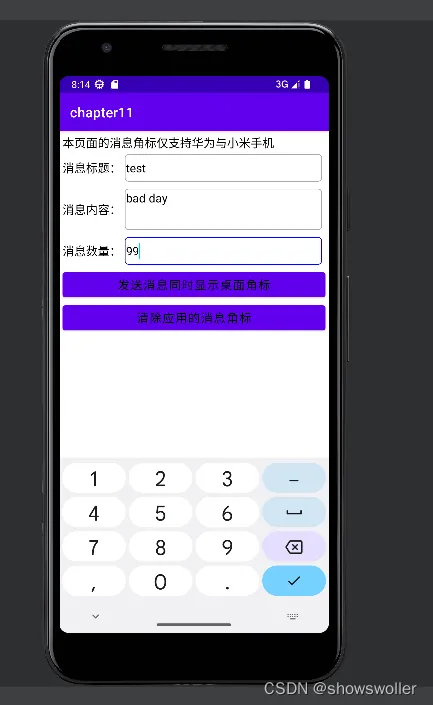
每个应用都可以给用户发送很多消息,通知栏显然有时候不够容纳如此之多的消息,于是各应用希望向用户展现未读消息的数量,好让用户知晓有没有未读消息或者是有几条未读消息。例如微信的99+,几个小红点好有申请之类。
因为各手机厂商对消息角标的实现方案各不相同,因此只能给它们的手机分别适配处理,
下面依次介绍华为和小米系手机的适配编码
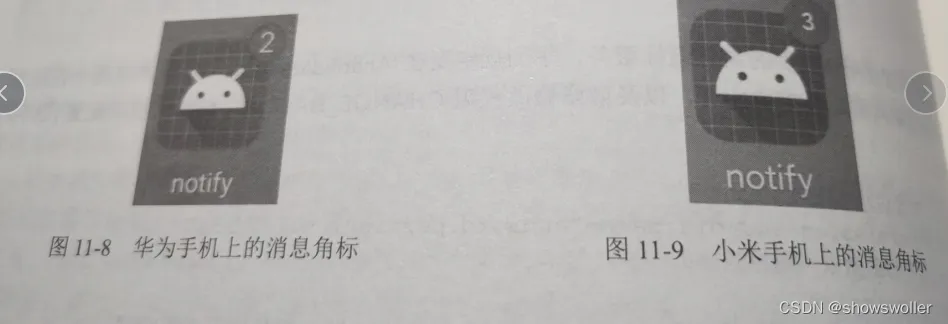
华为的消息角标不依赖通知推送,允许单独设置红点的展示情况
小米的消息角标方案则依赖于通知推送,必须在发送通知之时一起传送消息数量参数
效果如下 可自行设置
代码如下
Java类
package com.example.chapter11;
import android.app.Notification;
import android.app.NotificationManager;
import android.app.PendingIntent;
import android.content.Context;
import android.content.Intent;
import android.os.Build;
import android.os.Bundle;
import android.text.TextUtils;
import android.view.View;
import android.widget.EditText;
import android.widget.Toast;
import androidx.appcompat.app.AppCompatActivity;
import com.example.chapter11.util.NotifyUtil;
import com.example.chapter11.util.ViewUtil;
public class NotifyMarkerActivity extends AppCompatActivity implements View.OnClickListener {
    private EditText et_title;
    private EditText et_message;
    private EditText et_count;
    private static String mChannelId = "3"; // 通知渠道的编号
    private static String mChannelName = "一般重要"; // 通知渠道的名称
    private static int mImportance = NotificationManager.IMPORTANCE_DEFAULT; // 通知渠道的级别
    @Override
    protected void onCreate(Bundle savedInstanceState) {
        super.onCreate(savedInstanceState);
        setContentView(R.layout.activity_notify_marker);
        et_title = findViewById(R.id.et_title);
        et_message = findViewById(R.id.et_message);
        et_count = findViewById(R.id.et_count);
        findViewById(R.id.btn_show_marker).setOnClickListener(this);
        findViewById(R.id.btn_clear_marker).setOnClickListener(this);
    }
    @Override
    public void onClick(View v) {
        ViewUtil.hideOneInputMethod(this, et_message); // 隐藏输入法软键盘
        if (TextUtils.isEmpty(et_title.getText())) {
            Toast.makeText(this, "请填写消息标题", Toast.LENGTH_SHORT).show();
            return;
        }
        if (TextUtils.isEmpty(et_message.getText())) {
            Toast.makeText(this, "请填写消息内容", Toast.LENGTH_SHORT).show();
            return;
        }
        if (TextUtils.isEmpty(et_count.getText())) {
            Toast.makeText(this, "请填写消息数量", Toast.LENGTH_SHORT).show();
            return;
        }
        String title = et_title.getText().toString();
        String message = et_message.getText().toString();
        int count = Integer.parseInt(et_count.getText().toString());
        if (v.getId() == R.id.btn_show_marker) {
            sendChannelNotify(title, message, count); // 发送指定渠道的通知消息
            Toast.makeText(this, "已显示消息角标,请回到桌面查看", Toast.LENGTH_SHORT).show();
        } else if (v.getId() == R.id.btn_clear_marker) {
            sendChannelNotify(title, message, 0); // 发送指定渠道的通知消息
            Toast.makeText(this, "已清除消息角标,请回到桌面查看", Toast.LENGTH_SHORT).show();
        }
    }
    // 发送指定渠道的通知消息(包括消息标题和消息内容)
    private void sendChannelNotify(String title, String message, int count) {
        // 创建一个跳转到活动页面的意图
        Intent clickIntent = new Intent(this, MainActivity.class);
        // 创建一个用于页面跳转的延迟意图
        PendingIntent contentIntent = PendingIntent.getActivity(this,
                R.string.app_name, clickIntent, PendingIntent.FLAG_UPDATE_CURRENT);
        // 创建一个通知消息的建造器
        Notification.Builder builder = new Notification.Builder(this);
        if (Build.VERSION.SDK_INT >= Build.VERSION_CODES.O) {
            // Android 8.0开始必须给每个通知分配对应的渠道
            builder = new Notification.Builder(this, mChannelId);
        }
        builder.setContentIntent(contentIntent) // 设置内容的点击意图
                .setAutoCancel(true) // 点击通知栏后是否自动清除该通知
                .setSmallIcon(R.mipmap.ic_launcher) // 设置应用名称左边的小图标
                .setContentTitle(title) // 设置通知栏里面的标题文本
                .setContentText(message); // 设置通知栏里面的内容文本
        Notification notify = builder.build(); // 根据通知建造器构建一个通知对象
        if (Build.VERSION.SDK_INT >= Build.VERSION_CODES.O) {
            NotifyUtil.createNotifyChannel(this, mChannelId, mChannelName, mImportance);
        }
        NotifyUtil.showMarkerCount(this, count, notify); // 在桌面的应用图标右上方显示指定数字的消息角标
        // 从系统服务中获取通知管理器
        NotificationManager notifyMgr = (NotificationManager) getSystemService(Context.NOTIFICATION_SERVICE);
        // 使用通知管理器推送通知,然后在手机的通知栏就会看到该消息,多条通知需要指定不同的通知编号
        notifyMgr.notify(Integer.parseInt(mChannelId), notify);
    }
}
XML文件
<LinearLayout xmlns:android="http://schemas.android.com/apk/res/android"
    android:layout_width="match_parent"
    android:layout_height="match_parent"
    android:orientation="vertical"
    android:padding="5dp">
    <TextView
        android:layout_width="wrap_content"
        android:layout_height="wrap_content"
        android:text="本页面的消息角标仅支持华为与小米手机"
        android:textColor="@color/black"
        android:textSize="17sp" />
    <LinearLayout
        android:layout_width="match_parent"
        android:layout_height="50dp"
        android:orientation="horizontal">
        <TextView
            android:layout_width="wrap_content"
            android:layout_height="match_parent"
            android:gravity="center"
            android:text="消息标题:"
            android:textColor="@color/black"
            android:textSize="17sp" />
        <EditText
            android:id="@+id/et_title"
            android:layout_width="0dp"
            android:layout_height="match_parent"
            android:layout_weight="1"
            android:layout_margin="5dp"
            android:background="@drawable/editext_selector"
            android:hint="请填写消息标题"
            android:textColor="@color/black"
            android:textSize="17sp" />
    </LinearLayout>
    <LinearLayout
        android:layout_width="match_parent"
        android:layout_height="70dp"
        android:orientation="horizontal">
        <TextView
            android:layout_width="wrap_content"
            android:layout_height="match_parent"
            android:gravity="center"
            android:text="消息内容:"
            android:textColor="@color/black"
            android:textSize="17sp" />
        <EditText
            android:id="@+id/et_message"
            android:layout_width="0dp"
            android:layout_height="match_parent"
            android:layout_weight="1"
            android:gravity="top"
            android:layout_margin="5dp"
            android:background="@drawable/editext_selector"
            android:hint="请填写消息内容"
            android:textColor="@color/black"
            android:textSize="17sp" />
    </LinearLayout>
    <LinearLayout
        android:layout_width="match_parent"
        android:layout_height="50dp"
        android:orientation="horizontal">
        <TextView
            android:layout_width="wrap_content"
            android:layout_height="match_parent"
            android:gravity="center"
            android:text="消息数量:"
            android:textColor="@color/black"
            android:textSize="17sp" />
        <EditText
            android:id="@+id/et_count"
            android:layout_width="0dp"
            android:layout_height="match_parent"
            android:layout_margin="5dp"
            android:layout_weight="1"
            android:background="@drawable/editext_selector"
            android:gravity="left|center"
            android:inputType="number"
            android:textColor="@color/black"
            android:textSize="17sp" />
    </LinearLayout>
    <Button
        android:id="@+id/btn_show_marker"
        android:layout_width="match_parent"
        android:layout_height="wrap_content"
        android:gravity="center"
        android:text="发送消息同时显示桌面角标"
        android:textColor="@color/black"
        android:textSize="17sp" />
    <Button
        android:id="@+id/btn_clear_marker"
        android:layout_width="match_parent"
        android:layout_height="wrap_content"
        android:gravity="center"
        android:text="清除应用的消息角标"
        android:textColor="@color/black"
        android:textSize="17sp" />
</LinearLayout>
创作不易 觉得有帮助请点赞关注收藏