前言
本文的目的主要是介绍list的常用接口,从构造函数,访问数据,修改数据等接口函数介绍.帮助大家初步掌握list的使用,后续会分享list的模拟实现,从底层理解list更加深刻的理解list.
一、构造函数:
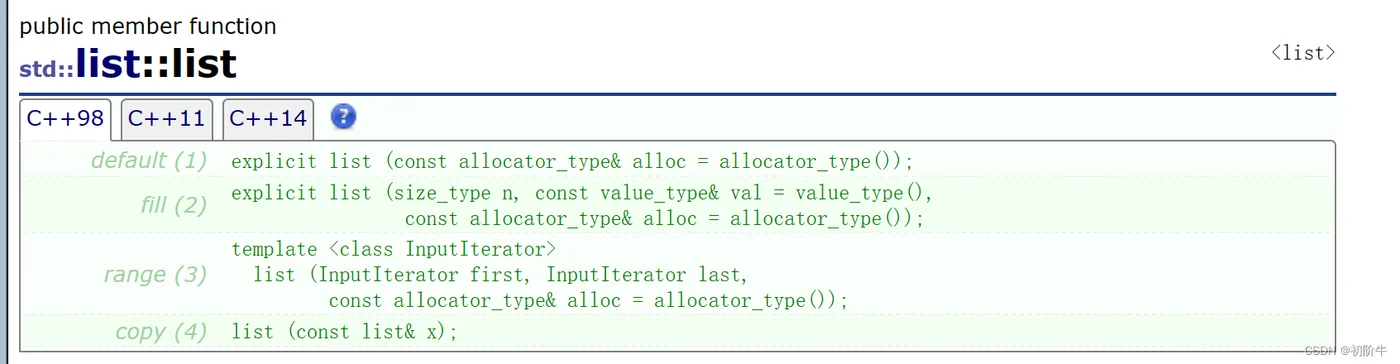
| 函数模型 | 表头 |
| explicit list(const allocator_type & alloc = allocator_type()); | 无参构造 |
| explicit list(size_type n, const value_type & val = value_type()) | n个val初始化 |
| list(InputIterator first, InputIterator last) | 迭代器区间初始化 |
| list(const list & x); | 拷贝构造 |
学习了string和vector这里就不过多介绍了.
(1) 无参构造
测试代码:
void test1()
{
  //无参构造  explicit list(const allocator_type & alloc = allocator_type());
  list<int> L1;
  cout << "L1=";
  for (auto it : L1)
  {
    cout << it << " ";
  }
  cout << endl;
}
运行结果:
L1=
(2) 用n个val构造
  //使用n个val构造 explicit list(size_type n, const value_type & val = value_type())
  list<int> L2(5,2);
  cout << "L2=";
  for (auto it : L2)
  {
    cout << it << " ";
  }
  cout << endl;
运行结果:
L2=2 2 2 2 2
(3) 迭代器区间构造
  //迭代器区间构造
  //template <class InputIterator>
  //list(InputIterator first, InputIterator last)
  int arr[] = { 1,2,3,4,5,6,7,8,9,10 };
  list<int> L3(arr, arr + 10);
  cout << "L3=";
  for (auto it : L3)
  {
    cout << it << " ";
  }
  cout << endl;
运行结果:
L3=1 2 3 4 5 6 7 8 9 10
(4) 拷贝构造
  //拷贝构造  list(const list & x);
  cout << "L4=";
  list<int> L4(L3);//上面的 L3=1 2 3 4 5 6 7 8 9 10
  for (auto it : L4)
  {
    cout << it << " ";
  }
  cout << endl;
运行结果:
L4=1 2 3 4 5 6 7 8 9 10
二、访问数据
(1) 迭代器
| 接口名 | 含义 |
| begin() | 返回第一个有效元素位置的迭代器 |
| end() | 返回最后一个有效元素位置的迭代器 |
(2) Element access:
| 接口名 | 含义 |
| front() | 返回list的第一个有效结点中存储的值的引用 |
| back() | 返回list的最后一个有效节点中存储的值的引用 |
测试代码:
void test2()
{
  //测试迭代器
  list<int> L1;
  L1.push_back(1);
  L1.push_back(4);
  L1.push_back(6);
  L1.push_back(8);
  L1.push_back(12);
  L1.push_back(20);
  list<int>::iterator it = L1.begin();
  while (it != L1.end())
  {
    cout << *it << " ";
    ++it;
  }
  cout << endl;
  //Element access:
  cout << "front()=" << L1.front() << endl; //返回list的第一个有效结点中存储的值的引用
  cout << "back()=" << L1.back() << endl;   //返回list的最后一个有效节点中存储的值的引用
}
运行结果:
1 4 6 8 12 20
front()=1
back()=20
三、修改(重点)
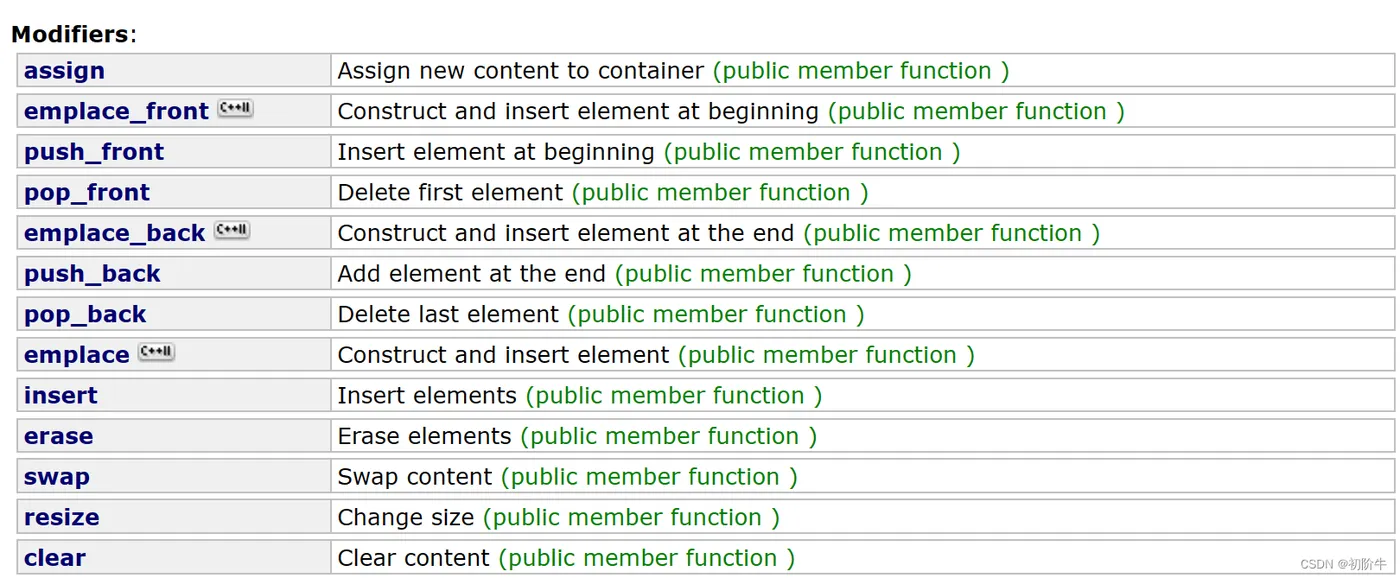
| 接口名 | 解释 |
| push_front | 头插 |
| pop_front | 头删 |
| push_back | 尾插 |
| pop_back | 尾删 |
| insert | 在list中的 pos 位置中插入值为val的元素 |
| erase | 删除list 中的pos位置的元素 |
| swap | 交换两个list |
| clear | 清除list中的有效数据 |
(1) 头插/删 && 尾插/删
void test3()
{
  list<int> L1;
  L1.push_back(1);
  L1.push_back(3);
  L1.push_back(4);
  L1.push_back(5);
  L1.push_back(7);
  L1.push_back(9);
  for (auto it : L1)
  {
    cout << it << " ";
  }
  cout << endl;
  //头插
  L1.push_front(0);
  L1.push_front(-1);
  cout << "依次头插0 和-1后:  ";
  for (auto it : L1)
  {
    cout << it << " ";
  }
  cout << endl;
  //头删
  L1.pop_front();
  cout << "头删一次后:   ";
  for (auto it : L1)
  {
    cout << it << " ";
  }
  cout << endl;
  //尾删
  L1.pop_back();
  L1.pop_back();
  cout << "尾删两次后:   ";
  for (auto it : L1)
  {
    cout << it << " ";
  }
  cout << endl;
}
运行结果:
1 3 4 5 7 9
依次头插0 和-1后:       -1 0 1 3 4 5 7 9
头删一次后:             0 1 3 4 5 7 9
尾删两次后:             0 1 3 4 5
(2) insert && erase
🍔insert
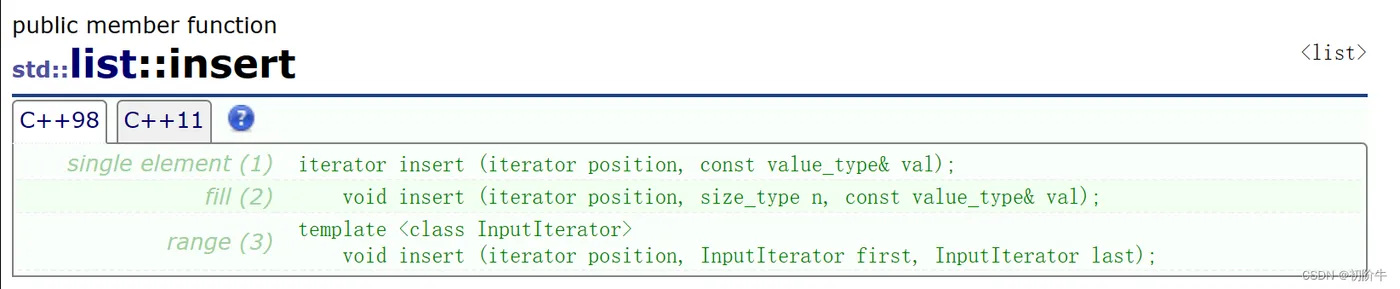
| 接口名 | 解释 |
| iterator insert (iterator position, const value_type& val); | 在pos位置插入值val |
| void insert (iterator position, size_type n, const value_type& val); | 在pos位置开始,插入n个val |
| void insert (iterator position, InputIterator first, InputIterator last); | 在pos位置插入,一个迭代器区间的值 |
由于list并不支持下标随机访问元素(" []"),所以,我们在使用迭代器的时候,避免使用
迭代器+ num
例如:L1.begin()+2
void test4()
{
  int arr[] = { 1,2,3,4,5,6,7,8 };
  list<int> L1(arr, arr + 8);
  for (auto it : L1)            //1 2 3 4 5 6 7 8
  {
    cout << it << " ";
  }
  cout << endl;
  // insert
  //iterator insert (iterator position, const value_type& val);\
  //list的迭代器不支持直接+=num
  //L1.insert(L1.begin()+2 ,66);  //报错
  auto it1 = L1.begin();
  ++it1;
  ++it1;
  L1.insert(it1, 66);
  for (auto it : L1)            //1 2 66 3 4 5 6 7 8
  {
    cout << it << " ";
  }
  cout << endl;
  //void insert(iterator position, size_type n, const value_type & val);
  L1.insert(L1.begin(), 3, 0);  //在第一个位置插入3个0
  for (auto it : L1)            //0 0 0 1 2 66 3 4 5 6 7 8
  {
    cout << it << " ";
  }
  cout << endl;
  //template <class InputIterator>
  //  void insert(iterator position, InputIterator first, InputIterator last);
  int arr2[] = { -1,-2,-3 };
  L1.insert(L1.begin(), arr2, arr2+3);  //在第一个位置插入一段迭代器区间的值
  for (auto it : L1)            //-1 -2 -3 0 0 0 1 2 66 3 4 5 6 7 8
  {
    cout << it << " ";
  }
  cout << endl;
}
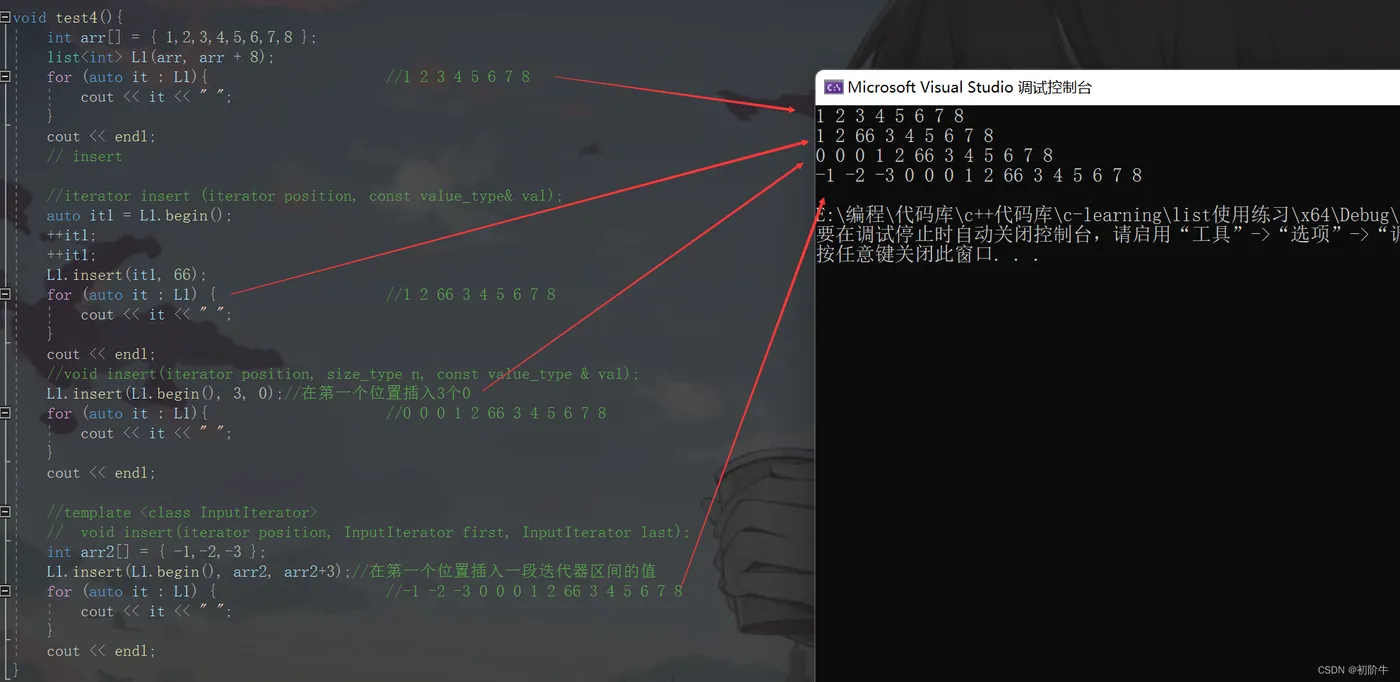
🍔erase

| 接口名 | 解释 |
| iterator erase (iterator position); | 删除该迭代器位置的值 |
| iterator erase (iterator first, iterator last); | 删除迭代器区间中的值 |
测试代码:
void test5()
{
  int arr[] = { 1,2,3,4,5,6,7,8 };
  list<int> L1(arr, arr + 8);
  for (auto it : L1)            //1 2 3 4 5 6 7 8
  {
    cout << it << " ";
  }
  cout << endl;
  //erase
  auto it1 = L1.end();    //指向最后一个有效元素的下一个位置
  --it1;          //指向最后一个有效元素的位置
  --it1;          //指向倒数第二个有效元素的位置
  L1.erase(it1);
  for (auto it : L1)            //1 2 3 4 5 6 8
  {
    cout << it << " ";
  }
  cout << endl;
  auto it2 = L1.begin();
  ++it2;
  auto it3 = L1.end();
  --it3;
  L1.erase(it2,it3);
  for (auto it : L1)            //1 8
  {
    cout << it << " ";
  }
  cout << endl;
}
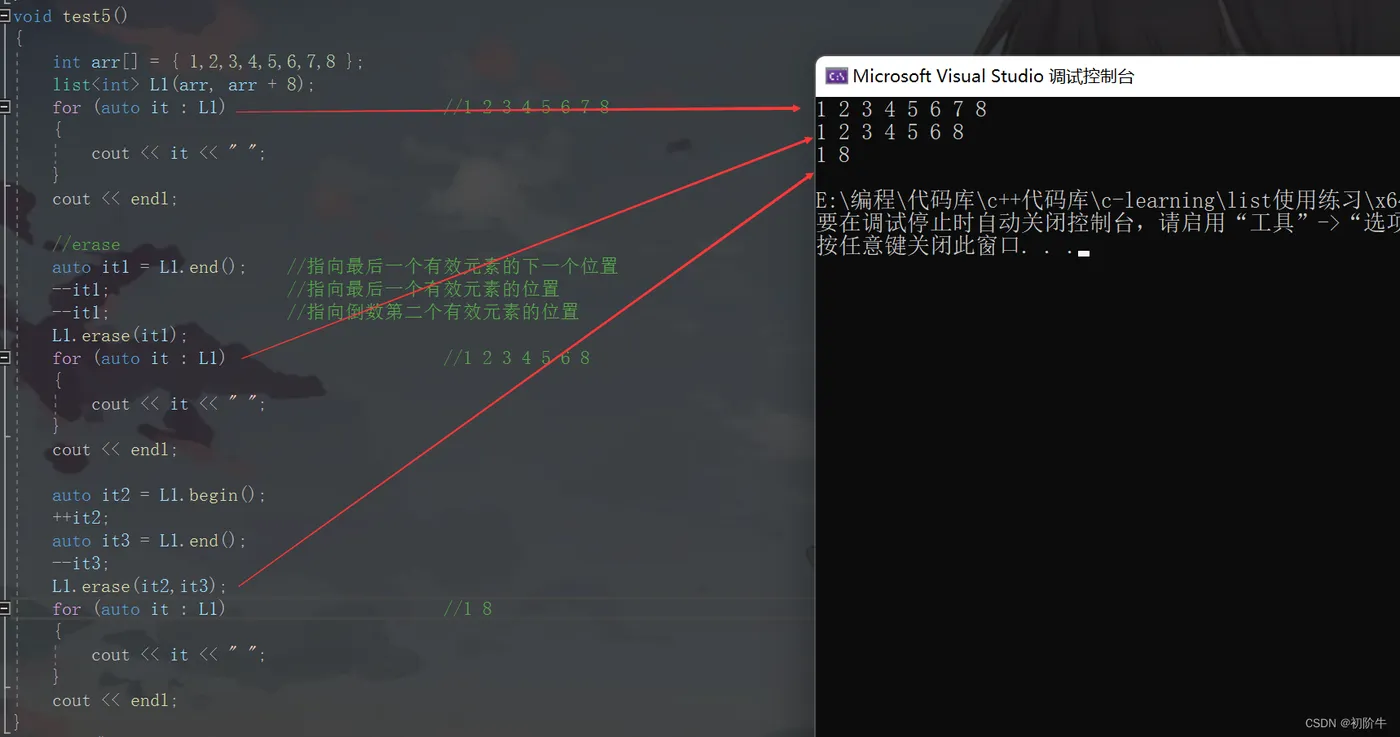
(3) 迭代器失效问题
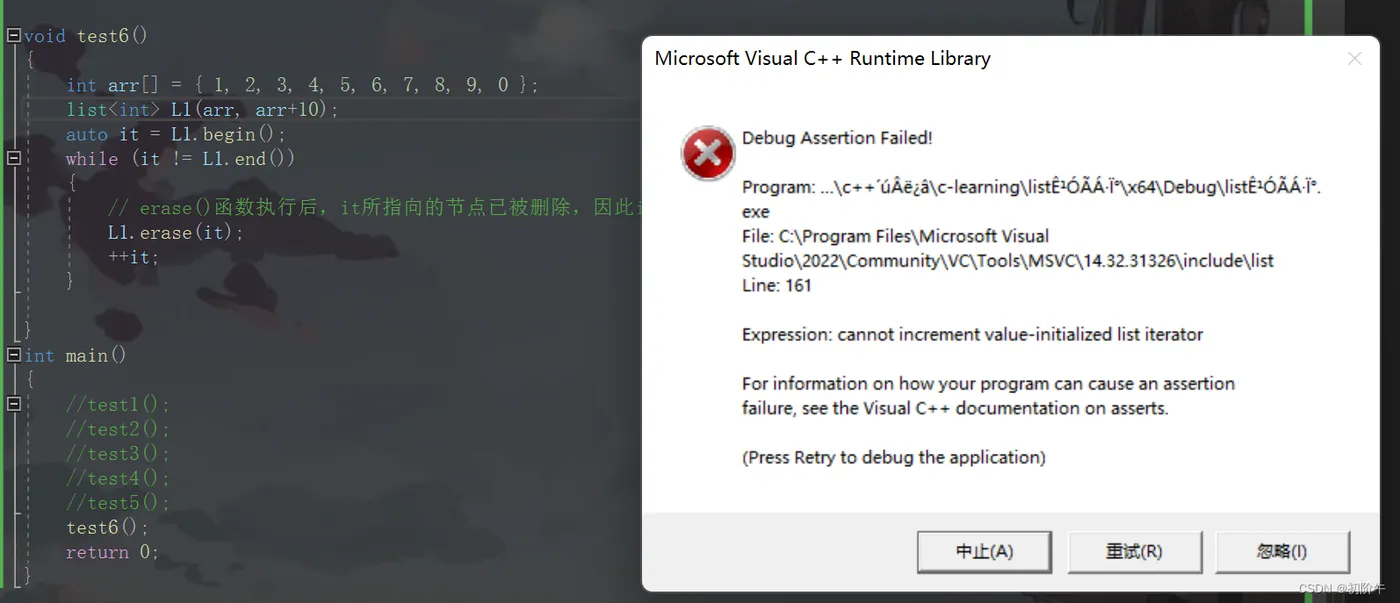
猜一猜这段代码的结果是什么?
void test6()
{
  int arr[] = { 1, 2, 3, 4, 5, 6, 7, 8, 9, 0 };
  list<int> L1(arr, arr + 10);
  auto it = L1.begin();
  auto it2 = L1.end();
  --it2;
  while (it != it2)
  {
    // erase()函数执行后,it所指向的节点已被删除,因此it无效,在下一次使用it时,it就失效了
    L1.erase(it);
    ++it;
  }
  cout << endl;
}

解释:
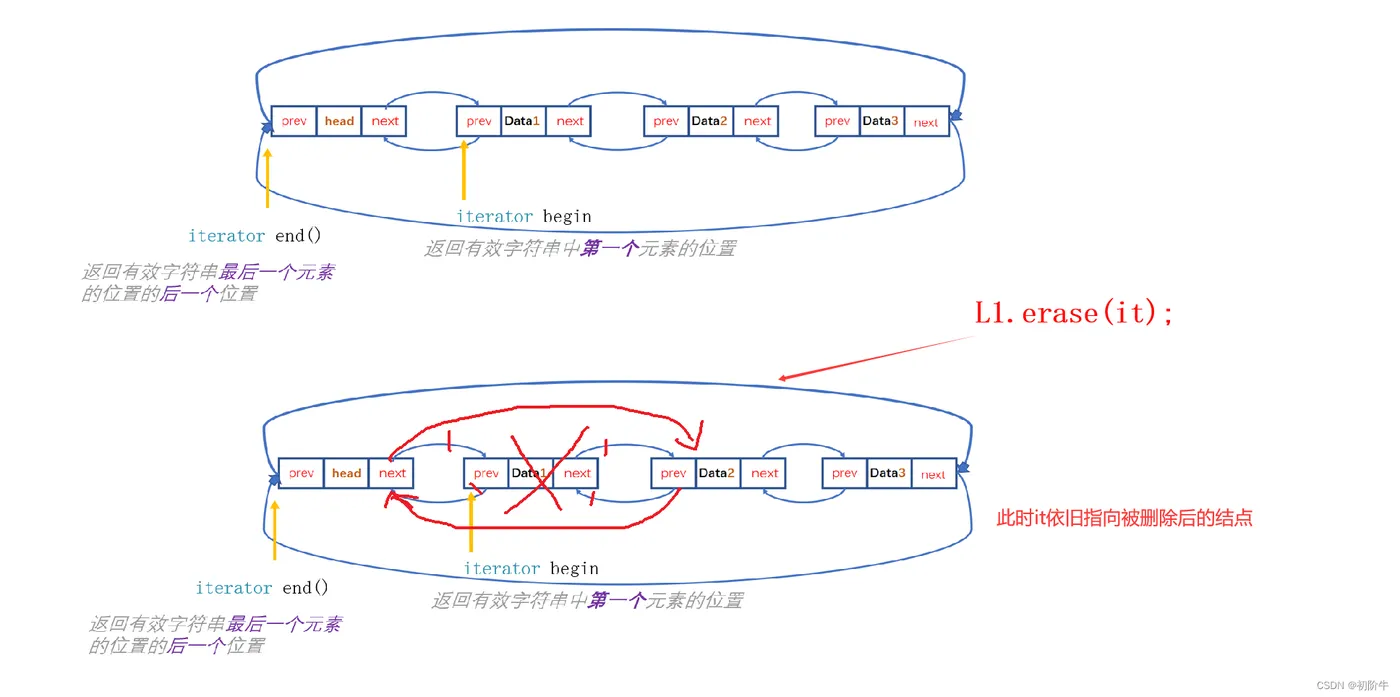
迭代器失效即迭代器所指向的节点的无效,即该节点被删除了。因为list的底层结构为带头结点的双向循环链表,插入并不会导致扩容而产生迭代器失效问题,只有在删除时才会失效,并且失效的只是指向被删除节点的迭代器,其他迭代器不会受到影响。
如下图:
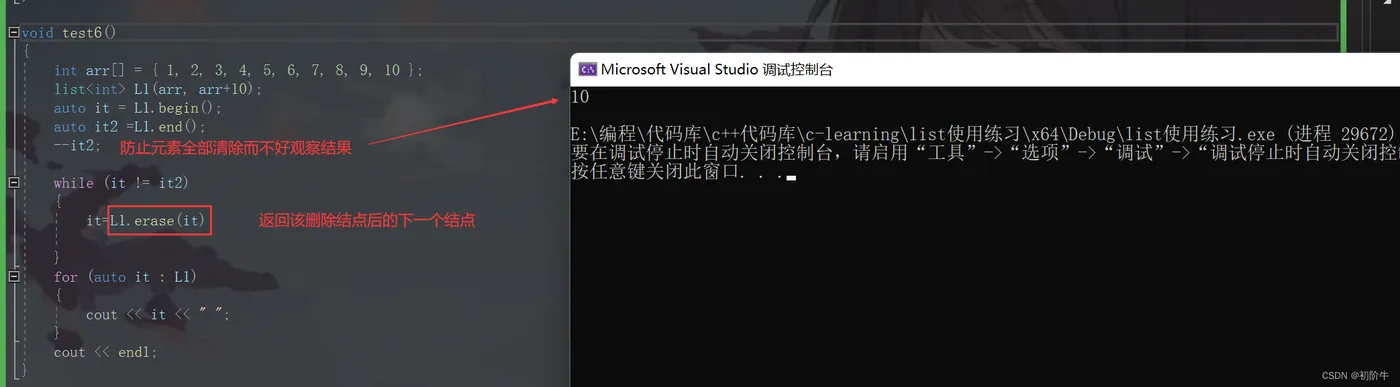
那我该如何解决这个问题呢?

void test6()
{
  int arr[] = { 1, 2, 3, 4, 5, 6, 7, 8, 9, 10 };
  list<int> L1(arr, arr+10);
  auto it = L1.begin();
  auto it2 =L1.end();
  --it2;
  while (it != it2)
  {
    it=L1.erase(it);
  }
  for (auto it : L1)
  {
    cout << it << " ";
  }
  cout << endl;
}
下一篇,我们list模拟实现见吧!