vector官网链接:传送门
一、构造函数
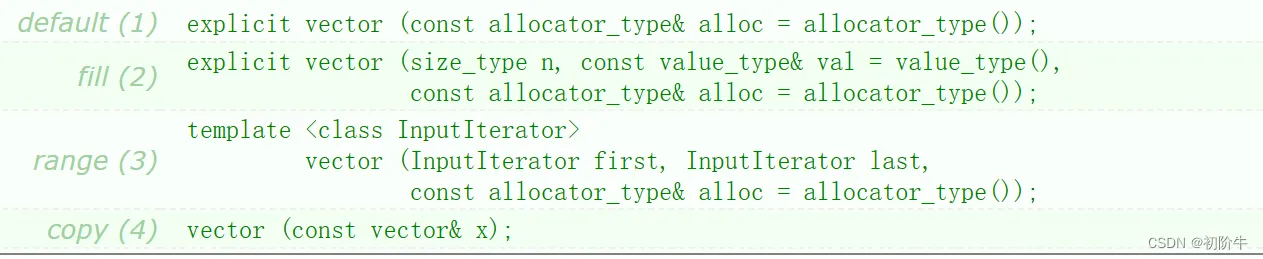
| 构造函数 | 含义 |
| vector (const allocator_type& alloc = allocator_type()); | 无参构造 |
| vector(size_type n, const value_type& val = value_type()) | 初始化为n个val |
| vector (InputIterator first, InputIterator last,const allocator_type& alloc = allocator_type()) | 迭代器区间初始化 |
| vector (const vector& x); | 拷贝构造 |
(1)无参构造
默认什么元素也没有.
有效元素个数:size=0
容量:capacity=0;
  //无参构造
  vector<int> v1;
  //auto it1 = v1.begin();//可以使用auto自动推导类型
  vector<int>::iterator it1 = v1.begin();
  while (it1 != v1.end())
  {
    cout << *it1 << " ";
    it1 ++ ;
  }
  cout << "v1.size=" << v1.size() << endl;
  cout << "v1.capacity=" << v1.capacity() << endl;
  cout << endl;
运行结果:
v1.size=0
v1.capacity=0
(2)初始化为n个值
用n个val去初始化vector;
  //初始化为n个值
  vector<int> v2(4,0);
  //auto it2 = v2.begin();
  vector<int>::iterator it2 = v2.begin();
  while (it2 != v2.end())
  {
    cout << *it2 << " ";
    it2++;
  }
  cout << endl;
运行结果:
0 0 0 0
(3) 迭代器区间初始化
用一个迭代器区间进行初始化,这里采用数组的头和尾作为迭代器区间.
  //迭代器区间初始化
  int a3[10] = { 1,3,4,5,6,7,8,98,100,11 };
  vector<int> v3(a3, a3 + 10);//注意这里给的是+10,因为迭代器的end是指向最后一个有效元素的下一个位置,左闭右开
  auto it3 = v3.begin();
  while (it3 != v3.end())
  {
    cout << *it3 << " ";
    it3++;
  }
  cout << endl;
运行结果:
1 3 4 5 6 7 8 98 100 11
(4)拷贝构造
  //拷贝构造
  vector<int> v4(v3);//v3就是上面的迭代器区间初始化好的v3
  auto it4 = v4.begin();
  while (it4 != v4.end())
  {
    cout << *it4 << " ";
    it4++;
  }
  cout << endl;
运行结果:
1 3 4 5 6 7 8 98 100 11
二、容量操作
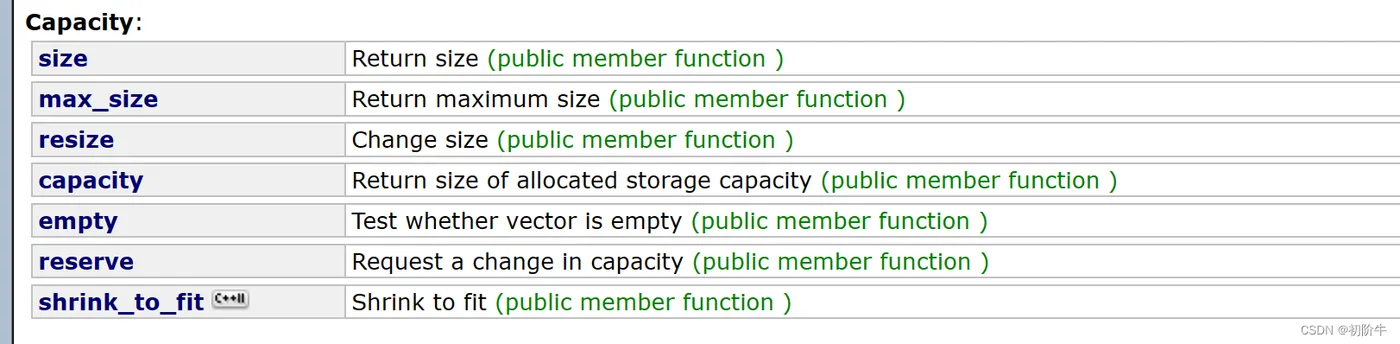
(1) 一览表
| 接口 | 说明 |
| size() | 有效数据的个数 |
| resize() | 改变有效数据的个数 |
| capacity() | 容量大小 |
| empty() | 判空 |
| reserve() | 改变容量大小 |
(2) 代码演示
void test2()
{
  int a1[10] = { 1,3,4,5,6,7,8,98,100,11 };
  vector<int> v1(a1, a1 + 10);
  cout << "v1.size()=" << v1.size() << endl;//显示有效数据的个数
  cout << "v1.capacity()=" << v1.capacity() << endl;//显示容量的大小
  cout << "v1.empty()=" << v1.empty() << endl;//判断容器是否为NULL
  cout << endl;
  v1.resize(5);//改变有效数据的个数
  cout << "v1.size()=" << v1.size() << endl;
  cout << "v1.capacity()=" << v1.capacity() << endl;
  vector<int>::iterator it1 = v1.begin();
  while (it1 != v1.end())
  {
    cout << *it1 << " ";
    it1++;
  }
  cout << endl;
  v1.resize(15,66);
  cout << "v1.size()=" << v1.size() << endl;
  cout << "v1.capacity()=" << v1.capacity() << endl;
  cout << endl;
  it1 = v1.begin();
  while (it1 != v1.end())
  {
    cout << *it1 << " ";
    it1++;
  }
  cout << endl;
  v1.reserve(10);//改变容量的大小.
  cout << "v1.capacity()=" << v1.capacity() << endl;
  v1.reserve(50);
  cout << "v1.capacity()=" << v1.capacity() << endl;
}
运行结果: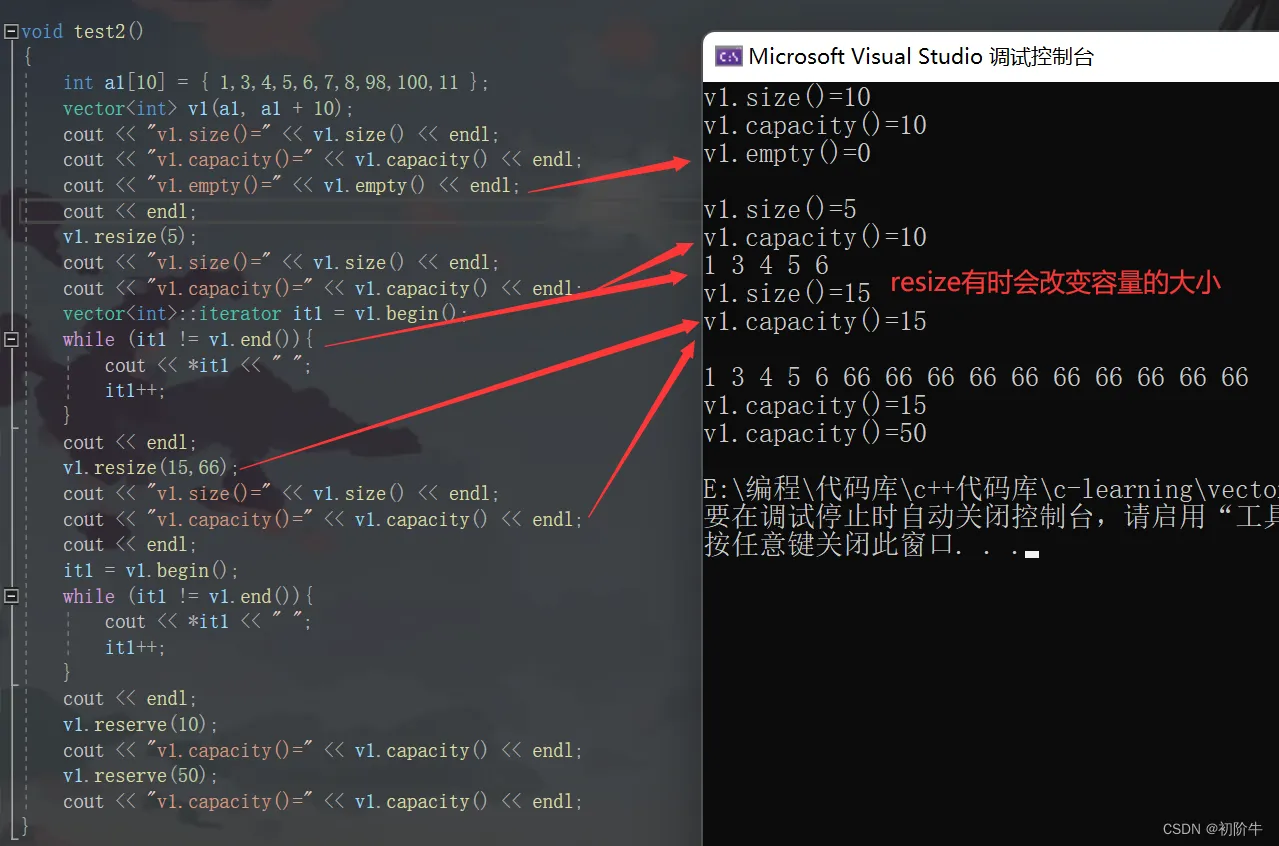
三、修改与访问

| 接口 | 说明 |
| assign() | 将新内容覆盖给容器,替换其当前内容,并相应地修改其大小。 |
| push_back() | 尾插 |
| pop_back() | 尾删 |
| insert() | 指定位置pos之前插入 |
| erase() | 删除指定位置pos的值 |
| swap() | 交换两个容器 |
operator[ ]() |
下标访问运算符重载 |
(1) push_back && pop_back
尾插和尾删相信大家已经比较熟悉了.
assign()
assign函数需要注意.
void assign (size_type n, const value_type& val);
如果n
如果n>size,则先扩容,再将n个val值存入.
  //push_back &&pop_back
  int a1[5] = { 1,2,3,4,5 };
  vector<int> v1(a1, a1 + 5);
  for (auto itt : v1){  //1 2 3 4 5
    cout << itt << " ";
  }
  cout << endl;
  //尾插
  v1.push_back(6);
  v1.push_back(7);
  for (auto itt : v1){  //1 2 3 4 5 6 7
    cout << itt << " ";
  }
  cout << endl;
  //尾删
  v1.pop_back();
  for (auto itt : v1){  //1 2 3 4 5 6
    cout << itt<<" ";
  }
  cout << endl;
  //将新内容覆盖给容器,替换其当前内容,并相应地修改其大小
  v1.assign(5, 2);
  for (auto itt : v1){  //2 2 2 2 2
    cout << itt << " ";
  }
  cout << endl << v1.size() << " " << v1.capacity() << endl;//5 7
  cout << endl;
运行结果:
1 2 3 4 5
1 2 3 4 5 6 7
1 2 3 4 5 6
2 2 2 2 2
5 7
(2) insert()
指定位置pos之前插入.

代码演示:
  int a1[5] = { 1,2,3,4,5 };
  vector<int> v1(a1, a1 + 5);
  for (auto itt : v1){
    cout << itt << " ";
  }
  cout << endl;
  //iterator insert(iterator position, const value_type & val);
  v1.insert(v1.begin() + 2, 66);//在第三个位置的前面插入数据.
  for (auto itt : v1)
  {
    cout << itt<<" ";
  }
  cout << endl;
  //void insert(iterator position, size_type n, const value_type & val);
  v1.insert(v1.begin() + 5, 5, -1);//在第六个位置的前面插入5个-1.
  for (auto itt : v1)
  {
    cout << itt << " ";
  }
  cout << endl;
  int a2[5] = { 1,2,3,4,5 };
  int a3[5] = { 6,7,8,9,10 };
  vector<int> v2(a2, a2 + 5);
  for (auto itt : v2)
  {
    cout << itt << " ";
  }
  cout << endl;
  //void insert (iterator position, InputIterator first, InputIterator last);
  v2.insert(v2.begin()+5,a3 ,a3 + 5);
  for (auto itt : v2)
  {
    cout << itt << " ";
  }
  cout << endl;
运行结果:

(3) erase()函数

删除指定位置pos的值
  //erase
  int a4[10] = { 1,2,3,4,5,6,7,8,9,10 };
  vector<int> v4(a4, a4 + 10);
  for (auto itt : v4)
  {
    cout << itt << " ";
  }
  cout << endl;
  //iterator erase (iterator position);
  v4.erase(v4.begin() + 1);
  for (auto itt : v4)
  {
    cout << itt << " ";
  }
  cout << endl;
  //iterator erase (iterator first, iterator last);
  v4.erase(v4.begin()+4, v4.begin() + 9);
  for (auto itt : v4)
  {
    cout << itt << " ";
  }
  cout << endl;
运行结果:

(4) swap()
用于交换两个容器,注意观察交换后容量的变化.
//swap
  //void swap(vector & x);
  int a5[10] = { 1,2,3,4,5,6,7,8,9,10 };
  vector<int> v5(a5, a5 + 10);
  int a6[10] = { 2,4,6,8,10 };
  vector<int> v6(a6, a6+5);
  cout << "v5=";
  for (auto itt : v5){
    cout << itt << " ";
  }
  cout << endl;
  cout << "v6=";
  for (auto itt : v6){
    cout << itt << " ";
  }
  cout << endl;
  swap(v5, v6);
  cout << endl;
  cout << "v5=";
  for (auto itt : v5){
    cout << itt << " ";
  }
  cout << endl;
  cout << "v6=";
  for (auto itt : v6){
    cout << itt << " ";
  }
  cout << endl;
  cout << "v5.capacity()" << v5.capacity();
  cout << endl;
  cout << "v6.capacity()" << v6.capacity();
  cout << endl;
运行结果:

(5) []运算符重载
可以像数组一样通过下标直接访问.
  //[]
  int a7[10] = { 1,2,3,4,5,6,7,8,9,10 };
  vector<int> v7(a5, a5 + 10);
  cout << "v7=";
  for (int i = 0; i < 10; i++)
  {
    cout << v7[i] << " ";
  }
v7=1 2 3 4 5 6 7 8 9 10
vector的使用就分享到这里了.下一期vector模拟实现见.