
MySQL基础
文章目录
1.数据库的操作
1.1 显示当前数据库
show databases;
数据库中的命令没有大小写之分
1.3创建数据库
create database db_name ;
示例
#创建名为db_test的数据库
create database db_test;
#创建名为db_test2的数据库,如果有则不创建
create database if not exists db_test2;
#创建一个使用utf8mb4字符集的 db_test 数据库
create database if not exists db_test character set utf8mb4;
1.4使用数据库
use db_name;
1.5删除数据库
drop database [if exists] db_name;
2.表的操作
需要使用数据库中的表时,首先得先使用该数据库
use db_test;
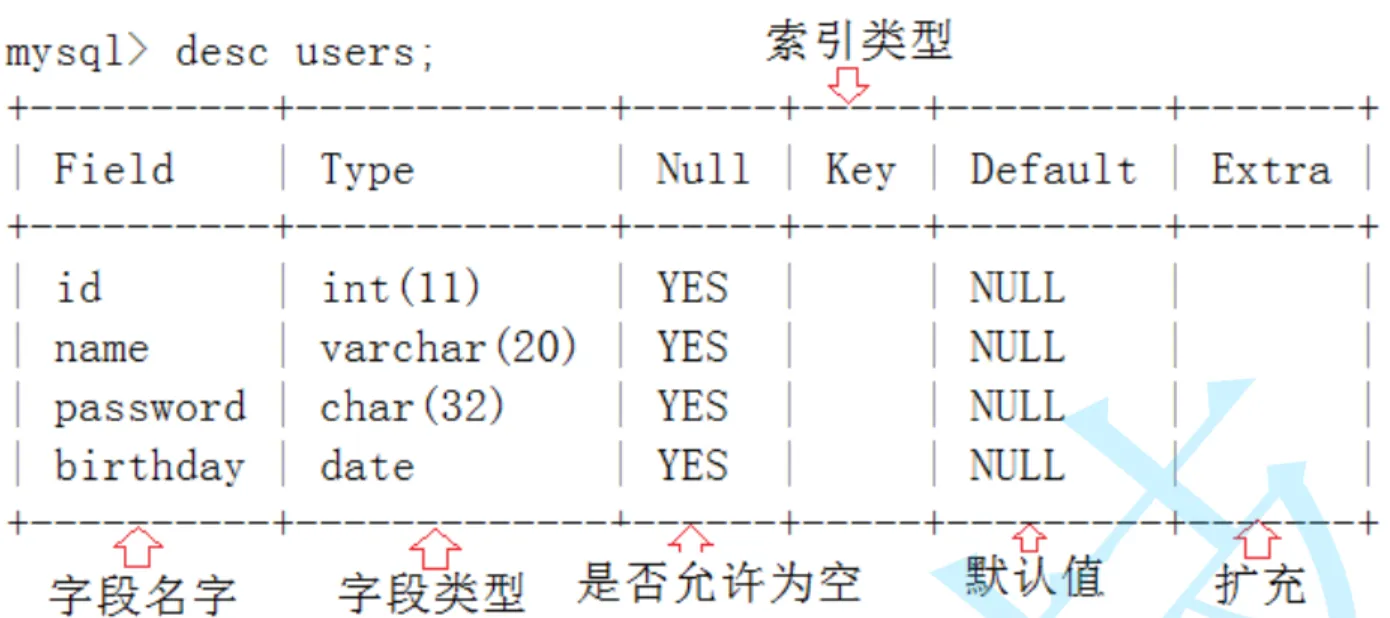
2.1查看表结构
desc 表;
2.2 创建表
create  table table_name(
  field1 datatype,
  field2 datatype,
  field3 datatype,
);
示例
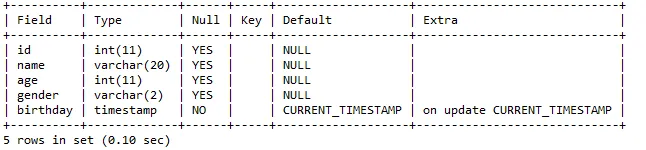
创建一个学生个人信息表
可使用
comment增加字段说明
create table student(
  id int,
    name varchar(20) comment '姓名',
    age int,
    gender varchar(2) comment '性别',
    birthday timestamp,
);
2.3 删除表
示例
-- 删除student表
drop table student;
# 如果存在student表,则删除student表
drop table if exists student;
3.新增 Create
案例
-- 创建一张学生表
drop table if extists student;
create table student(
  id int,
    sn int comment '学号',
    name varchar(20) comment '姓名',
    mail varchar(20) comment '邮箱'
);
3.1 单行数据+全列插入
-- 插入两年数据,value_list数量和定义表的列的数量及顺序一致
insert into studene values(1,101,'张三',NULL);
insert into student values(2,102,'李四','123456');
3.2多行数据+指定列插入
-- 插入两条数据,value_list数量和定义表的列的数量及顺序一致
insert into student(id,sn,name)values
  (3,103,'王五'),
  (4,104,'孙悟空');
4.查询 Select
4.1全列查询
select id,sn,name from student;
通常情况下不建议使用*进行全列查询
- 查询的越多,对网络、磁盘的开销非常大
- 对服务器资源的使用也非常大
4.2指定列查询
select id,sn,name from student;
4.3查询字段为表达式
-- 表达式不含字段
select id,name,10 from exam_result;
-- 表达式含一个字段
select id,name,english+10 from exam_result;
-- 表达式中含多个字段
select id,name,chinese+math+english from exam_result;
4.4别名
select id, name, chinese+math+english 总分 from exam_result;
select id, name, chinese+math+english as 总分 from exam_result;
4.5 去重
select distinct math from exam_result;
4.6 排序
-- 降序
select name,qq_mail from student order by desc;
-- 升序
select name,qq_mail from student order by asc;
注意:
NULL数据排序,视为比任何值都小,升序时出现在最上面,降序时出现在最下面
-- 使用表达式排序
select name,chinese+math+english from exam_result order by chinese+math+english order by desc;
-- 使用别名
select name,chinese+math+english as totle from exam_result order by totle order by desc;
MySQL中的NULL
- 不论什么值和他运算,返回值都是NULL
- NULL 始终会判定为FALSE - 0
4.7条件查询 WHERE
比较运算符
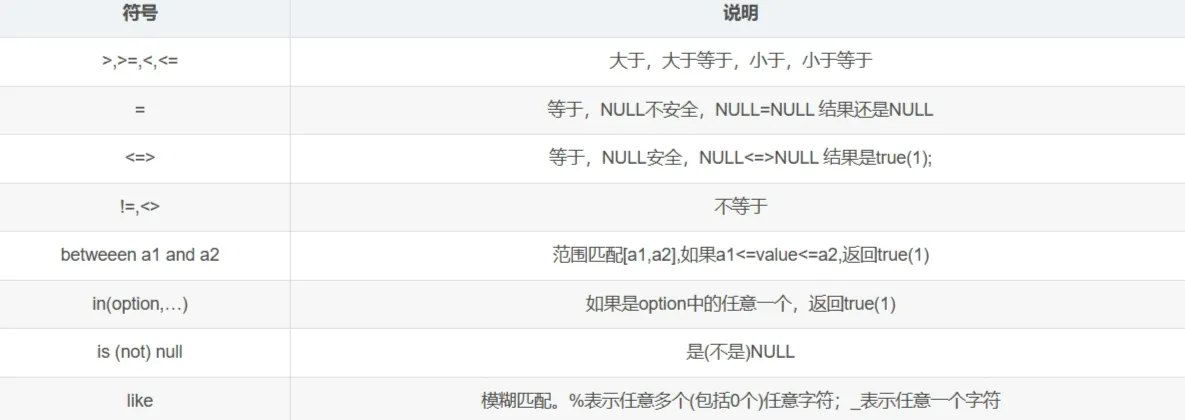
| 运算符 | 说明 |
| and | 类似于编程中的&&多个条件同时为true,结果才为true |
| or | ` |
| not | !条件为true,结果为false |
- where条件可以使用表达式,但不能使用别名
- and的优先级高于or
4.8分页查询 LIMIT
-- 起始下标为0
-- 从0开始,查询n条结果
select ... from table_name [where..] [order by..] limit n;
-- 从s开始,查询n条结果
select ... from table_name [where..] [order by..] limit s,n;
-- 从s开始,查询n条结果
select ... from table_name [where..] [order by..] limit n offser s;
5.修改 Update
-- 将孙悟空同学的数学成绩变更为80分
update exam_result set math=80 where name='孙悟空';
-- 将曹孟德同学的数学成绩更改为90分,语文更改为93分
update exam_result set math=90,chinese=93 where name='曹孟德';
-- 将总成绩倒数前三的3位同学的数学成绩加上30分
update exam_result set math=math+30 order by chinese+math+english limit 3;
-- 将所有同学的语文成绩更新为原来的2倍
update exam_result set chinese=chinese*2;
6.删除 Delete
delete from 表 where 条件
chinese=93 where name=‘曹孟德’;
– 将总成绩倒数前三的3位同学的数学成绩加上30分
update exam_result set math=math+30 order by chinese+math+english limit 3;
– 将所有同学的语文成绩更新为原来的2倍
update exam_result set chinese=chinese*2;
## 6.删除 Delete
```sql
delete from 表 where 条件
