![HSEP~{_~~~J5}SZ]T1N034D.png](https://ucc.alicdn.com/pic/developer-ecology/q7zvrojhun744_a6447968bddd4791b9dabde76d92fbee.png?x-oss-process=image/resize,w_1400/format,webp "HSEP~{_~~~J5}SZ]T1N034D.png")
背景
最近的一个小项目,部署在专网中,可是最近等保测评要求整改为HTTPS加密传输。像我们以前的部署在互联网上的项目都购买了域名,并在云服务商那里申请免费的 SSL 证书,然后再配置 Nginx 代理,一气呵成、顺理成章、水到渠成。可是现在在专网中,而且没有域名,甚至没有 DNS 服务器;既然要求通过 HTTPS 传输,那么还有一种办法是自签 SSL 证书,这样在浏览器中会提示证书不安全,用户需要多操作一步添加例外才可以正常访问系统。好在可以满足等保的要求,可行那就开干。
生成证书与秘钥
- 生成RSA密钥文件server.key(要设置并记住密码,后面要用到) openssl genrsa -des3 -out server.key 1024
- 生成证书的申请文件server.csr openssl req -new -key server.key -out server.csr
- 备份密钥文件 cp server.key server.key.bk
- 移除文件口令,输出到新的server.key(这时,需要输入第一步设置的密码) openssl rsa -in server.key.bk -out server.key
- 生成证书文件server.crt openssl x509 -req -days 365 -in server.csr -signkey server.key -out server.crt
[root@hadoop2 ~]# cd /opt/
# 生成RSA密钥文件server.key(要设置并记住密码,后面要用到)
[root@hadoop2 opt]# openssl genrsa -des3 -out server.key 1024
Generating RSA private key, 1024 bit long modulus (2 primes)
..................+++++
.................................................+++++
e is 65537 (0x010001)
Enter pass phrase for server.key:
Verifying - Enter pass phrase for server.key:
# 生成证书的申请文件server.csr
[root@hadoop2 opt]# openssl req -new -key server.key -out server.csr
Enter pass phrase for server.key:
You are about to be asked to enter information that will be incorporated
into your certificate request.
What you are about to enter is what is called a Distinguished Name or a DN.
There are quite a few fields but you can leave some blank
For some fields there will be a default value,
If you enter '.', the field will be left blank.
-----
Country Name (2 letter code) [AU]:CN
State or Province Name (full name) [Some-State]:ShanXi
Locality Name (eg, city) []:TaiYuan
Organization Name (eg, company) [Internet Widgits Pty Ltd]:YourCompany
Organizational Unit Name (eg, section) []:
Common Name (e.g. server FQDN or YOUR name) []:
Email Address []:YourEmail
Please enter the following 'extra' attributes
to be sent with your certificate request
A challenge password []:
An optional company name []:
# 备份密钥文件
[root@hadoop2 opt]# cp server.key server.key.bk
# 移除文件口令,输出到新的server.key(这时,需要输入第一步设置的密码)
[root@hadoop2 opt]# openssl rsa -in server.key.bk -out server.key
Enter pass phrase for server.key.bk:
writing RSA key
# 生成证书文件server.crt
[root@hadoop2 opt]# openssl x509 -req -days 365 -in server.csr -signkey server.key -out server.crt
Signature ok
subject=C = CN, ST = ShanXi, L = TaiYuan, O = YourCompany, emailAddress = YourEmail
Getting Private key
Note: 记得将申请文件时填写的 YourCompany , YourEmail 信息改为自己的公司/组织及邮箱。
Enter pass phrase for root.key: <—— 前面设置的密码
Country Name (2 letter code) [AU]:CN <—— 国家代号,中国输入CN
State or Province Name (full name) [Some-State]:ShanXi <—— 省的全名,拼音
Locality Name (eg, city) []:TaiYuan <—— 市的全名,拼音
Organization Name (eg, company) [Internet Widgits Pty Ltd]:YourCompany <—— 公司英文名
Organizational Unit Name (eg, section) []: <—— 可不填
Common Name (eg, YOUR name) []: <—— 可不填
Email Address []:YourEmail <—— 电子邮箱
Please enter the following ‘extra’ attributes
to be sent with your certificate request
A challenge password []: <—— 可不填
An optional company name []: <—— 可不填
确认Nginx是否安装了SSL模块
[root@hadoop2 ~]# nginx -V
nginx version: nginx/1.20.1
built by gcc 4.8.5 20150623 (Red Hat 4.8.5-44) (GCC)
built with OpenSSL 1.0.2k-fips  26 Jan 2017
TLS SNI support enabled
configure arguments: --with-http_stub_status_module --with-http_ssl_module
Note:如果一开始在安装 Nginx 时没有安装 SSL 模块,需要重新编译安装 Nginx 。
Nginx配置SSL证书代理静态资源
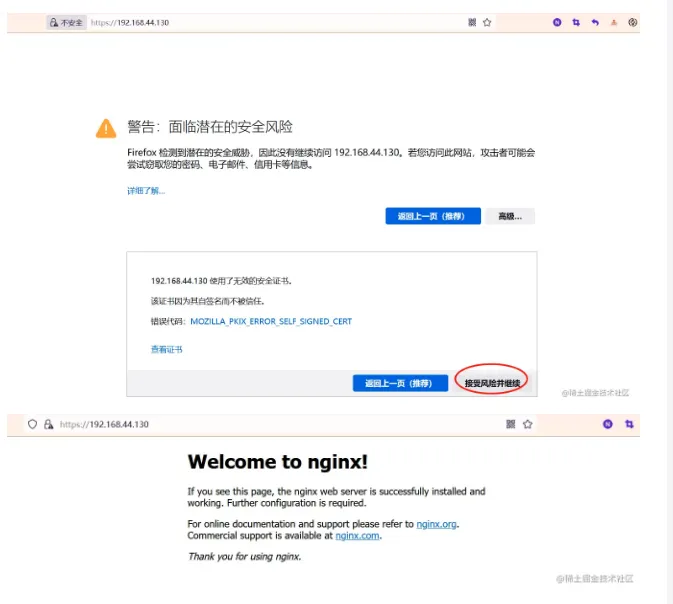
确认 Nginx 安装了 SSL 模块后,将前面生产的秘钥及证书放到一个目录中,我这里是 /opt/ssl-cert 。在配置前后端分离的 HTTPS 访问前,我们先通过 Nginx 代理静态资源,以验证证书的有效性。
# HTTPS server
    #
    server {
        listen       443 ssl;
        server_name  localhost;
        ssl_certificate      /opt/ssl-cert/server.crt;
        ssl_certificate_key  /opt/ssl-cert/server.key;
        ssl_session_cache    shared:SSL:1m;
        ssl_session_timeout  5m;
        ssl_ciphers  HIGH:!aNULL:!MD5;
        ssl_prefer_server_ciphers  on;
        location / {
            root   html;
            index  index.html index.htm;
        }
    }
Nginx配置SSL证书代理前后端服务
以下是一个基于 Vue 与 SpringBoot 的前、后端分离的单体架构项目 Nginx 中 SSL 的完整配置,最终实现 HTTPS 加密传输。
# HTTPS server
    #
    server {
        listen       443 ssl;
        server_name  localhost;
        ssl_certificate      /opt/ssl-cert/server.crt;
        ssl_certificate_key  /opt/ssl-cert/server.key;
        ssl_session_cache    shared:SSL:1m;
        ssl_session_timeout  5m;
        ssl_ciphers  HIGH:!aNULL:!MD5;
        ssl_prefer_server_ciphers  on;
        #location / {
        #    root   html;
        #    index  index.html index.htm;
        #}
        location / {
            root       /opt/frontend/dist;
            try_files $uri $uri/ /index.html;
        }
        location /prod-api  {                              # custom prefix: third party API
            proxy_set_header X-Forwarded-For $proxy_add_x_forwarded_for;
            rewrite  ^/prod-api/(.*)$ /$1 break;           # rewrite the URL and redirect
            include  uwsgi_params;
            proxy_pass   http://localhost:8080;   # Third party API URL
        }
    }
![TV(H@RMG8{}]YD}(6%91N4V.png](https://ucc.alicdn.com/pic/developer-ecology/q7zvrojhun744_da5b5a76f66e4506bb179a2b6ee59110.png?x-oss-process=image/resize,w_1400/format,webp "TV(H@RMG8{}]YD}(6%91N4V.png")
Note: 每次修改完Nginx配置,记得刷新保证配置生效:nginx -s reload。
If you have any questions or any bugs are found, please feel free to contact me.
Your comments and suggestions are welcome!