来源:
核酸结果统计难?复旦博士生的操作火了
https://m.gmw.cn/baijia/2022-04/08/35644611.html
1 程序背景
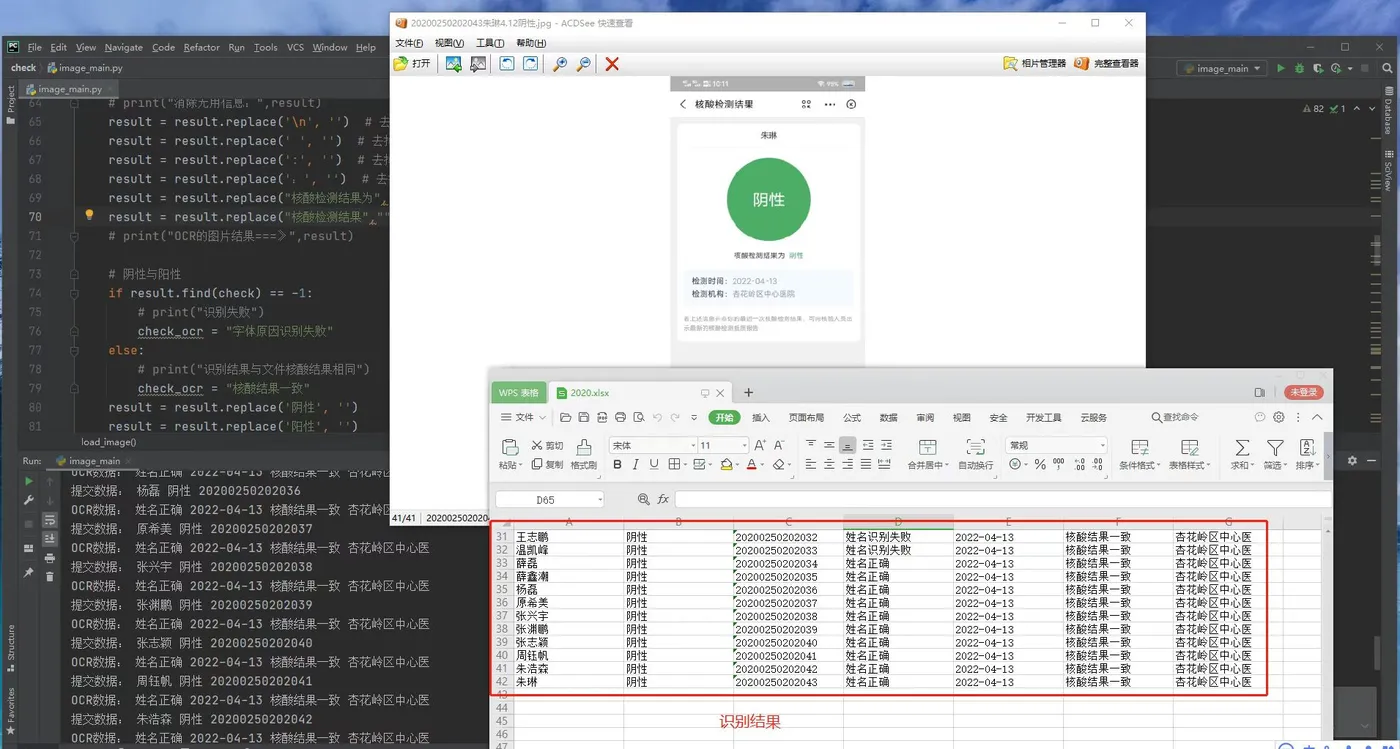
学校要收核酸截图,汇总太麻烦了,故将OCR整合到数据中。
1.1 命名规范
20200250202003曹文举4.12阴性.jpg
1.2 EasyOCR
easyOCR
https://github.com/JaidedAI/EasyOCR
pip install easyocr
2 程序
import timeit
import xlsxwriter
import cv2 as cv
import numpy as np
import os
import easyocr
import re
os.environ['KMP_DUPLICATE_LIB_OK'] = 'True'
def load_file_name(file_name):
    # file_name = "201902811221邱江4.12阴性.jpg"
    file_result_date_no = re.findall(r"\d+", file_name)
    no = file_result_date_no[0]
    date = '2022-0' + file_result_date_no[1] + '-' + file_result_date_no[2]
    file_result_name_name_check = re.findall('[\u4e00-\u9fa5]', file_name)
    # print(file_result_name_name_check)
    check = file_result_name_name_check[len(file_result_name_name_check)-2] +file_result_name_name_check[len(file_result_name_name_check)-1] # 检测结果
    up = len(file_result_name_name_check)-2
    name = ''
    for i in range(up):
        name = name + file_result_name_name_check[i]
    # print("姓名:",name)
    # print("日期:",date)
    # print("学号:",no)
    # print("结果:",check)
    return name,date,no,check
def load_image(path,name,date,check):
    # coding=utf-8
    # 当前目录读取一张图片,转化为灰色
    img = cv.imdecode(np.fromfile(path, dtype=np.uint8), 0)
    reader = easyocr.Reader(['ch_sim', 'en'])
    result = reader.readtext(img)
    # 拼接单个图片的识别结果
    result_str = ''
    for i in result :
        result_str = result_str+i[1]
    # print("包含无关文字:", result_str)
    temp = re.sub('[a-zA-Z]', '', result_str)
    # print("去掉无关文字:",temp)
    a = temp.find("若上述")
    result = temp[0:a]
    # print(result)
    # print("消除无用信息:",result)
    result = result.replace('\n', '')  # 去掉换行符
    result = result.replace(' ', '')  # 去掉空格
    result = result.replace(':', '')  # 去掉-
    result = result.replace(':', '')  # 去掉-
    result = result.replace("核酸检测结果为","")
    result = result.replace("核酸检测结果","")
    # print(result)
    # 姓名校正
    if result.find(name) == -1:
        # print("识别失败")
        name_ocr = "识别失败"
        check_ocr = "字体原因识别失败"
    else:
        # print("名字校正成功:",name)
        # name_ocr = name
        name_ocr = "姓名正确"
    # 阴性与阳性
    if result.find(check) == -1:
        # print("识别失败")
        check_ocr = "字体原因识别失败/"
    else:
        # print("识别结果与文件核酸结果相同")
        check_ocr = "核酸结果一致"
    result = result.replace('阴性', '')
    result = result.replace('阳性', '')
    # 检测机构
    if result.find("检测机构") == -1:
        # print("识别失败")
        organization_ocr = "字体原因识别失败"
        check_ocr = "字体原因识别失败/"
    else:
        index = result.find("检测机构")
        # print("检测机构:",result[index+4:])
        organization_ocr = result[index+4:]
        result = result[0:index]
    # 核酸检测时间
    if result.find("检测时间") == -1:
        date_ocr = "字体原因识别失败"
        check_ocr = "字体原因识别失败/"
        # print("识别失败")
    else:
        index = result.find("检测时间")
        # print("检测时间:",result[index + 4:])
        date_ocr = result[index + 4:]
        if date_ocr == date:
            date_ocr = "检测时间正确"
        result = result[0:index - 1]
    return name_ocr,check_ocr,organization_ocr,date_ocr
# 读取函数,用来读取文件夹中的所有函数,输入参数是文件名
def read_directory(directory_name):
    for filename in os.listdir(directory_name):
        for filename_1 in os.listdir(directory_name+"/"+filename):
            # print(filename_1)  # 仅仅是为了测试
            name,date,no,check = load_file_name(filename_1)
            path = directory_name + "/" + filename+"/"+filename_1
            name_ocr,check_ocr,organization_ocr,date_ocr = load_image(path,name,date,check)
            print("提交数据:",name,date,check,no)
            print("OCR数据:",name_ocr,date_ocr,check_ocr,organization_ocr)
            result_list = [name,date,check,no,name_ocr,date_ocr,check_ocr,organization_ocr]
            result_list_total.append(result_list)
if __name__ == '__main__':
    start = timeit.default_timer()
    # 保存excel
    result_list_total=[["姓名","日期","核算结果","学号","姓名校对","时间校对","核酸状态校对","核酸医院"]]
    read_directory("./imge")#这里传入所要读取文件夹的绝对路径,加引号(引号不能省略!)
    # xlsxwriter只可以新建一个excel,不可以读取和更新
    # 创建一个workbook 和增加一个worksheet,默认为sheet1...,也可以直接为sheet命名,例如下边的test
    workbook = xlsxwriter.Workbook('./data.xlsx')
    # 添加 sheet
    worksheet = workbook.add_worksheet("elite")  # 下方Sheet名
    worksheet.set_column(0,len(result_list_total),18) #全部列宽为18
    # 测试数据
    result_list_total = tuple(result_list_total)
    print(result_list_total)
    # 从首行、首列开始.
    row = 0
    col = 0
    # 通过迭代写入数据.
    for name,date,check,no,name_ocr,date_ocr,check_ocr,organization_ocr in (result_list_total):
        worksheet.write(row, col,     name)
        worksheet.write(row, col + 1, date)
        worksheet.write(row, col + 2, check)
        worksheet.write(row, col + 3, no)
        worksheet.write(row, col + 4, name_ocr)
        worksheet.write(row, col + 5, date_ocr)
        worksheet.write(row, col + 6, check_ocr)
        worksheet.write(row, col + 7, organization_ocr)
        row += 1
    # 只有此函数才可以生成excel
    workbook.close()
    #中间写上代码块
    end = timeit.default_timer()
    print('一共耗时 %s 秒'%(end-start))
    total = len(result_list_total)
    print("处理完毕,共处理 %s 条学生信息"%total)
3 结果