前言
为了进一步巩固yvu格式的存放方式以及应对更多应用场景,在补充下YUV图像怎么旋转
常规算法
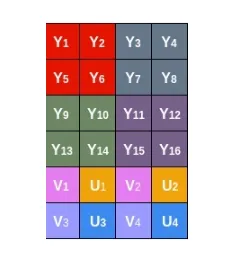
一般的来说,要旋转的角度无非就是90,180,270,我们只要能转到90度后进行翻转或者镜像是可以做到其他角度的,参考下图来看,第一行变成了Y13Y9Y5Y1,对应的V4U4也提到了前面,但是很明显这样的运算量或者换个角度头得多大啊
void rotateYUV420SP(unsigned char src[],unsigned char des[],int width,int height)
 {
    int wh = width * height;
    int k = 0;
    for(int i=0;i<width;i++)
    { //旋转Y
        for(int j=0;j<height;j++)
        {
            des[k] = src[width*j + i];
            k++;
        }
     }
    for(int i=0;i<width;i+=2)
    { //旋转vu
        for(int j=0;j<height/2;j++)
        {
            des[k] = src[wh+ width*j + i];
            des[k+1]=src[wh + width*j + i+1];
            k+=2;
        }
    }
 }
HI_MPI_VPSS_SetChnRotation
海思也自然考虑到了这点,自己底层有硬件加速,很方便的提供了相应的旋转函数HI_MPI_VPSS_SetChnRotation和任意角度的HI_MPI_VPSS_SetChnRotationEx,只需要提供vpss的group,chnl和旋转角度即可,用起来还是非常方便的,在vpss初始化之后调用
s32Ret = HI_MPI_VPSS_SetChnRotation(VpssGrp, VpssChn[1], ROTATION_90);
    if(s32Ret != HI_SUCCESS)
    {
        printf("HI_MPI_VPSS_SetChnRotation failed with %#x\n", s32Ret);
        return HI_FAILURE;
    }
注意事项
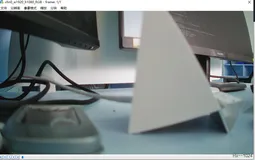
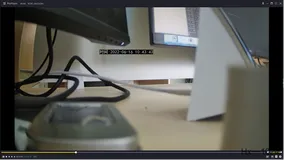
需要注意的是保存输出的时候一定一定不要忘记修改编码通道的分辨率!不然会报获取不到图像的错误!当时刚好因为dump例程的问题,直接在vpss后保存了yuv,只有y分量正确,uv惨不忍睹。还好在大佬的点醒下,想到venc压根就没配这部分!(同理的还有下一篇记录的YUV422编码获取不到的问题)
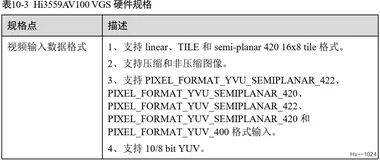
通道 AUTO 模式下不支持。
仅支持 semi-planar 420 和单分量像素格式。
(后面两个注意事项手册上有,细心点很容易发现)
补充算法
参考博客
https://blog.csdn.net/huangjiazhi_/article/details/103960883
// Yuv420pRotate.cpp : 定义控制台应用程序的入口点。
//
#include "stdafx.h"
// clockwise 顺时针
// contrarotate 逆时针旋转
// flip horizontal 镜像翻转/水平翻转
/**
* 顺时针旋转90。
*     取元素:从左下方第一个点开始,从下往上,从左往右取点;
*     放元素:从左上方第一个位置开始放,从左往右,从上往下;把每一列转换成每一行。
*
* @param yuvFileaName 一帧YUV420P格式的文件
* @param width 图像的宽
* @param height 图像的高
*
* @return 空
*/
void clockwiseRotate90(const char* yuvFileaName, int width, int height){
  FILE* fp = NULL;
  fopen_s(&fp, yuvFileaName, "rb");
  unsigned char* yuvbuf = new unsigned char[width*height * 3 / 2];
  fread(yuvbuf, width*height * 3 / 2, 1, fp);
  fclose(fp);
  int idx = 0;
  //Y
  unsigned char* dstbuf = new unsigned char[width*height * 3 / 2];
  for (int i = 0; i <= width - 1; i++){
  for (int j = height - 1; j >= 0; j--){
    dstbuf[idx++] = *(yuvbuf + (j*width + i));
  }
  }
  //U
  unsigned char* uheader = yuvbuf + width*height;
  int hw = width / 2;
  int hh = height / 2;
  for (int i = 0; i <= hw - 1; i++){
  for (int j = hh - 1; j >= 0; j--){
    dstbuf[idx++] = *(uheader + (j*hw + i));
  }
  }
  //V
  unsigned char* vheader = uheader + width*height / 4;
  for (int i = 0; i <= hw - 1; i++){
  for (int j = hh - 1; j >= 0; j--){
    dstbuf[idx++] = *(vheader + (j*hw + i));
  }
  }
  FILE* fpout = NULL;
  fopen_s(&fpout, "clockwiseRotate90.yuv", "wb");
  fwrite(dstbuf, width*height * 3 / 2, 1, fpout);
  fclose(fpout);
  delete[] yuvbuf;
  delete[] dstbuf;
}
/**
* 逆时针旋转90。
*     取元素:从右上方第一个点开始,从上往下,从右往左取点;
*     放元素:从左上方第一个位置开始放,从左往右,从上往下;把每一列转换成每一行。
*
* @param yuvFileaName 一帧YUV420P格式的文件
* @param width 图像的宽
* @param height 图像的高
*
* @return 空
*/
void contrarotate90(const char* yuvFileaName, int width, int height)
{
  int i, j, k, p;
  FILE* fp = NULL;
  fopen_s(&fp, yuvFileaName, "rb");
  unsigned char* yuvbuf = new unsigned char[width*height * 3 / 2];
  fread(yuvbuf, width*height * 3 / 2, 1, fp);
  fclose(fp);
  unsigned char* dstbuf = new unsigned char[width*height * 3 / 2];
  char* dest = (char*)dstbuf;
  char* src = (char*)yuvbuf;
  // rotate Y
  for (j = 0; j < width; j++){
  for (i = 1; i <= height; i++){
    *dest++ = *(src + i*width - j);
  }
  }
  // rotate U
  char *src_u = src + width*height;
  for (p = 0; p < width / 2; p++){
  for (k = 1; k <= height / 2; k++){
    *dest++ = *(src_u + k*width / 2 - p);
  }
  }
  // rotate V
  char *src_v = src + width*height * 5 / 4;
  for (p = 0; p < width / 2; p++){
  for (k = 1; k <= height / 2; k++){
    *dest++ = *(src_v + k*width / 2 - p);
  }
  }
  FILE* fpout = NULL;
  fopen_s(&fpout, "contrarotate90.yuv", "wb");
  fwrite(dstbuf, width*height * 3 / 2, 1, fpout);
  fclose(fpout);
  delete[] yuvbuf;
  delete[] dstbuf;
}
/**
* 逆时针180。
*     取元素:从右下方第一个点开始,从右往左,从下往上取点;
*     放元素:从左上方第一个位置开始放,从左往右,从上往下;
*
* @param yuvFileaName 一帧YUV420P格式的文件
* @param width 图像的宽
* @param height 图像的高
*
* @return 空
*/
void contrarotate180(const char* yuvFileaName, int width, int height){
  FILE* fp = NULL;
  fopen_s(&fp, yuvFileaName, "rb");
  unsigned char* yuvbuf = new unsigned char[width*height * 3 / 2];
  fread(yuvbuf, width*height * 3 / 2, 1, fp);
  fclose(fp);
  int idx = 0;
  //Y
  unsigned char* dstbuf = new unsigned char[width*height * 3 / 2];
  for (int i = height - 1; i >= 0; i--){
  for (int j = width - 1; j >= 0; j--){
    dstbuf[idx++] = *(yuvbuf + (i*width + j));
  }
  }
  //U
  unsigned char* uheader = yuvbuf + width*height;
  for (int i = height / 2 - 1; i >= 0; i--){
  for (int j = width / 2 - 1; j >= 0; j--){
    dstbuf[idx++] = *(uheader + (i*width / 2 + j));
  }
  }
  unsigned char* vheader = uheader + width*height / 4;
  //V
  for (int i = height / 2 - 1; i >= 0; i--){
  for (int j = width / 2 - 1; j >= 0; j--){
    dstbuf[idx++] = *(vheader + (i*width / 2 + j));
  }
  }
  FILE* fpout = NULL;
  fopen_s(&fpout, "contrarotate180.yuv", "wb");
  fwrite(dstbuf, width*height * 3 / 2, 1, fpout);
  fclose(fpout);
  delete[] yuvbuf;
  delete[] dstbuf;
}
/**
* 镜像翻转/水平翻转
*     取元素:将右上角的点作为第一个点,从右往左,从上往下取点;
*     放元素:从左上方第一个位置开始放,从左往右,从上往下;
*
* @param yuvFileaName 一帧YUV420P格式的文件
* @param width 图像的宽
* @param height 图像的高
*
* @return 空
*/
void flipHorizontal(const char* yuvFileaName, int width, int height)
{
  FILE* fp = NULL;
  fopen_s(&fp, yuvFileaName, "rb");
  unsigned char* yuvbuf = new unsigned char[width*height * 3 / 2];
  fread(yuvbuf, width*height * 3 / 2, 1, fp);
  fclose(fp);
  int idx = 0;
  //Y
  unsigned char* dstbuf = new unsigned char[width*height * 3 / 2];
  for (int i = 0; i < height; i++){
  for (int j = width - 1; j >= 0; j--){
    dstbuf[idx++] = *(yuvbuf + (i*width + j));
  }
  }
  //U
  unsigned char* uheader = yuvbuf + width*height;
  for (int i = 0; i < height / 2; i++){
  for (int j = width / 2 - 1; j >= 0; j--){
    dstbuf[idx++] = *(uheader + (i*width / 2 + j));
  }
  }
  //V
  unsigned char* vheader = uheader + width*height / 4;
  for (int i = 0; i < height / 2; i++){
  for (int j = width / 2 - 1; j >= 0; j--){
    dstbuf[idx++] = *(vheader + (i*width / 2 + j));
  }
  }
  FILE* fpout = NULL;
  fopen_s(&fpout, "flipHorizontal.yuv", "wb");
  fwrite(dstbuf, width*height * 3 / 2, 1, fpout);
  fclose(fpout);
  delete[] yuvbuf;
  delete[] dstbuf;
}
/**
* 逆时针旋转180后,再水平翻转/镜像。
*     取元素:从左下方第一个点开始,从左往右,从下往上取点;
*     放元素:从左上方第一个位置开始放,从左往右,从上往下;
*
* @param yuvFileaName 一帧YUV420P格式的文件
* @param width 图像的宽
* @param height 图像的高
*
* @return 空
*/
void contrarotate180AndFlipHorizontal(const char* yuvFileaName, int width, int height){
  FILE* fp = NULL;
  fopen_s(&fp, yuvFileaName, "rb");
  unsigned char* yuvbuf = new unsigned char[width*height * 3 / 2];
  fread(yuvbuf, width*height * 3 / 2, 1, fp);
  fclose(fp);
  int idx = 0;
  //Y 宽
  unsigned char* dstbuf = new unsigned char[width*height * 3 / 2];
  for (int i = height - 1; i >= 0; i--){
  for (int j = 0; j <= width - 1; j++){
    dstbuf[idx++] = *(yuvbuf + (i*width + j));
  }
  }
  //U
  unsigned char* uheader = yuvbuf + width*height;
  for (int i = height / 2 - 1; i >= 0; i--){
  for (int j = 0; j <= width / 2 - 1; j++){
    dstbuf[idx++] = *(uheader + (i*width / 2 + j));
  }
  }
  //V
  unsigned char* vheader = uheader + width*height / 4;
  for (int i = height / 2 - 1; i >= 0; i--){
  for (int j = 0; j <= width / 2 - 1; j++){
    dstbuf[idx++] = *(vheader + (i*width / 2 + j));
  }
  }
  FILE* fpout = NULL;
  fopen_s(&fpout, "contrarotate180AndFlipHorizontal.yuv", "wb");
  fwrite(dstbuf, width*height * 3 / 2, 1, fpout);
  fclose(fpout);
  delete[] yuvbuf;
  delete[] dstbuf;
}
int _tmain(int argc, _TCHAR* argv[])
{
  const char* yuvFileaName = "yuv420p.yuv";
  int w = 160;
  int h = 128;
  clockwiseRotate90(yuvFileaName, w, h);
  contrarotate90(yuvFileaName, w, h);
  contrarotate180(yuvFileaName, w, h);
  flipHorizontal(yuvFileaName, w, h);
  contrarotate180AndFlipHorizontal(yuvFileaName, w, h);
  return 0;
}