
开发者学堂课程【RocketMQ 知识精讲与项目实战(第三阶段):路由注册之发送心跳包】学习笔记,与课程紧密联系,让用户快速学习知识。
课程地址:https://developer.aliyun.com/learning/course/704/detail/12465
路由注册之发送心跳包
路由注册
思考:路由注册由谁注册?
应该由broker完成路由注册。
打开broker启动的代码,在broker启动之后就会开始向NameServer注册路由信息。
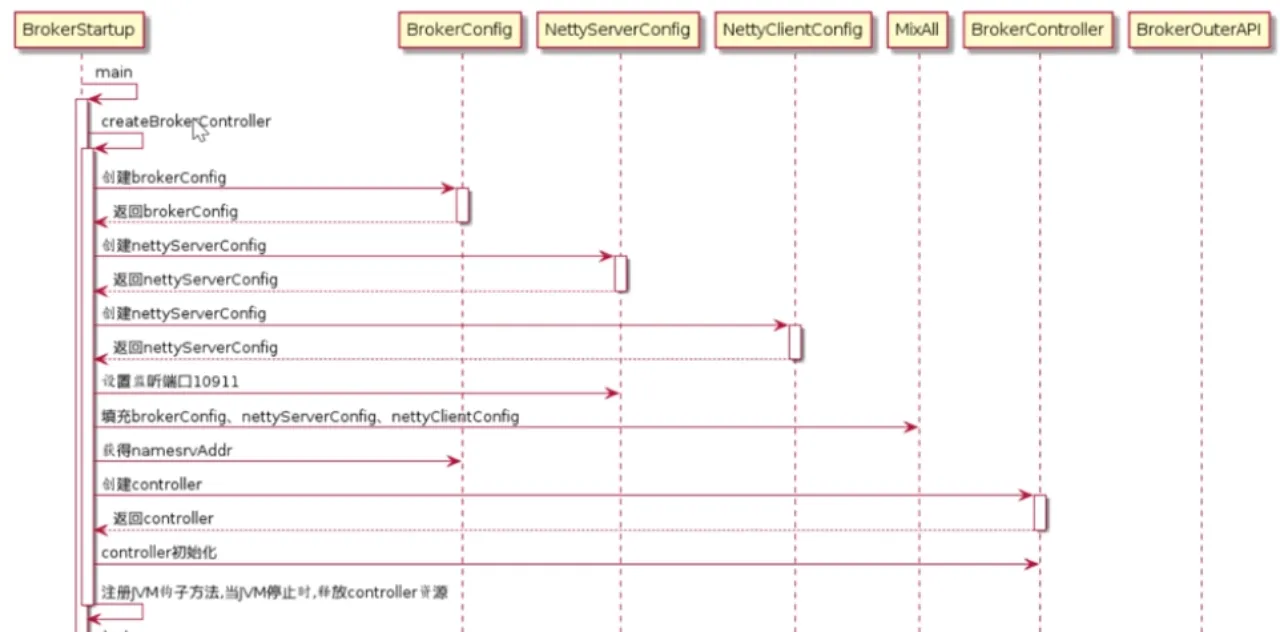
 如上图,首先启动入口有个main方法,在main方法里首先是创建BrokerController,创建BrokerController的方式和创建namesrvcontroller相似,先创建brokerconfig,然后再创建nettyserverconfig和nettyclientconfig。对于生产者来说,broker需要处理生产者的请求,nettyserverconfig是作为服务端存在的;而对于NameServer,broker要上报数据给NameServer进行心跳检测,所以就要分别创建brokerconfig、nettyserverconfig及nettyclientconfig
final Brokerconfig brokerconfig = new Brokerconfig();
final NettyServerconfig nettyServerconfig = new Nettyserverconfig();
final NettyclienEconfig nettyclientconfig = new Nettyclientconfig();nettyclientconfig.setuseTLS(Boolean.parseBoolean(System.getproperty(TLs_ENABLE,
string.valueof(Tlssystemconfig.tlsMode == TlsMode.ENFORCING))));
nettyServerconfig.setListenPort(10911);
//nettyServerconfig.setListenPort(10911)是配置nettyServerconfig的端口号,生产者是通过10911这个端口提交信息到broker。
final Messagestoreconfig messagestoreConfig = new MessagestoreConfig();
//填充配置类
if (BrokerRole.SLAVE == messagestoreconfig.getBrokerRole()) {
int ratio = messagestoreconfig.getAccessMessageInMemory
MaxRatio() - 10;
messagestoreconfig.setAccessMessageInMemoryMaxRatio(ratio);
}
if (commndLine.hasoption( 'c')) {
//-c解析配置文件填充配置类
strig file = commandLine.getoptionvalue( 'c' );
if (file != nul1) {
configFile = file;
Inputstream in = new BufferedInputstream(new FileInputstre
am(file));
properties = new Properties();
properties. load(in);
properties2systemEnv( properties);
MixAll.properties20bject(properties, brokerConfig);
MixAll.properties20bject(properties,nettyserverConfig);
MixAll.properties2object(properties,nettyclientconfig);
MixAll.properties20bject(properties,messagestoreconfig);
BrokerPathconfigHelper.setBrokerconfigpath(file);
in.close();
}
}
以下代码是从brokerconfig中拿到NameServerAddr,因为broker要上报心跳信息到NameServer,所以在解析配置文件完成后,brokerConfig就可以得到NameServerAddr。通过这个代码看到,如果NameServer是搭建一个集群,需要以分号拼接。
string namesrvAddr = brokerconfig.getNamesrvldr();
if ( null != namesrvAddr) {
try {
string[] addrArray = namesrvAddr.split( regex: "; ");
for ( string addr : addrArray) {
Remotingutil.string2socketAddress( addr);
}
}catch (Exception e) {
system.out.printf(
"The Name Server Address[%s] illegal,please set it as follows,\"127.0.0.1:9876;192
namesrvAddr);
System.exit( status: -3);
}
}
//BrokerController创建完成
final Brokercontroller controller = new BrokerController(
brokerconfig,
nettyServerconfig,
nettyclientconfig,
messagestoreconfig);
// remember all configs to prevent discard
controller.getconfiguration( ).registerconfig(properties);
//对BrokerController进行初始化
boolean initResult = controller.initialize();
if ( !initResult) {
controller.shutdown( );
system.exit( status: -3);
}
在完成初始化里,完成的是对BrokerController属性的赋值,包括进行messageStore等等。初始化完成之后,controller就可以返回,返回到start方法,最终通过start方法进行启动。
Runtime.getRuntime().addShutdownHook(new Thread(new Runnable() {
private volatile boolean hasshutdown = false;
private AtomicInteger shutdownTimes = new AtomicInteger( initialValue: 0);
@override
public void run() {
synchronized (this) {
Log.info("shutdown hook was invoked,{}" , this.shutdownTimes.incrementAndGet());
if ( ! this.hasshutdown) {
this.hasshutdown = true;
long beginTime = system.currentTimeMillis();
controller.shutdown();
long consumingTimeTotal = system.currentTimeMillis() - beginTime;
log.info("shutdown hook over,consuming total time(ms): { }" , consumingTimeTotal)
}
}
}
},name: "shutdownHook" ) );
这段代码是JVM中注册钩子函数,保证JVM在退出时,进行资源释放。
之后是进行启动,启动是调用Controller里面的start方法,启动之后要开始进行注册路由信息,注册完成之后创建线程池
this.registerBrokerAll( checkOrderConfig: true,oneway:. false,forceRegister: true);
this.scheduledExecutorService.scheduleAtFixedRate(new Runnable() {
@override
public void run( ) {
try {
BrokerController.this.registerBrokerAll( checkOrderConfig: true,oneway:. false,brokercoConfig.isForceRegister()
}catch (Throwable e) {
log.error( "registerBrokerAll Exception", e);
}
}
},initialDelay: 1000 * 10,Math.max(10000,Math.min(brokerCo
nfig.getRegisterNameServerPeriod(),6000)),TimeUnit.
getRegisterNameServerPeriod()默认是30s,因为以上代码的存在,broker在启动之后每隔30s要上传细条信息给NameServer。
在registerBrokerAll注册代码中,有一个重要方法doRegisterBrokerAll:
doRegisterBrokerAll(checkorderconfig,oneway,topicconfigwrapper);
通过这个方法,调用了brokerOuterAPI,通过registerBrokerAll方法向外发送请求:
private void doRegisterBrokerAl1(boolean checkorderconfig, boolean oneway,
Topicconfigserializewrapper topicconfigwrapper) {
List<RegisterBrokerResult> registerBrokerResultList = this.bpokerouterAPI.registerBrokerAll(
this. brokerconfig.getBrokerclusterName(),
this.getBrokerAddr(),
this.brokerconfig.getBrokerName(),
this. brokerconfig-getBrokerId(),
this.getHAServerAddr(),
topicconfigwrapper,
this.filterServerManager.buildNewFilterServerList(),
oneway ,
this.brokerconfig.getRegisterBrokerTimeoutMills(),
this.brokerconfig.iscompressedRegister());
//封装请求头
final RegisterBrokerRequestHeader requestHeader = new RegisterBrokerRequestHeader();
requestHeader.setBrokerAddr(brokerAddr);
requestHeader.setBrokerid(brokerId);
requestHeader. setBrokerName (brokerName);
requestHeader.setc1usterName(c1usterName);
requestHeader.setHaserverAddr(haserverAddr);
requestHeader. setcompressed(compressed);
//封装请求体
RegisterBrokerBody requestBody = new RegisterBrokerBody();requestBody.setTopicconfigserializewrapper(topicconfigwrapper);
requestBody . setFi1terserverList(fi1teserverList);
final byte[] body = requestBody.encode(compressed);
final int bodycrc32 = uti1A17.crc32(body);
requestHeader.setBodycrc32(bodycrc32);
final countDownLatch countDownLatch = new countDownLatch(nameServerAddressList.size());
for (fina1 string namesrvAddr : nameserverAddressList) {
brokerouterExecutor.execute(new Runnab1e( ){
在registerBrokerAll中创建了请求header、封装请求体,
请求体创建之后,在 NameServerAddressList处遍历NameServer的地址,分别给每一个NameServer注册当前broker信息。
for (final string namesrvAddr : nameServerAddressList) {
brokerouterExecutor.execute( new Runnable( ) i
@override
public void run() {
try {
RegisterBrokerResult result = registprBroker(namesr
vAddr , oneway, timeoutMills,requestHeader, ody) ;
if ( result != null) {
registerBrokerResultList.add( result);
}
registerBroker通过remotingClient向NameServer发送请求,然后上报心跳数据,如果是oneway方式表示不接受返回值;如果是其他方式,以同步方式上报数据,会获得响应,之后会解析注册结果。
RemotingCommand response = this.remotingclient.invokeSync(namesrvAddr, request,timeoutNills);
assert response != null;
switch (response.getcode()) {
case Responsecode.success: {
RegisterBrokerResponseHeader responseHeader =(RegisterBrokerResponseHeader)response.decodeCommandCustomHeader(RegisterBrokerResponseHeader.class);
RegisterBrokerResult result = new RegisterBrokerResult();
result.setMasterAddr(responseHeader.getMasterAddr());
result.setHaServerAddr(responseHeader.getHaServerAddr());if (response.getBody() != nul1) {
result.setKvTable(KVTable.decode(response.getBody(),KVTable.class));
}
return result;
}
default:
break;
}
小结:路由注册的入口在BrokerStartup里,在BrokerStartup里首先是创建BrokerController,BrokerController的创建需要brokerconfig、nettyserverconfig和nettyclientconfig配置类,并且设置端口号10911,然后获取namesrvAddr。Controller创建之后就要进行对其初始化,完成controller内部的赋值。然后再注册钩子函数,释放资源。整个controller创建完成之后进行启动,在启动时会调用controller的startup,在controller启动的位置会完成路由信息注册,broker会每隔30s上报心跳信息到NameServer。

