第四章 运算符
4.1 算数操作符
| 操作符 | 操作 |
| ** | 指数 |
| % | 取模/余数 |
| // | 取整 |
| / | 除法 |
- | 乘法
- | 减法
- | 加法
print(5/2)
2.5
例2:
print(9//-4)
print(-9//4)
-3
-3
例
a=5%2       #求余数
print(a)
1
例1:输出结果打印8遍
print('zdb'* 3)
zdbzdbzdb
例
幂运算操作符优先级比左侧高,比右侧低
a=3**2      #求幂,3的2次方
print(a)
a=-3**2       #-(3*3)
print(a)
a=-3**-2      #=(1/9)
print(a)
9
-9
-0.1111111111111111
4.2 赋值运算符
-=、+=、*=、/=、//=
a=b=c=d=e=10
a+=1        #相当于a=a+1
b-=3        #相当于b=b-3
c*=10       #相当于c=c*10
d/=8        #相当于d=d/8
e //= 3
print(a)
print(b)
print(c)
print(d)
print(e)
11
7
100
1.25
3
解包赋值
变量和值个数对应
a,b,c=20,30,40
4.3 布尔运算符:and、or、not
分别为与、或、非,结果返回True或者False
例1
a=(3>2)and(1<2)
print(a)
a=(3>2)and(1>2)
print(a)
True
False
例2
print(not True)
print(not False)
print(not 0)
print(not 4)
print(3<4<5)
False
True
True
False
True
in , not in
s = 'helloworld'
print('w' in s)
print('k' not in s)
True
True
练习案例:操作列表:
例1:
>>> requested_toppings = ['mushrooms', 'onions', 'pineapple']
>>>> 'mushrooms' in requested_toppings
True
>>> 'pepperoni' in requested_toppings
False
例2:
banned_users = ['andrew', 'carlina', 'david']
user = 'marie'
if user not in banned_users:
    print(user.title() + ', you can post a response if  you wish.')
Marie, you can post a response if you wish.
4.4 比较操作符
、>=、<、<=、!=、==
结果为bool型:True, False
a=1>3
print(a)
False
例
a = 10
b = 10
print(a == b)   # 说明值相等
print(id(a), id(b))
print(a is b)   # 说明a与b的id标识,相等
True
140711260299952 140711260299952
True
例
list1 = [11, 22, 33, 44]
list2 = [11, 22, 33, 44]
print(list1 == list2)
print(id(list1), id(list2))
print(list1 is list2)
print(list1 is not list2)
True
1935213154696 1935213155208
False
True
4.5 位运算符: & , |,>>, <<
& , |:按位与,按为或
# 十进制先转为二进制,再按位与,最后显示十进制
print(4 & 8)  # 0100 & 1000
# 按位或
print(4 | 8)  # 0100 | 1000
0
12
>>, <<
print(4 << 1)   # 总共是8位,现在化为二进制,左移1位
print(4 << 2)
print(4 >> 1)   # 右移一位
8
16
2
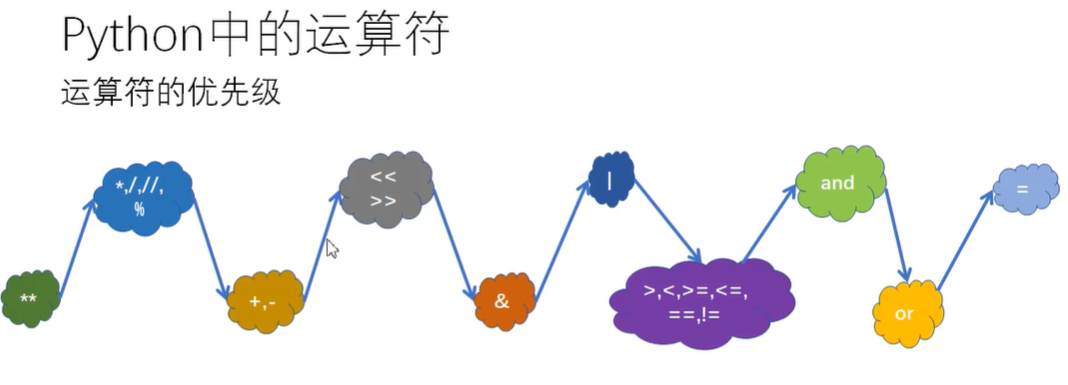
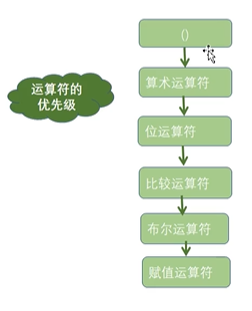
4.6 运算符优先级
第五章 程序流程结构
5.1 选择结构:if语句
1. if-else
age = 17
if age >= 18:
    print('You are old enough to vote!')
    print('Have you registered to vote yet?')
else:        #输出这个
    print('Sorry,you are too young to vote.')
    print('Please register to vote as soon as you turn 18!')
Sorry,you are too young to vote.
Please register to vote as soon as you turn 18!
2. if-elif-else结构
例1
age = 12
if age < 4:
    price = 0
elif age < 18:
    price = 5
elif age < 65:
    price = 10
else:
    price = 5
print('Your admission cost is $' + str(price) + '.')
Your admission cost is $5.
3. if-elif结构
age = 12
if age < 4:
    price = 0
elif age < 18:
    price = 5
elif age < 65:
    price = 10
elif age >= 65:
    price = 5
print('Your admission cost is $' + str(price) + '.')
Your admission cost is $5.
4. 测试多个条件:多个if
requested_toppings = ['mushrooms', 'extra cheese']
if 'mushrooms' in requested_toppings:    #添加
    print('Adding mushrooms.')
if 'pepperoni' in requested_toppings:    #没有这个,没加进去
    print('Adding pepperoni.')
if 'extra cheese' in requested_toppings: #添加
    print('Adding extra cheese.')
print('\nFinished making your pizza!')
Adding mushrooms.
Adding extra cheese.
Finished making your pizza!
5. 嵌套if
"""会员 >=200  8折
       >=100  9折
       |      不打折
非会员  >=200  9.5折
       |      不打折"""
answer = input('你是会员吗?y/n')
money = float(input('请输入您的购物金额:'))
if answer == 'y':
    if money >= 200:
        print('打8折,最终付款金额为:', money * 0.8)
    elif 200 > money >= 100:
        print("打9折,最终付款金额为:", money * 0.9)
    else:
        print("不打折,最终付款金额为:", money)
else:
    if money >= 200:
        print('打9.5折,最终付款金额为:', money * 0.95)
    else:
        print('不打折,最终付款金额为:', money)
你是会员吗?y/ny
请输入您的购物金额:300
打8折,最终付款金额为: 240.0
6. if简写
if x:
    print('True')
只要x是非零数值、非空字符串、非空list等,就判断为True,否则为False
三元操作符: x if 条件 else y
语法:x if 条件 else y
满足条件则返回x;否则为y
例1: 输出任意两个整数中的最大整数
"""请输入两个数,输出最大值"""
num_a = int(input("请输入一个整数:"))
num_b = int(input("请输入第二个整数:"))
num_max = num_a if num_a > num_b else num_b
print('两者中最大整数:', num_max)
请输入一个整数:6
请输入第二个整数:7
两者中最大整数: 7
if练习案例
使用random模块的randint()函数:生成随机数
要猜的数字随机生成
import random     #import调用random模块
secret = random.randint(1,10)     #调用import模块中内置函数randint()生成随机数,随机数为1到10
print('开始游戏')
temp=input('猜数字,请输入数字:')
guess=int(temp)
while guess !=secret:
    temp=input('猜错了,重新输入')
    guess = int(temp)
    if guess==secret:
       print('Yes')
    else:
        if guess<secret:
           print('小了')
        else:
           print('大了')
print('结束了,不玩了')
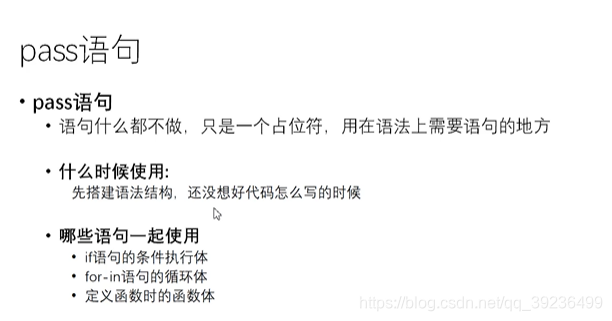
pass语句
5.2 循环结构
5.2.1 for循环
语法:
for 自定义变量 in 可迭代对象:
    循环体
for 自定义变量 in 可迭代对象:
    循环体
else:
     ...
例1
favorite = 'FishC'
for i in favorite:
    print(i,end=' ')
F i s h C
例2:计算1到100偶数和
i_sum = 0
for i in range(1, 101):
    if i % 2 == 0:
        i_sum += i
print(i_sum)
2550
例3
这行代码让python从列表magicians中取出一个名字,并将其存储在变量magician中。(注意单复数,便于理解)
magicians = ['alice', 'david', 'carolina']
for magician in magicians:
    print(magician)
alice
david
carolina
例4:输出100到999之间的水仙花数
"""输出100到999之间的水仙花数
例如:153 = 3*3*3 + 5*5*5 + 1*1*1"""
list_i = []
for i in range(100, 1000):
    for item in str(i):
        list_i.append(int(item))
    if i == (list_i[0])**3 + (list_i[1])**3 + (list_i[2])**3:
        print(i)
    list_i.clear()
153
370
371
407
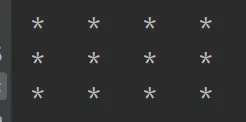
for嵌套
for i in range(1, 4):
    for item in range(1, 5):
        print('*', end='\t')  # 不换行输出
    print()    # 打印行
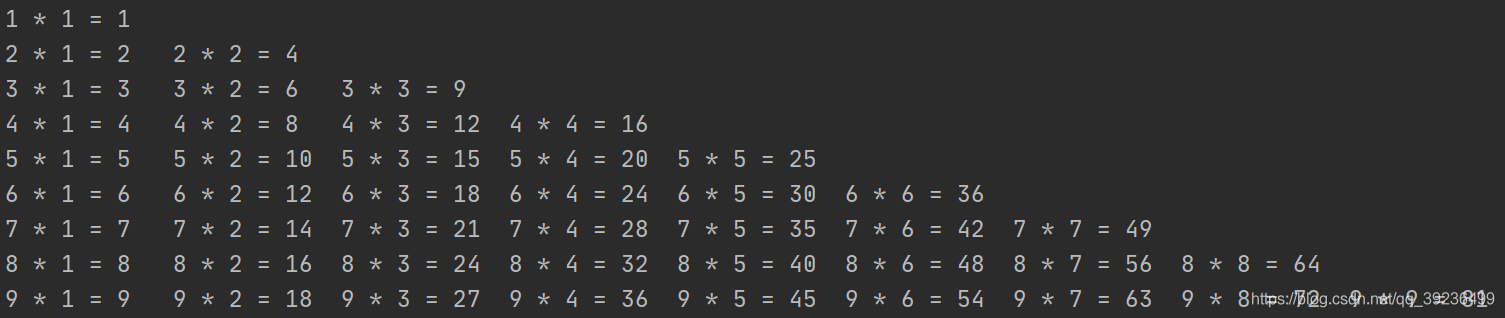
例2:99乘法表
for i in range(1, 10):
    for j in range(1, i+1):
        print(i, '*', j, '=', i*j, end='\t')
    print()
练习案例
案例描述:求1到10的平方累加
版本一
squares = []
for value in range(1,11):   # 生成1到10
    square = value**2
    squares.append(square)
print(squares)
[1, 4, 9, 16, 25, 36, 49, 64, 81, 100]
版本二
squares = []
for value in range(1,11):
    squares.append(value**2)    #舍去了中间变量square
print(squares)
5.2.2 while循环
while是一直循环到条件不成立
number = 1
while number <= 5:
    print(number)
    number += 1
1
2
3
4
5
练习案例
案例描述:用while循环处理列表和字典
for循环遍历时不能修改列表和字典,使用while循环可在遍历列表的同时对其进行修改,可收集、存储并组织大量输入、供以后查看和显示。
例1 在列表之间移动元素
list1 = ['alice', 'brian', 'candace']
list2 = []
while list1:
    i = list1.pop()
    print("现在打印的是: " + i.title())
    list2.append(i)
print("\n打印了的有:")
for i in list2:
    print(i.title())
现在打印的是: Candace
现在打印的是: Brian
现在打印的是: Alice
打印了的有:
Candace
Brian
Alice
例2 删除包含特定值的所有列表元素
之前使用方法remove()来删除列表中中的特定值,这之所以可行,是因为要删除的值在列表中只出现了一次。如果要删除列表中所有包含特定值的元素,该怎么办呢?
pets = ['dog', 'cat', 'dog', 'goldfish', 'cat', 'rabbit', 'cat']
print(pets)
while 'cat' in pets:
    pets.remove('cat')
print(pets)
['dog', 'cat', 'dog', 'goldfish', 'cat', 'rabbit', 'cat']
['dog', 'dog', 'goldfish', 'rabbit']
例3 用用户输入来填充字典
while polling_active:
    name = input("请输入姓名:")
    response = input("喜欢爬什么山? ")
    responses[name] = response  # 生成字典
    repeat = input("会带别人去爬山吗(yes/no)")
    if repeat == 'no':
        polling_active = False
print("\n---汇总---")
for name, response in responses.items():
    print(name + "喜欢爬的山是:" + response + '.')
5.3 跳转语句
break语句可以在循环过程中直接退出循环
而continue语句可以提前结束本轮循环,并直接开始下一轮循环
5.3.1 break
if为真,直接结束退出程序
示例1: break直接退出循环,else后面的不执行
bingo = 'zdb'
answer = input('请输入一句话:')
while True:   # 这里为死循环
    if answer == bingo:
        break
    else:
        answer = input('抱歉,错了,请重新输入(答案正确才能退出游戏)')
print('对咯')
示例2:
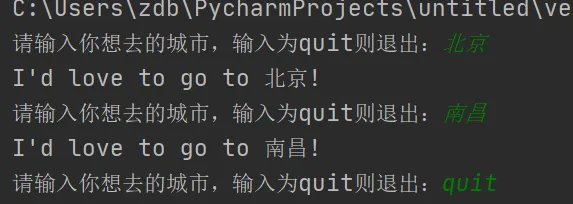
prompt = "请输入你想去的城市,输入为quit则退出:"
while True:
    city = input(prompt)
    if city == 'quit':
        break
    else:
        print("I'd love to go to " + city.title() + '!')
这里跟上面标志True很类似
1.处理for循环
"""输入密码,三次机会"""
i = 1
for item in range(3):
    answer = input("请输入密码:")
    if answer == '1234':
        print("密码正确")
        break
    else:
        if i == 3:
            print("三次输入错误,密码锁定,三分钟后解锁!")
        else:
            print("密码错误,请重新输入:")
            i += 1
请输入密码:1111
密码错误,请重新输入:
请输入密码:1234
密码正确
2.处理while循环
"""输入密码,三次机会"""
i = 1
a = 0
while a < 3:
    answer = input("请输入密码:")
    if answer == '1234':
        print("密码正确")
        break
    else:
        if i == 3:
            print("三次输入错误,密码锁定,三分钟后解锁!")
        else:
            print("密码错误,请重新输入:")
            i += 1
    a += 1
5.3.2 continue
if为真,continue后面不执行,返回到循环开头,重新执行;
反之为假,执行continue后面
例1:
for i in range(10):  #0到9
    if i%2 !=0:    #除2余数非零的有1、3、5、7、9
        print(i)   #if条件满足,continue后面不执行; 即i为1 3 5 7 9
        continue   #if条件不满足,执行continue后面的;  不满足,即余数为零
    i += 2
    print(i)       #余数为零,输出i+2;   0、2、4、6、8 都加2: 2、4、6、8、10
2
1
4
3
6
5
8
7
10
9
方法二:
i = 0
while i < 10:
    if i%2 != 0:
        print(i)
    elif i%2 == 0:
        print(i+2)
    i +=1
输出结果一样
例2
n = 0
i = []
while n < 10:
    n = n + 1
    if n % 2 == 0:  # 如果n是偶数,执行continue语句
        continue    # continue语句会直接继续下一轮循环,后续的print()语句不会执行
    i.append(n)
print(i)
[1, 3, 5, 7, 9]
例3:输出1到20之间的所有5的倍数
"""输出1到20之间的所有5的倍数:5,10,15..."""
list1 = []
for item in range(1, 51):
    if item % 5 != 0:
        continue
    else:
        list1.append(item)
print(list1)
[5, 10, 15, 20, 25, 30, 35, 40, 45, 50]
5.3.3 使用标志(True,False)退出
标志为True,继续执行;标志为False,退出while循环
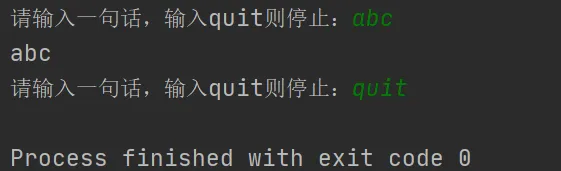
prompt = "请输入一句话,输入quit则停止:"
active = True   # 初始化为True
while active:   # 为True时
    message = input(prompt)   # 输入
    if message == 'quit':     # 输入的为True
        active = False        # 改False,则退出了循环
    else:                     # 为True时
        print(message)
第六章 列表list
1、列表是有序的
2、列表可以包含任意类型的数据
3、列表是动态的,随着程序的运行可以进行修改、添加、删除操作
4、索引映射唯一一个数据
5、列表可存储重复数据
整数列表
number = [1,2,3,4,5]
print(number)
[1, 2, 3, 4, 5]
混合列表
mix = [1,'zdb',3.14,[1,2,3]]   #可存放不同类型,列表里的元素可以是列表
print(mix)
[1, 'zdb', 3.14, [1, 2, 3]]
空列表
empty = []   #空列表
print(empty)
a = list()   #空列表
print(a)
[]
[]
6.1 创建列表:[]、list()、列表生成式
- 1.方括号括起来
- 2.使用内置函数list()
- 3.列表生成式
1. list():内置函数,把一个可迭代对象转换为列表
b = 'I love you'
b = list(b)
print(b)
['I', ' ', 'l', 'o', 'v', 'e', ' ', 'y', 'o', 'u']
2. 列表生成式
–for–in–
- 列表解析将for循环和创建新元素的代码合并成一行,并自动附加新元素。
例1:输出1到10的平方
注意:for这里没有冒号结尾
#将值1到10提供给表达式value**2
squares = [value**2 for value in range(1,11)]
print(squares)
[1, 4, 9, 16, 25, 36, 49, 64, 81, 100]
例2
b = {i:i % 2 == 0 for i in range(10)}   #判断0到9是否为偶数
print(b)
{0: True, 1: False, 2: True, 3: False, 4: True, 5: False, 6: True, 7: False, 8: True, 9: False}
例3:100内能被2整除但是不能被3整除是数
a = [i for i in range(100) if not (i%2) and i%3]  #能被2整除,但是不能被3整除
print(a)
[2, 4, 8, 10, 14, 16, 20, 22, 26, 28, 32, 34, 38, 40, 44, 46, 50, 52, 56, 58, 62, 64, 68, 70, 74, 76, 80, 82, 86, 88, 92, 94, 98]
x --for-- in-- if–
例1:没有else
a= [x * x for x in range(1, 11) if x % 2 == 0]
print(a)
[4, 16, 36, 64, 100]
x --if–else–for–in
例2:有if-else,但是必须放在前面
b = [-x if x % 2 == 0 else x for x in range(1, 11)]
print(b)
[1, -2, 3, -4, 5, -6, 7, -8, 9, -10]
6.2 索引访问元素、元素返回索引index()
只需将该元素的位置或者索引告诉python即可 ,第一个索引为0
访问最后一个元素可以索引[-1];以此类推,[-2]倒数第二…
例1
bicycles = ['trek', 'cannondale', 'redline', 'specialized']
print(bicycles[0])            #访问第一个
print(bicycles[0].title())    #第一个首字母大写
print(bicycles[-1])          #访问最后一个
trek
Trek
specialized
例2
bicycles = ['trek', 'cannondale', 'redline', 'specialized']
message = 'My first bicyclr was a ' + bicycles[0].title() + '.'   #访问第零个
print(message)
My first bicyclr was a Trek.
例3
number = [1,'zdb','c','d']
print(number[0])  #输出第零个
number[0] = number[1]
print(number)   #第一个赋值给第零个
1
['zdb', 'zdb', 'c', 'd']
.index():元素返回索引值
- 如果列表中被索引的元素有多个,只返回第一个的位置
- 如果索引不存在的元素,会报错
- 可以指定范围查找元素
list1=[123,456]
list1 = list1 * 3
print(list1)
print(list1.index(123))      #索引
print(list1.index(123,3,9))   #第三个到第九个
[123, 456, 123, 456, 123, 456]
0      #第0个位置
4      #第4个位置
6.3 列表增加元素:append()、extend()、insert()
1、.append(sth): 只能加一个,在列表末尾添加元素
例1
number = [1,'zdb']
number.append('zdbya')
print(number)
print(len(number))
[1, 'zdb', 'zdbya']
3
例2:空列表中添加元素
motorcycles = []   #创建空列表,添加元素
motorcycles.append('honda')
motorcycles.append('yamaha')
motorcycles.append('suzuki')
print(motorcycles)
['honda', 'yamaha', 'suzuki']
2、.extend([列表]):
用列表扩展列表,在末尾插入
number = [1,'zdb']
number.extend(['a','b'])
print(number)
[1, 'zdb', 'a', 'b']
3、.insert(位置,sth):
在指定位置插入元素,0为第一个位置
number = [1,'zdb']
number.insert(1,'zz')     #在位置1插入
print(number)
[1, 'zz', 'zdb']
4、用切片添加元素
list1 = [1, 2, 3, 4, 5, 6, 7, 8]
list2 = ['a', 'b', 'c', 'd', 'e']
list1[2:] = list2
print(list1)
[1, 2, 'a', 'b', 'c', 'd', 'e']
6.4 列表删除元素:remove()、del()、pop()、clear()
1、.remove(sth):
- 永久的
- 只移除一个
- 元素重复只移除第一个
- 空列表移除元素会报错
number = [1, 2, 3, 4, 2]
number.remove(2)
print(number)
[1, 3, 4, 2]
2、del():
- 加索引,删除位置,永久的
- 不要索引,删除整个列表,注意是删除,不是清空为空列表
例1:
number = [1,'zdb']
del(number[0])   #删除第零个位置,即1
print(number)
['zdb']
3、.pop():
- 删除一个指定索引位置上的元素
- 不指定索引时,删除最后一个,永久的
- 指定索引不存在时报错
例1:不指定索引,删除最后一个
number = [1,'zdb']
name = number.pop()
print(number)
print(name)
[1]
zdb
例2: 指定索引
number2 = ['a', 'b', 'c', 'd', 'e']
number2.pop(0)
print(number2)
['b', 'c', 'd', 'e']
4、.clear(): 清空成空列表
number2 = ['a', 'b', 'c', 'd', 'e']
number2.clear()
print(number2)
[]
5、切片删除元素
把不想要的元素切掉
6.5 列表修改元素
1、指定索引赋新值
motorcycles = ['handa', 'yamaha', 'suzuki']
print(motorcycles)
motorcycles[0] = 'ducati'     #修改第零个
print(motorcycles)
['handa', 'yamaha', 'suzuki']
['ducati', 'yamaha', 'suzuki']
2、切片赋新值
number2 = ['a', 'b', 'c', 'd', 'e']
number2[:2] = [1, 2, 3]
print(number2)
[1, 2, 3, 'c', 'd', 'e']
6.6 排序:.sort()、.reverse()、sorted()、reversed()
1、 .sort()方法:排序,从小到大,永久性
list4=[4,3,2,5]
list4.sort()   #排序
print(list4)
list4.sort(reverse=True)   #reverse = True
print(list4)
[2, 3, 4, 5]
[5, 4, 3, 2]
例2
cars = ['bnw', 'audi', 'toyota', 'subaru']
cars.sort()      #按首字母排序
print(cars)
['audi', 'bnw', 'subaru', 'toyota']
.sort(reverse = True)
翻转倒着排序
cars = ['bnw', 'audi', 'toyota', 'subaru']
cars.sort(reverse = True)      #按首字母排序
print(cars)
['toyota', 'subaru', 'bnw', 'audi']
2、 sorted():内置函数,临时排序
- 这是产生一个新的列表,而原列表不发生任何改变,所以是临时排序
同理也有:sorted(reverse = True) 用法
sorted用法较多
(1)数字排序
按大小
print(sorted([36, 5, -12, 9, -21]))
[-21, -12, 5, 9, 36]
按绝对值大小
- sorted()函数也是一个高阶函数,它还可以接收一个key函数来实现自定义的排序,例如按绝对值大小排序
print(sorted([36, 5, -12, 9, -21], key=abs))
[5, 9, -12, -21, 36]
(2)字符串排序
分大小写
- 默认情况下,对字符串排序,是按照ASCII的大小比较的,由于’Z’ < ‘a’,结果,大写字母Z会排在小写字母a的前面。
print(sorted(['bob', 'about', 'Zoo', 'Credit']))
['Credit', 'Zoo', 'about', 'bob']
不分大小写
print(sorted(['bob', 'about', 'Zoo', 'Credit'], key=str.lower))
['about', 'bob', 'Credit', 'Zoo']
(3)反向排序 reverse=True
要进行反向排序,不必改动key函数,可以传入第三个参数reverse=True:
print(sorted(['bob', 'about', 'Zoo', 'Credit'], key=str.lower, reverse=True))
['Zoo', 'Credit', 'bob', 'about']
习题:对字典的键值对分别实现成绩和人名的排序
def by_name(t):
    return t[1]
def by_score(t):
    return t[0]
L = [('Bob', 75), ('Adam', 92), ('Bart', 66), ('Lisa', 88)]
L2 = sorted(L, key=by_name, reverse=True)   # 成绩倒序
print(L2)
L3 = sorted(L, key=by_score)  # 名字排序
print(L3)
例
cars = ['bnw', 'audi', 'toyota', 'subaru']
print('用了sort(cars)方法后的排序:')
print(sorted(cars))
print(cars)   # 并没有变化
用了sort(cars)方法后的排序:
['audi', 'bnw', 'subaru', 'toyota']
['bnw', 'audi', 'toyota', 'subaru']
3、 .reverse():翻转
按排列顺序翻转,永久性修改排列顺序,再一次翻转可恢复
list1=[123,456,789]
print(list1)
list1.reverse()           #翻转
print(list1)
[123, 456, 789]
[789, 456, 123]
4、 reversed():暂时的
list1=[3,2,1,6,5,4]
list2 = reversed(list1)
print(list2)
print(list(list2))
<list_reverseiterator object at 0x000002338F11CA48>     #迭代器对象
[4, 5, 6, 1, 2, 3]
6.7 求列表长度:len():
确定列表长度,即列表中元素个数
例1
>>> cars = ['bnw', 'audi', 'toyota', 'subaru']
>>> len(cars)
4
例2
number =['小甲鱼','小布丁','黑夜','迷途','怡静']
for each in number:
    print(each,len(each))   #each为元素字符长度
小甲鱼 3
小布丁 3
黑夜 2
迷途 2
怡静 2
6.8 切片
切片记左不记右,左闭右开
例1:默认步长为1
number = [1,'zdb','a','b','c']
print(number[1:3])    #记左不记右
print(number[:3])     # 0,1,2
print(number[1:])
print(number[:])
print(number[-3:])   #后三个
['zdb', 'a']
[1, 'zdb', 'a']
['zdb', 'a', 'b', 'c']
[1, 'zdb', 'a', 'b', 'c']
['a', 'b', 'c']
例2: 步长指定为2
list1 = [1, 2, 3, 4, 5, 6, 7, 8]
print(list1[::2])
[1, 3, 5, 7]
例3:for循环遍历切片
语法:
for 迭代变量 in 列表名:
    操作
players = ['charles', 'martina', 'michael', 'florence', 'eli']
print("Here are the first three players on my team:")
for player in players[:3]:
    print(player.title())
Here are the first three players on my team:
Charles
Martina
Michael
例4:步长为负数
这时候切片的第一个元素默认为原列表的最后一个元素
list1 = [1, 2, 3, 4, 5, 6, 7, 8]
print(list1[::-1])
print(list1[7::-1])
print(list1[7::-2])
[8, 7, 6, 5, 4, 3, 2, 1]
[8, 7, 6, 5, 4, 3, 2, 1]
[8, 6, 4, 2]
6.9 对数字列表统计计算:min()、max()、sum()
min():求最小
b = [1,18,13,0,-98,34,54,76,32]
print(max(b))
print(min(b))
c='1234567890'
print(min(c))
76
-98
0
max():返回序列或者参数集合中的最大值
print(max(1,2,3,4,5))
b = 'I love you'                    #y的码最大
print(max(b))
b = [1,18,13,0,-98,34,54,76,32]     #76最大
print(max(b))
5
y
76
tuple1 = (1,2,3,4,5,6,7,8,9)
print(max(tuple1))
9
错误情况如下:
list1=[1,2,3,4,5,6,7,8,9,'a']
print(max(list1))
错误,必须同一类型
sum():求和
sum(iterable[,start=0])
返回序列iterable和可选参数start的总和
tuple2=(3.1,2.3,3.4)
print(sum(tuple2))
list1=[1,2,3,4]
print(sum(list1))
print(sum(list1,8))     #list1求和,再与8求和
8.8
10
18
>>> digits = [1, 2, 3, 4, 5, 6, 7, 8, 9, 0]
>>> min(digits)
0
>>> max(digits)
9
>>> sum(digits)
45
6.10 复制列表
list1[:]
list1 = ['a', 'b', 'c']
list2 = list1[:]
print(list1)
print(list2)
['a', 'b', 'c']
['a', 'b', 'c']
复制后的列表与原列表互不干扰
list1 = ['a', 'b', 'c']
list2 = list1[:]
list1.append('cannoli')
list2.append('ice cream')
print(list1)
print(list2)
['a', 'b', 'c', 'cannoli']
['a', 'b', 'c', 'ice cream']
list2 = list1
list1 = ['a', 'b', 'c']
list2 = list1
list1.append('cannoli')
list2.append('ice cream')
print(list1)
print(list2)
['a', 'b', 'c', 'cannoli', 'ice cream']
['a', 'b', 'c', 'cannoli', 'ice cream']
list1=[789,456,123]
list2=list1[:]     #拷贝,1变2不变
print(list2)
list3=list1       #赋值,修改list1,list3跟着改
print(list3)
list1.sort()
print(list1)
print(list2)
print(list3)
[789, 456, 123]    #list2
[789, 456, 123]    #list3
###################排序list1
[123, 456, 789]
[789, 456, 123]   #list2不变
[123, 456, 789]   #list3跟着变
6.11 列表元素比大小
list1 = [123]
list2 = [234]
print(list1 > list2)
False
多个元素只比第零个
list1 = [123,456]
list2 = [234,123]
print(list1 > list2)   #只比较第零个
list3 = [123,456]
print((list1<list2) and (list1==list3))   #and运算
False
True
列表拼接:+
list1 = [123,456]
list2 = [234,123]
list4 = list1+list2        #拼接
print(list4)
[123, 456, 234, 123]
列表元素复制多遍:*
list3 = [123,456]
print(list3*3)             #复制多个,输出3遍
[123, 456, 123, 456, 123, 456]
6.12 in 、not in:判断元素是否在列表中
这个知识点在前面的各种运算符里面也有
print(123 in list3)
print(789 not in list3)    #判断是否在里面
True
True
list5 = [123,['z','zdb'],456]
print('z' in list5)
print('z'in list5[1])  #第一个
print(list5[1][1])
False
True
zdb
6.13 一些内置函数:enmumerate()、dir()、count()
enumerate():将索引值与元素括起来
enumerate()用法链接:enumerate
list1=[3,2,1,6,5,4]
print(enumerate(list1))
print(list(enumerate(list1)))
<enumerate object at 0x000001DC6B664E58>
[(0, 3), (1, 2), (2, 1), (3, 6), (4, 5), (5, 4)]
dir():查询
print(dir(list))
['__add__', '__class__', '__contains__', '__delattr__', '__delitem__', '__dir__',
 '__doc__', '__eq__', '__format__', '__ge__', '__getattribute__', '__getitem__',
 '__gt__', '__hash__', '__iadd__', '__imul__', '__init__', '__init_subclass__',
 '__iter__', '__le__', '__len__', '__lt__', '__mul__', '__ne__', '__new__', '__reduce__',
 '__reduce_ex__', '__repr__', '__reversed__', '__rmul__', '__setattr__', '__setitem__',
 '__sizeof__', '__str__', '__subclasshook__', 'append', 'clear', 'copy', 'count', 'extend',
 'index', 'insert', 'pop', 'remove', 'reverse', 'sort']
count():计算出现次数
list1 = [123,456]
list1 *= 3
print(list1)
print(list1.count(123))      #计算出现次数,3次
[123, 456, 123, 456, 123, 456]
3
6.14 用if语句处理列表
requested_toppings = ['mushrooms', 'green peppers', 'extra cheese']
for requested_topping in requested_toppings:     #遍历列表
    print('Adding ' + requested_topping + '.')
print('\nFinished making your pizza!')
Adding mushrooms.
Adding green peppers.
Adding extra cheese.
Finished making your pizza!
requested_toppings = ['mushrooms', 'green peppers', 'extra cheese']
for requested_topping in requested_toppings:     #遍历
    if requested_topping == 'green peppers':
        print('Sorry, we are out of green peppers right now')
    else:
        print('Adding ' + requested_topping + '.')
print('\nFinished making your pizza!')
Adding mushrooms.
Sorry, we are out of green peppers right now
Adding extra cheese.
Finished making your pizza!
确定列表不是空的
requested_toppings = []
if requested_toppings:  #默认非空执行if里面的
    for requested_topping in requested_toppings:
        print('Adding' + requested_topping + '.')
    print('\nFinished making your pizza!')
else:                  #为空时,执行else
    print('Are you sure you want a plain pizza?')
Are you sure you want a plain pizza?
使用多个列表
available_toppings = ['mushrooms', 'olives', 'green peppers',
                      'pepperoni', 'pineapple', 'extra cheese']
requested_toppings = ['mushrooms', 'fresh fries', 'extra cheese']   #中间的没有
for requested_topping in requested_toppings:       #遍历需要的列表
    if requested_topping in available_toppings:    #如果需要的在现有的里面
        print('Adding ' + requested_topping + '.')
    else:                                          #如果需要的不在现有的里面
        print("Sorry, we don't have " + requested_topping + '.')
print('\nFinished making your pizza!')
Adding mushrooms.
Sorry, we don't have fresh fries.
Adding extra cheese.
Finished making your pizza!
第七章 元组tuple
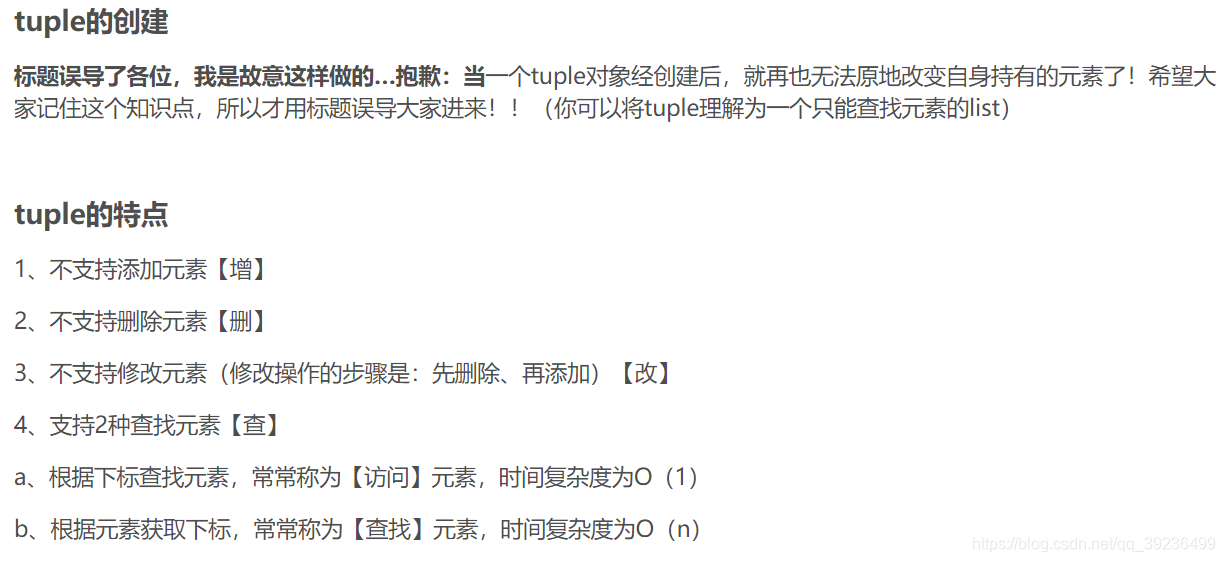
元组内元素不能修改,即不可变的列表被称为元组
7.1 创建元组
- 小括号,小括号可以不写,但是一定要逗号
- 内置函数tuple()
空元组
t = ()
print(t)
print(type(t))
print(tuple())
()
<class 'tuple'>
()
7.2 访问元组:索引(与列表一样)
dimensions = (200, 50)
print(dimensions[0])
print(dimensions[1])
200
50
7.3 修改元组元素(不可)、修改元组中列表
错误,元组元素不能被修改
它也没有append(),insert()这样的方法
dimensions = (200, 50)
dimensions[0] = 250
    dimensions[0] = 250
TypeError: 'tuple' object does not support item assignment
修改元组中列表
t = (10, [20, 30], 9)
print(t, type(t))
print(t[0], type(t[0]), id(t[0]))
print(t[1], type(t[1]), id(t[1]))
print(t[2], type(t[2]), id(t[2]))
"""这里尝试修改元组里面的列表"""
t[1].append(40)
print(t[1], type(t[1]), id(t[1]))
print(t)
(10, [20, 30], 9) <class 'tuple'>
10 <class 'int'> 140710970368688
[20, 30] <class 'list'> 2374489493896
9 <class 'int'> 140710970368656
[20, 30, 40] <class 'list'> 2374489493896
(10, [20, 30, 40], 9)
7.4 修改元组变量:可以
重新给变量名赋值就行
tuple1 = (200, 50)
print('原来的:')
for i in tuple1:
    print(1)
tuple1 = (400, 100)
print('现在的:')
for i in tuple:
    print(i)
原来的:
1
1
现在的:
400
100
7.5 遍历:与列表一样
dimensions = (200, 50)
for dimension in dimensions:
    print(dimension)
200
50
7.6 切片:与列表一样
temp=(1,2,3,4)
temp=temp[:2]+('a',)+temp[2:]
print(temp)
(1, 2, 'a', 3, 4)
7.7 判断元组、列表类型:tuple()、list()
tuple = (1,2,3,44,55,66,7,8)   #元组不能被修改
print(tuple)
print(tuple[1])     #输出第一个
print(tuple[5:])    #输出第五个及后面;记左不记右
print(tuple[:5])    #输出第五个前面(不包括第五个)
tuple2=tuple[:]
print(tuple2)
(1, 2, 3, 44, 55, 66, 7, 8)
2
(66, 7, 8)
(1, 2, 3, 44, 55)
(1, 2, 3, 44, 55, 66, 7, 8)
temp=(1)
print(temp)
print(type(temp))      #整型
temp2=2,3,4
print(temp2)
print(type(temp2))     #元组,tuple
temp=[]
print(type(temp))      #列表,list
temp=()
print(type(temp))      #元组
temp=(1,)
print(type(temp))      #元组
temp=1,
print(type(temp))      #元组
1
<class 'int'>
(2, 3, 4)
<class 'tuple'>
<class 'list'>
<class 'tuple'>
<class 'tuple'>
<class 'tuple'>