实现效果
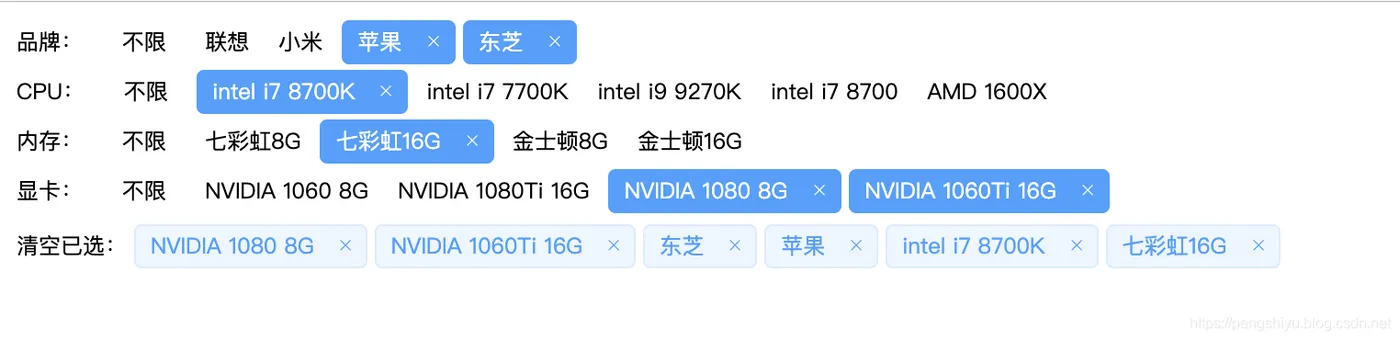
实现代码
<html lang="en">

<head>
    <title>Document</title>

    <!-- 引入本地组件库 -->
    <link rel="stylesheet" href="static/element-ui/index.css">
    <script src="static/element-ui/vue.js"></script>
    <script src="static/element-ui/index.js"></script>

    <!-- 引入CDN样式 -->
    <!-- <link rel="stylesheet" href="https://unpkg.com/element-ui/lib/theme-chalk/index.css"> -->
    <!-- <script src="https://cdn.jsdelivr.net/npm/vue/dist/vue.js"></script> -->
    <!-- <script src="https://unpkg.com/element-ui/lib/index.js"></script> -->

    <style>
        .not-active {
            display: inline-block;
            font-size: 12px;
            margin: 5px 8px;
        }

        span {
            margin: 0 2px;
        }
    </style>
</head>

<body>

    <div id="app">
        <!-- 待选标签 -->
        <div v-for='(category, categoryIndex) in categories' :key="category.id">
            <!-- 分类  -->
            <span class="not-active">{
        {category.name}}:</span>

            <template>
                <span  v-if="category.count"class="not-active" @click="clearCategory(category, categoryIndex)"> 不限</span>
                <my-tag v-else>不限</my-tag>
            </template>

            <!-- 标签  -->
            <template v-for='(child, childIndex) in category.children'>
                <my-tag  v-if="child.active" :closable='true'  @click-child='clickChild(category, categoryIndex, child, childIndex)'>
                    {
        { child.name }}
                </my-tag>
                <span v-else class="not-active" @click='clickChild(category, categoryIndex, child, childIndex)'>{
        { child.name }}</span>
            </template>
        </div>

        <!-- 已选标签 -->
        <div v-if='conditions.length'>
            <span class="not-active" @click="clearCondition">清空已选:<span>

            <el-tag
            v-for='(condition, index) in conditions'
            :key="condition.id"
            type="primary"
            :closable="true"
            size="small"
            :disable-transitions="true"
            @close='removeCondition(condition, index)'
            @click='removeCondition(condition, index)'>
                {
        {condition.name}}
            </el-tag>
        </div>
    </div>

    <script src="./data.js"></script>

    <script>
        // 简单封装一个公用组件
        Vue.component('my-tag', {
            template: "<el-tag v-bind='$attrs' v-on='$listeners' effect='dark' size='small' :disable-transitions='true' @click='clickChild' @close='clickChild'><slot></slot></el-tag>",

            methods: {
                clickChild() {
                    this.$emit("click-child")
                }
            }
        });

        var app = new Vue({
            el: '#app',
            data() {
                return {
                    categories, // 分类标签,可从外部加载配置
                    conditions: [] // 已选条件
                }
            },

            watch: {
                // 监听条件变化,按照请求接口拼装请求参数
                conditions(val){
                    let selectedCondition = {};

                    for(let categorie of this.categories){
                        let selected_list = [];
                        for(let child of categorie.children){
                            if(child.active){
                                selected_list.push(child.name);
                            }
                        }
                        selectedCondition[categorie.name] = selected_list.join("|")
                    }
                    console.log(selectedCondition);
                }
            },

            methods: {
                // 处理标签点击事件,未选中则选中,已选中则取消选中
                clickChild(category, categoryIndex, child, childIndex) {
                    let uid = `${categoryIndex}-${childIndex}`
                    child.uid = uid;
                    console.log(uid)

                    // 取消选择
                    if (child.active === true) {
                        category.count--;
                        child.active = false;
                        this.conditions.forEach((conditionChild, index) => {
                            if (conditionChild.uid === child.uid) {
                                this.conditions.splice(index, 1);
                            }
                        });
                    // 选择
                    } else {
                        category.count++;
                        child.active = true;
                        this.conditions.push(child);
                    }
                },

                // 清除已选整个类别标签
                clearCategory(category, categoryIndex) {
                    category.count = 0;

                    // 可选列表均为未选中状态
                    category.children.forEach(child => {
                        child.active = false;
                    })

                    // 清空该类已选元素
                    for (let index = this.conditions.length - 1; index >= 0; index--) {
                        const conditionChild = this.conditions[index];
                        if (conditionChild.uid.startsWith(categoryIndex)) {
                            this.conditions.splice(index, 1);
                        }
                    }
                },

                // 移除一个条件
                removeCondition(condition, index) {
                    let categoryIndex = condition.uid.split("-")[0];
                    this.categories[categoryIndex].count --;

                    this.conditions.splice(index, 1)
                    condition.active = false;
                },

                // 清空所有条件
                clearCondition() {
                    for(let i = this.conditions.length-1; i >=0 ; i--){
                        this.removeCondition(this.conditions[i], i);
                    }
                }
            }
        });
    </script>

</body>

</html>
标签筛选的数据格式
data.js
var categories = [{
name: '品牌',count: 0,
children: [{
name: '联想',
}, {
name: '小米',
}, {
name: '苹果',
}, {
name: '东芝',
}]
}, {
name: 'CPU',
count: 0,
children: [{
name: 'intel i7 8700K',
}, {
name: 'intel i7 7700K',
}, {
name: 'intel i9 9270K',
}, {
name: 'intel i7 8700',
}, {
name: 'AMD 1600X',
}]
}, {
name: '内存',
count: 0,
children: [{
name: '七彩虹8G',
}, {
name: '七彩虹16G',
}, {
name: '金士顿8G',
}, {
name: '金士顿16G',
}]
}, {
name: '显卡',
count: 0,
children: [{
name: 'NVIDIA 1060 8G',
}, {
name: 'NVIDIA 1080Ti 16G',
}, {
name: 'NVIDIA 1080 8G',
}, {
name: 'NVIDIA 1060Ti 16G',
}]
}]
</div>