前两天发了一篇基于[
德哥测试脚本]的测试对比文章
《Deepgreen与Greenplum TPC-H性能测试对比(使用德哥脚本)》,由于测试数据量少,两个数据库有几轮测试都是1秒持平,但是大多数测试Deepgreen均优于Greenplum,有的甚至快至百倍,感兴趣的朋友可以再回头看看。
今天分享一下Deepgreen提供的TPC-H测试脚本,这个脚本分为浮点类型、数值类型两类进行22轮测试,更加细化,并且结果值更加中肯。
一、测试环境
服务器         IP              节点
Master          192.168.100.107 1 Master
Segment1        192.168.100.107 3 instance
Segment2        192.168.100.106 3 instance
软件版本:
Greenplum 4.3.12
Deepgreen 16.17
脚本放在github上,有3种方式可以下载,为方便大家,分别介绍一下:
1. 如果已经与github主机建立ssh互信(点此访问建立方法):
# 使用语句克隆repo:
git clone git@github.com:cktan/bench.git
# 初始化子模块(tpch-dbgen):
cd bench;
git submodule init
git submodule update
2.如果懒得建立ssh互信,但是本机装有git工具:
# 克隆bench:
git clone https://github.com/vitessedata/bench
# 切换目录:
cd bench
# 克隆tpch-dbgen模块:
git clone https://github.com/electrum/tpch-dbgen
3. 如果你机器上什么都没有,或者不能直接访问外网:
访问 - https://github.com/vitessedata/bench,点击右侧clone or download按钮
,下载zip包
访问 - https://github.com/electrum/tpch-dbgen,点击右侧clone or download按钮,下载zip包
将两个压缩包整合上传到服务器解压缩,并把tpch-dbgen文件夹放到bench下面
  访问 - https://github.com/vitessedata/bench,点击右侧clone or download按钮
,下载zip包
访问 - https://github.com/electrum/tpch-dbgen,点击右侧clone or download按钮,下载zip包
将两个压缩包整合上传到服务器解压缩,并把tpch-dbgen文件夹放到bench下面
三、执行测试
1. 登录服务器重新编译:
cd bench/tpch-dbgen
make clean
rm *.tbl
make
2. 生成测试文件、初始化数据库、加载数据:
[dgadmin@linux1 bench]$ python create.py 10f
dbgen 10
TPC-H Population Generator (Version 2.14.0)
Copyright Transaction Processing Performance Council 1994 - 2010
TPC-H Population Generator (Version 2.14.0)
Copyright Transaction Processing Performance Council 1994 - 2010
TPC-H Population Generator (Version 2.14.0)
Copyright Transaction Processing Performance Council 1994 - 2010
TPC-H Population Generator (Version 2.14.0)
Copyright Transaction Processing Performance Council 1994 - 2010
TPC-H Population Generator (Version 2.14.0)
Copyright Transaction Processing Performance Council 1994 - 2010
createdb tpch10f
mktab
mkview
load
    customer
    lineitem
    nation
    orders
    part
    partsupp
    region
    supplier
analyze
WARNING:  skipping "__gp_localid" --- cannot analyze indexes, views, external tables or special system tables
WARNING:  skipping "__gp_masterid" --- cannot analyze indexes, views, external tables or special system tables
WARNING:  skipping "__gp_log_segment_ext" --- cannot analyze indexes, views, external tables or special system tables
WARNING:  skipping "__gp_log_master_ext" --- cannot analyze indexes, views, external tables or special system tables
WARNING:  skipping "gp_disk_free" --- cannot analyze indexes, views, external tables or special system tables
备注:create.py脚本解读:
- 该脚本用于创建测试数据文件、创建数据库、初始化表、初始化试图、加载数据文件到数据库表、Analyze数据库。
- 它接受一个参数,用于指定测试的数据类型及数据量,具体如下:
- 1f: scale 1 with float8 type
- 1n: scale 1 with numeric type
- 10f: scale 10 with float8 type
- 10n: scale 10 with numeric type
3. 执行测试:
[dgadmin@linux1 bench]$ python run.py 10f
WARNING:  "work_mem": setting is deprecated, and may be removed in a future release.
ERROR:  unrecognized configuration parameter "vitesse.thread"
WARNING:  "work_mem": setting is deprecated, and may be removed in a future release.
ERROR:  unrecognized configuration parameter "vitesse.thread"
备注:run.py脚本解读:该脚本用于执行测试,脚本接受一个参数,指定测试类型及数据量,与create.py脚本参数一致。
四、对比结果
最终结果分四列展示,分别为:查询编号、Greenplum查询耗时、Deepgreen查询耗时、加速倍数。下面为10G数据量解释结论:
1. float8:
1 13514 2399 5.63
2 1850 616 3.00
3 6011 1930 3.11
4 5647 1566 3.61
5 5688 1711 3.32
6 3432 859 4.00
7 5651 1803 3.13
8 5357 1773 3.02
9 12323 4253 2.90
10 7532 3818 1.97
11 1933 1343 1.44
12 5605 1727 3.25
13 5422 3337 1.62
14 3433 999 3.44
15 7222 1970 3.67
16 1969 761 2.59
17 22211 7526 2.95
18 15879 4745 3.35
19 4274 1842 2.32
20 6826 2915 2.34
21 18977 4274 4.44
22 6388 2493 2.56
tot: 167144 54660 3.06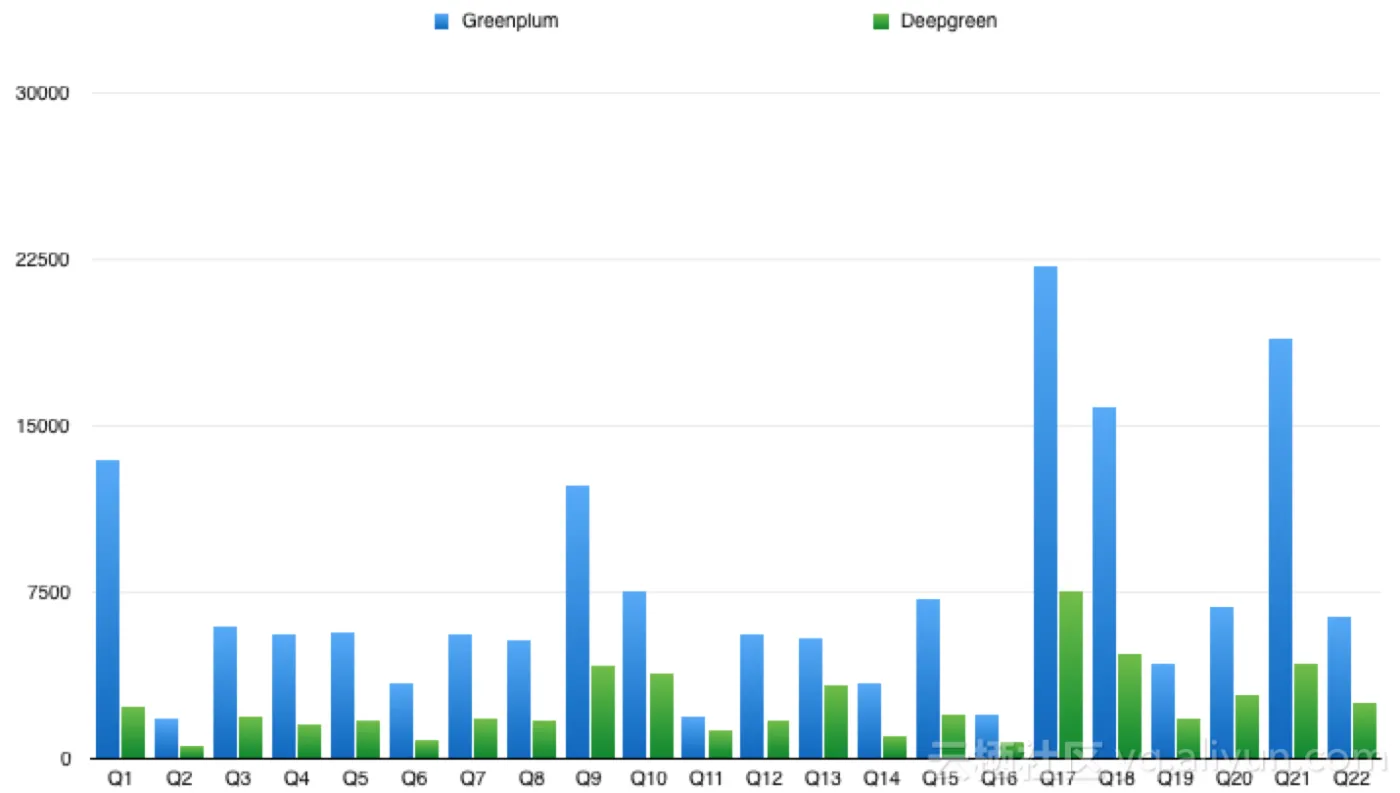
2. numeric:
[dgadmin@linux1 bench]$ python run.py 10n
WARNING:  "work_mem": setting is deprecated, and may be removed in a future release.
ERROR:  unrecognized configuration parameter "vitesse.thread"
WARNING:  "work_mem": setting is deprecated, and may be removed in a future release.
ERROR:  unrecognized configuration parameter "vitesse.thread"
1 32405 21151 1.53
2 2303 702 3.28
3 5934 1969 3.01
4 5653 1766 3.20
5 5471 1673 3.27
6 4307 1264 3.41
7 5396 1889 2.86
8 6055 1913 3.17
9 11853 4544 2.61
10 6006 2696 2.23
11 2153 1299 1.66
12 5619 2284 2.46
13 5417 3429 1.58
14 3526 1136 3.10
15 8265 2910 2.84
16 1768 808 2.19
17 23811 14610 1.63
18 40284 28665 1.41
19 4321 2359 1.83
20 7177 4440 1.62
21 16938 5039 3.36
22 6439 2685 2.40
tot: 211101 109231 1.93l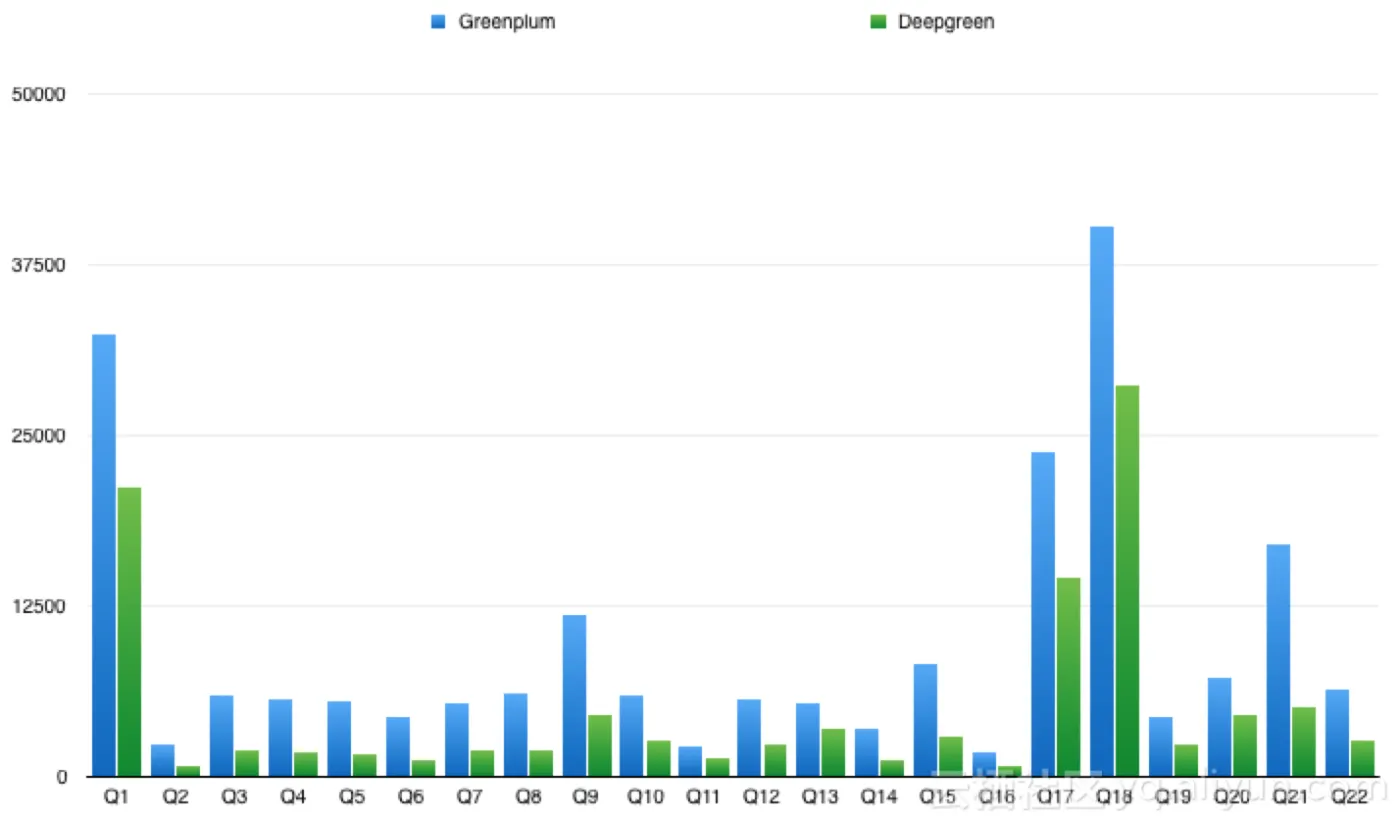
End~